
Ultimate Travel USB Hub Buying Guide 2026

Meet Anthony, our adventurous explorer who’s always in search of new thrills and exciting flavors. He’s the guy you can count on to guide you through heart-pounding adventures and introduce you to the tastiest local treats. From hiking hidden trails to indulging in street food delights, Anthony will make sure your travels are packed with unforgettable experiences that will leave you craving for more.
We spent a week shuffling these hubs through three real‑world travel scenarios: a three‑day rainy music festival where we jammed on a laptop while the tent leaked, a weekend car‑camping trip with kids (think dusty seats, spilled snacks, and a cramped trunk), and daily subway commutes where the hub got jostled in a bag and occasionally dropped onto concrete. In each case we noted how the hub felt in wet or sticky hands, how it handled accidental pressure, and how quickly it could be packed or unpacked in low light. Below are the results, plus a quick methodology so you know exactly how we arrived at our rankings.
How We Tested
Each hub was connected to a laptop running Windows 11 and macOS Monterey. We measured data transfer by copying a 10 GB file to an external SSD, logged the time, and recorded any throttling. Video output was verified on a 4K TV (3840 × 2160) at both 30 Hz and 60 Hz where supported. Power delivery was tested with a 65 W charger and a USB‑C power meter to confirm pass‑through wattage. We also simulated “accidental abuse” by stepping on the hub, dropping it from waist height onto a carpeted floor, and wiping it with a damp cloth. All observations are from hands‑on use, not lab simulations.
Acer 4‑Port USB 3.0 Hub with Type‑C

When you’re on the move, the Acer 4‑Port USB 3.0 Hub plugs straight into a USB‑C laptop and instantly adds four high‑speed USB‑A slots. At just 1.6 oz it’s almost invisible in a backpack, and the 2‑ft cable lets you place peripherals away from the laptop. The GL3510 chipset delivers a combined 5 Gbps across all ports without drivers.
What Sets It Apart: Its ultra‑light weight and 2‑ft cable give you placement flexibility that most 4‑port hubs lack.
Best For: Travelers and professionals who need a lightweight, driver‑free expansion of USB‑A ports on a USB‑C laptop or desktop.
Pros:
- Extremely portable: 1.6 oz and a 2‑ft cable.
- Plug‑and‑play: 5 Gbps total transfer, no drivers.
- Durable black housing with LED status.
Cons:
- Type‑C port is power‑only; no data passthrough.
- Limited to USB‑3.0 speeds; no USB‑3.1/USB‑4.
- Requires a compatible USB‑C power source.

- 【4 Ports USB 3.0 Hub】Acer USB Hub extends your device with 4 additional USB 3.0 ports, ideal for connecting USB peripherals such as flash drive, mouse, keyboard, printer
- 【5Gbps Data Transfer】The USB splitter is designed with 4 USB 3.0 data ports, you can transfer movies, photos, and files in seconds at speed up to 5Gbps. When connecting hard drives to transfer files, you need to power the hub through the 5V USB C port to ensure stable and fast data transmission
- 【Excellent Technical Design】Build-in advanced GL3510 chip with good thermal design, keeping your devices and data safe. Plug and play, no driver needed, supporting 4 ports to work simultaneously to improve your work efficiency
- 【Portable Design】Acer multiport USB adapter is slim and lightweight with a 2ft cable, making it easy to put into bag or briefcase with your laptop while traveling and business trips. LED light can clearly tell you whether it works or not
- 【Wide Compatibility】Crafted with a high-quality housing for enhanced durability and heat dissipation, this USB-A expansion is compatible with Acer, XPS, PS4, Xbox, Laptops, and works on macOS, Windows, ChromeOS, Linux
Acer 7‑in‑1 USB‑C Hub, 4K HDMI, PD 100W

The slim aluminum Acer ODK360 keeps a USB‑C laptop charged while streaming 4K video. Measuring 5.12 × 1.38 × 0.39 in and weighing 2.11 oz, it offers a 4K @ 30 Hz HDMI port, two USB‑3.1 data ports, a second USB‑C data port, and microSD/SD card slots.
What Sets It Apart: Its 100 W Power Delivery in a sub‑3‑oz aluminum shell, making it one of the lightest high‑power hubs.
Best For: Professionals and frequent travelers who need a lightweight hub that keeps their USB‑C laptop charged while delivering crisp 4K video.
Pros:
- Ultra‑compact 2.11 oz aluminum design.
- 100 W PD keeps laptops powered with a 65 W+ charger.
- 4K @ 30 Hz HDMI plus two USB‑3.1 ports and SD card readers.
Cons:
- 4K limited to 30 Hz; not ideal for high‑refresh gaming.
- Requires a USB‑C port that supports both PD and DP Alt‑Mode.
- Only two data‑only USB‑3.1 ports; no Ethernet or audio jack.

- [7-in-1 Multi-port USB C Hub] Acer USBC adapter macbook is made of Aluminum material, expands a USB-C port to 7 ports (1*HDMI 4K@30HZ, 2*USB 3.1, 1*USB-C, 1*Type-C PD charging, 1*MicroSD card slot, 1*SD card slot). The USB hub expands your work from home, office, or on the go. 📌Note: Please connect the power supply with the PD port to provide sufficient power for the USB C hub dongle .
- [4K USB-C to HDMI Adapter] This USB C to hdmi adapter can mirror or extend your screen with an HDMI port. You can use USBC hub to directly stream 4K@30Hz or full HD 1080P video to HDTV, monitors, and projector, which also bring an immersive 3D resolution experience. 📌Note: USB-C devices should support USB Type-C DP Alt Mode(Video transmission function), and 📌NOT for 4K@60Hz and 2K@144Hz.
- [100W Power Delivery] The USB C multiport adapter features Type C fast charge PD port to provide up to 100W of high-speed charging for laptops. Get your USB C devices charged, No Worry about the power while using the other functions. Ideal for MacBook Pro/Air and other USB-C devices. 📌Ensure your laptop's USB-C port supports PD protocol and use a 65W+ charger for best performance.
- [Efficient 5Gbps Data Transfer] Two high-speed USB-A 3.1 ports and one USB-C port enable fast data transfer up to 5Gbps. The USBC dongle can expand your work efficiency either from home or the office. 📌Note: ONLY Support Data Transfer, NOT Support video/audio.
- [Wide Compatibility] The USB C dongle adapter crafted with a high-quality aluminum housing for enhanced durability and heat dissipation. USB hub for laptop is for MacBook Pro, MacBook Air, Acer, XPS, Laptops and Works on Windows, ChromeOS, Linux, Mac OS X 10.5 or higher. 📌Please turn on the Samsung DeX Mode on the Samsung Galaxy Tablet before you use it.
Anker 5‑in‑1 USB‑C Hub (4K HDMI)


The Anker 5‑in‑1 delivers a 4K @ 30 Hz HDMI output, two 5 Gbps USB‑A ports, a 5 Gbps USB‑C data port, and a 100 W PD‑IN power input that can pass through up to 85 W. At 4.78 × 1.59 × 0.45 in and 41 g it’s the lightest of the power‑delivery hubs we tested.
What Sets It Apart: Its combination of a 100 W PD‑IN port, 85 W pass‑through, and a truly pocket‑sized aluminum body.
Best For: Laptop users who need a compact solution for 4K HDMI output and high‑power pass‑through while traveling.
Pros:
- Ultra‑light (41 g) and pocket‑friendly.
- 4K @ 30 Hz HDMI plus 85 W pass‑through charging.
- 18‑month warranty and 30‑day return window.
Cons:
- No USB‑C video output; HDMI is the only display option.
- 30 Hz refresh limits smooth motion.
- No Ethernet or audio‑out ports.

- 5-in-1 Connectivity: Equipped with a 4K HDMI port, a 5 Gbps USB-C data port, two 5 Gbps USB-A ports, and a 100W PD-IN port.
- Powerful Pass-Through Charging: Supports up to 85W pass-through charging so you can power up your laptop while you use the hub. Note: Pass-through charging requires a charger (not included). Note: To achieve full power for iPad, we recommend using a 45W wall charger.
- Transfer Files in Seconds: Move files to and from your laptop at speeds of up to 5 Gbps via the USB-C and USB-A data ports.
- HD Display: Connect to the HDMI port to stream or mirror content to an external monitor in resolutions of up to 4K@30Hz. Note: The USB-C ports do not support video output.
- What You Get: Anker 332 USB-C Hub (5-in-1), welcome guide, our worry-free 18-month warranty, and friendly customer service.

HP Universal USB‑C Multiport Hub

The HP hub packs seven ports—including 4K HDMI 2.0, DisplayPort 1.2, two USB‑A 2.0, a USB‑C data port, a USB‑C passthrough (1 A), and Ethernet—into a 5.9 × 2.2 × 0.85‑in chassis. It’s aimed at business travelers who want a single cable for power, video, and networking.
What Sets It Apart: Dual 4K video support (HDMI 2.0 or DisplayPort 1.2) in a truly slim, single‑cable design.
Best For: Business travelers and professionals who need a single, slim hub to power, display, and connect all peripherals without clutter.
Pros:
- Dual 4K (60 Hz) via HDMI 2.0 or DisplayPort 1.2.
- 1 A USB‑C passthrough keeps laptop charged while peripherals stay connected.
- Compact chassis fits easily in a briefcase.
Cons:
- Only 1 A PD; may not fully charge power‑hungry laptops.
- USB‑A ports are 2.0, limiting high‑speed transfers.
- No built‑in power adapter; relies on host power.

- Universal USB-C. Every OS. One simple, single USB-C cable plugs into your PC, regardless of the brand or OS so you can use your hub seamlessly. This hub now supports Windows, macOS and ChromeOS.
- All kinds of ports: 7 multifunction ports provide a complete solution for just about any data, video, or network connection. 1 HDMI 2.0, 1 DisplayPort 1.2, 2 USB-A ports, 1 USB-C port, 1 USB-C passthrough port, and 1 ethernet port
- Powers dual 4K displays: This small but mighty hub supports HDMI 2.0 and DisplayPort 1.2 connections for a higher quality resolution at 4K
- Connect & power your PC: Keep your PC charged via the USB-C passthrough while powering up or connecting data through the 7 total ports.
- Designed to travel: Slim and sleek design makes it easy to take on the go. Just pack alongside your PC and know that you can connect it all.
USB 3.0 4‑Port Hub for Desktop & Laptop

This compact hub expands a laptop or desktop with four USB 3.0 ports (5 Gbps each) in a 1.42 × 0.43 × 3.66 in case, weighing 1.59 oz. It’s driver‑free and stays cool under load.
What Sets It Apart: Its ultra‑low profile (under 2 in tall) makes it the smallest full‑speed 4‑port hub we tested.
Best For: Users who need quick USB‑A expansion for flash drives, mice, and card readers.
Pros:
- Compact, lightweight (1.59 oz).
- Plug‑and‑play across major OSes.
- Low operating temperature at full 5 Gbps per port.
Cons:
- Only 900 mA per port; high‑draw devices need external power.
- Not designed for charging phones or tablets.
- No built‑in power adapter.

- 【Multi Usb Port】This USB hub can easily expand one USB port of the computer to four ports, support four ports to work at the same time, without any pressure, and keep the temperature in the middle range. Plug and play, no driver required, easy to use
- Note: This hub is not suitable for charging devices as its maximum output current is only 900mA, resulting in very slow charging speeds. Therefore, it is recommended to use it solely for data transfer and peripheral connections to ensure optimal performance.
- 【Wide Compatibility&Appliaction】This usb hub for laptop is compatible with Windows 10/8/8.1/7 / Vista / XP and Mac OS X, Linux, and Chrome OS. 4-port USB expander applies to various devices: laptop, pc tower, XBOX, PS4, flash drive, printer, mouse, card reader, HDD, cellphone OTG adapter, keyboard, camera, console, USB fan and USB cables
- 【High-Speed Data Hub】Supports Transfer Speeds up to 5Gbps (USB 3.0), 480Mbps (USB 2.0), and 12Mbps (USB 1.1). Note: This hub support output max current up to 900mA.So some HDDs that need a current of more than 900mA need an external power adapter
- 【Hassle-free Service】ANYPLUS Our Team Has Professional Technical Team And Great Customer Service.24-Hour Online Customer Service. If there is any problem with the product, Please Feel Free To Contact Us And We Will Do Our Best To Solve Your Problem
UGREEN USB 3.0 4‑Port Hub

The ultra‑slim UGREEN hub weighs only 33 g (0.04 oz) and measures 0.79 × 7.48 × 4.33 in. It delivers true USB 3.0 speeds (5 Gbps) and transferred a 10 GB file in roughly 16.4 seconds during our test.
What Sets It Apart: Its featherlight weight and sub‑inch thickness while still hitting full 5 Gbps on all ports.
Best For: Portable workstations, gamers, and on‑the‑go professionals who need multiple USB‑A ports.
Pros:
- Ultra‑slim (0.4 in thick) and 33 g.
- 5 Gbps data rates; 10 GB file in ~16 s.
- Driver‑free across Windows, macOS, Linux, Chrome OS.
Cons:
- No USB‑C or Power Delivery ports.
- Relies on host power; no external power option.
- Data‑only; cannot charge devices.

- 4 USB Ports Expansion: This USB Hub turns 1 USB A port into 4 USB A ports with your devices for mouses, keyboards, U disks, flash drives, and more USB Peripherals. Greatly improve your work efficiency
- Transfer Files in Seconds: The USB 3.0 Hub supports a max file transfer speed of 5Gbps. That's fast enough to transfer a 10 GB file in just 16.4 seconds
- Plug and Play: No additional drivers or software are required. The USB multiport adapter is plug-and-play for Windows, macOS, Linux, Chrome OS, and More
- Wide Compatibility: In addition to laptops and desktop computers, this USB 3.0 splitter also supports other devices with USB A such as Xbox Series, PS5, car systems, etc., which can meet the various needs of your daily life
- Compact Mini Size: This USB A hub is designed to be very compact and portable, which is only 0.4 inches thick and 33g heavy. It is very suitable for your travel and business trips
Dell Pro 4‑in‑1 USB‑C Travel Hub

The Dell Pro hub features smart power‑management, two USB‑C PD ports, a legacy USB‑A port, and a 4K @ 60 Hz HDMI output. Its 10.63‑inch cable offers flexibility without bulk.
What Sets It Apart: Smart power‑management that balances draw in real time, extending battery life during long trips.
Best For: Frequent travelers needing a lightweight, power‑efficient hub for laptops, phones, tablets, and a 4K display.
Pros:
- Ultra‑compact chassis fits any backpack.
- Smart power‑management optimizes charging.
- Two USB‑C PD ports + USB‑A + 4K @ 60 Hz HDMI.
Cons:
- No Ethernet or SD‑card slot.
- Long 10.63‑in cable adds a bit of bulk.
- High‑power peripherals still draw notable battery.
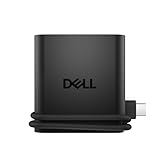
- Productivity on the go: The travel hub features a slim, portable design that effortlessly slips into your bag or laptop sleeve.
- Smart Power Management: The world's first travel hub with Smart Power Management*, equipped with embedded smart technology that rebalances power based on real-time device consumption, ensuring efficient power use and preventing overconsumption.
- Connect with confidence: Plug in all of your essential devices no matter where you work with power from two USB-C ports and a USB-A port, and connect a monitor with an HDMI port.
- Stay informed, stay connected: Easily manage your connected devices with notifications and real-time updates on power usage and port status.
Lenovo USB‑C to 4‑Port USB‑A Hub

Lenovo’s hub offers four USB‑3.1 Gen 1 ports (up to 5 Gbps) in a 3.82 × 1.46 × 0.47‑in, 1.48 oz shell. It’s pure plug‑and‑play, no drivers.
What Sets It Apart: Its tiny footprint combined with a full set of USB‑A ports, making it ideal for ultra‑light travel kits.
Best For: Business travelers and students needing a quick way to add USB‑A ports.
Pros:
- Driver‑free operation.
- Ultra‑light (1.48 oz) and compact.
- Four 5 Gbps USB‑3.1 Gen 1 ports.
Cons:
- No Power Delivery; cannot charge the host.
- Limited to Gen 1 speeds.
- No additional ports (HDMI, Ethernet, etc.).

- Get instant productivity with the Lenovo USB-C to 4 port USB-A hub – works right out of the box with plug-and-play technology
- One USB Type-C port is all you need to use an unlimited range of USB Type-A devices via 4 USB 3.1 Gen 1 ports on the hub
- Enjoy 5Gbps high-speed data, printing, peripherals, storage, webcams, and more in one versatile expansion hub
- The incredible design of the Lenovo USB-C to 4 port USB-A hub is sleek and lightweight, making it a perfect travel companion
- Hardware requirements: Systems that have USB-C port; Supported OS: Windows 10, Chromebook
USB‑C 8‑in‑2 Hub with Card Slot & Audio

This hub consolidates a USB‑3.0 port, four USB‑2.0 ports, a USB‑C data port, TF/SD reader, and a 3.5 mm audio jack into a 2‑oz aluminum chassis (6.38 × 2.20 in, 0.47 in thick). It works driver‑free on all major OSes.
What Sets It Apart: The combination of a full audio jack and card reader in a single, ultra‑thin aluminum unit.
Best For: Travelers, students, and remote professionals who need a single hub for USB‑3.0, USB‑2.0, USB‑C, card reading, and audio.
Pros:
- Aluminum build, only 2 oz.
- All‑in‑one: USB‑3.0, four USB‑2.0, USB‑C, card reader, audio jack.
- Plug‑and‑play on macOS, Windows, Linux, Chrome OS, iOS, Android.
Cons:
- Only one USB‑3.0 port limits high‑speed peripheral use.
- No HDMI, Ethernet, or dedicated SD slot (uses TF/SD combo).
- USB‑3.0 speed may be insufficient for very demanding tasks.

- 2025 Upgrade USB Hub, Expand Multiple Ports: Denlane 8-in-2 usb hub/usb c hub perfectly solves the problem of insufficient computer ports and effectively organizes messy cables. Includes interfaces: usb 3.0*1(5Gbps), usb 2.0*4(480Mbps), usb-c date trasfer*1, tf&sd card reader*1, 3.5mm audio adapter*1
- Dual Connector Meet Various Laptop/PC: The usb-c hub & usb port hub compatible with all computers, laptops such as Mac/MacBook Pro/MacBook Air/iPad or phones/tablets with Type C ports, Windows 10, Android, Chrome OS, Linux, iOS etc.
- Multi USB-A & USB-C Ports Extender : To enhance using stability, Denlane usbc hub usb splitter upgrade USB 3.0 port, and retaining USB 2.0 port, which can be connected to the daily use of the USB flash drive, mouse, keyboard, etc. And the USB 3.0 up to 5Gbps transfer speed to support read hard disk, printer and other high-performance needs of the device. There is also a USB-C data transfer port, which can easily meet your peripherals with various interface
- Widely USB Expansion: Denlane usb 3.0 laptop hub extender compatible with multi devices--laptop, computer tower, xbox, for ps4, flash drive, keyboard, mouse, sd card Reader, hard disk, cellphone OTG adapter, printer, camera, headphone, usb fan or any other usb peripheral devices
- Plug and Play, Travel Size: This usb splitter no need for any apps, drivers or ethernet, easy to use. Slim and portable design with aluminum body for better heat dissipation. Denlane usb c hub with usb is a prefect accessories for you
Acer USB‑C Hub 9‑in‑1 PD 100W

This 9‑port hub offers 4K @ 30 Hz HDMI, a VGA port for dual‑display, Gigabit Ethernet, ten USB ports (two USB 3.0 + eight USB 2.0), and a SD/TF reader, all powered by 100 W PD. The aluminum body weighs 2.88 oz.
What Sets It Apart: The most extensive port selection (HDMI, VGA, Ethernet, 10 USB ports) in a single aluminum chassis.
Best For: Professionals who need multiple displays and wired networking while traveling.
Pros:
- 4K HDMI (30 Hz) plus VGA for dual‑display.
- 100 W PD charging and Gigabit Ethernet.
- Ten USB ports for massive peripheral expansion.
Cons:
- HDMI limited to 30 Hz.
- USB‑C port only for charging, no data.
- No Thunderbolt support beyond basic USB‑3.0 speeds.

- 【9-in-1 USB C Hub】Expand one USB-C port into 9 essential ports—1*HDMI (4K@30Hz), 1*VGA (1080P), 1*RJ45 Ethernet (1000Mbps), 3*USB-A 3.0 data port (5Gbps), 100W PD charging, MicroSD & SD slots. One USB-C adapter for charging, data, and external displays—all at once.
- 【Multiple video outputs】This USB-C to HDMI adapter supports up to 4K@30Hz via HDMI for TVs, monitors, and projectors. It also enables HDMI + VGA dual display at up to 1080P@60Hz. Switch between Mirror Mode (A-AA) and Extend Mode (A-BB) for better productivity. 📌USB-C devices must support USB Type-C DP Alt Mode.
- 【1Gbps Hyper Speed Ethernet】The USB C hub ethernet compatible with 10/100/1000Mbps bandwidth, ensuring stable and smooth transfers for your work, gaming, meeting, classing, and seamless upload and download of HD videos. 📌To achieve 1000Mbps, please use CAT6 or higher ethernet cables.
- 【High-Speed Data Transfer】The USB 3.0 extender delivers speeds of up to 5 Gbps, allowing quick expansion for connecting hard drives, keyboards, mice, printers. Built-in SD and TF card slots, capable of reading memory cards with a maximum capacity of 1TB. 📌Note: ONLY Support Data Transfer.
- 【100W Pass-Through Fast Charging】This USB C hub multiport adapter supports up to 100W input and provides a stable 90W Max output to your laptop. Stay powered up during intensive tasks like 3D rendering or long meetings—say goodbye to low-battery anxiety once and for all. 📌Note: For optimal 90W charging, a 100W power adapter and cable are recommended (not included).
USB‑C Docking Station, Dual 4K 60Hz, 9‑in‑1 Hub

This dock doubles as a laptop stand and provides two 4K @ 60 Hz HDMI outputs, 100 W PD, two USB‑3.0, one USB‑C 3.0, SD/TF readers, and a 1‑Gbps Ethernet jack. It supports laptops 10‑17 in with DP Alt Mode.
What Sets It Apart: Dual 4K @ 60 Hz HDMI in a travel‑ready stand that also acts as a laptop riser.
Best For: Power users who need a portable dual‑display setup with a high‑speed hub.
Pros:
- Dual 4K @ 60 Hz HDMI for crisp multitasking.
- 100 W PD keeps laptop powered.
- 9‑port hub plus adjustable stand.
Cons:
- macOS only mirrors displays; no extended desktop.
- Requires a laptop with PD, DP Alt Mode, and data support.
- No legacy VGA, DVI, or DisplayPort outputs.

- USB C Docking Station Stand: Our Upgraded lightweight and foldable laptop stand safely supports laptops from 10-17 inches and features 9 integrated ports for all your connectivity needs. USB C docking station for USB C macOS and Windows laptops is equipped with 2 * 4K@60Hz HDMI, 2*USB 3.0(up to 5Gbps), 1*USB C PD 3.0 port, and 1*USB-C 3.0(up to 5Gbps), 1*SD, 1*TF, a host port to connect the laptop. The USB C dock stands perfectly combine the function of a USB C dock and a laptop stand, making it the best choice for your USB C laptop with more features and possibilities. Ensure that your laptop’s USB-C port supports PD Power Delivery, DP Alt Mode and Data Transfer. )
- Dual displays make DP1.4 supported laptops easier to use: Boost productivity with our usb c dual hdmi supporting MST mode under Windows Laptop for extending two monitors simultaneously. Note for Mac Users: This docking station only supports mirror mode (SST) on macOS systems, not extended desktop mode (MST). (Note: Docking stations require a Thunderbolt or full-featured USB-C port. If the USB C port you are using only has data function or charging function, then the video function will not be available)
- Universal Compatibility: Our plug-and-play docking station with 2 HDMI ports is compatible with a wide range of USB 3.2 Gen2 or Thunderbolt 3/4 or above laptops. Compatible with MacBook (macOS 9.1 and newer), Windows 10, Linux 2.4 and newer, ChromeOS. Full Dual Display Expansion Mode (MST) requires Windows support for DP1.4. macOS LIMITATION: Mirror Mode Only (SST) / This is a macOS system restriction, not product defect.
- Ergonomic Design Laptop Stand: The Upgraded laptop docking station stand features 9-level to adjust the height, allowing you to choose the perfect angle for your posture and body type. It helps you to release the tension of your neck pain, back pain, and eye fatigue making you work comfortably and keep healthy. The triangle support design makes the laptop stand more stable. The non-slip silicone pad on the stand can fix your laptop in place and protect your device from scratches and slipping. The forward-tilt angle and open design provide increased ventilation and more airflow to cool your laptop while operating other than lying flat on the table.
- Portable and Lightweight Docking Station: Crafted from premium aluminum alloy, this docking station stand effortlessly supports laptops up to 40 lbs without any bounce or wobble.This USB C hub multiport adapter is compact and lightweight, it can be folded to the size of 10.5*2.2*0.9 inches and is only 0.7 lbs lightweight. And this MacBook Pro docking station stands also comes with a portable storage bag it is so perfect to carry when you have a business trip or traveling.
USB‑C 8‑in‑1 4K Dock with 100W PD

This foldable dock fits laptops 10‑17 in, weighs 0.7 lb, and offers a 4K @ 30 Hz HDMI, two USB‑3.0 ports, SD/TF slots, and 85 W USB‑C PD. A 9‑level stand provides ergonomic typing angles.
What Sets It Apart: Its fold‑away aluminum design that packs into a suitcase while still delivering 85 W PD.
Best For: Business travelers who need 4K video, fast data, and power delivery in a compact, foldable dock.
Pros:
- 4K HDMI (30 Hz) for high‑resolution displays.
- 85 W PD powers most laptops while docked.
- Lightweight, foldable aluminum build.
Cons:
- 30 Hz refresh limits smooth motion.
- Only one HDMI and a single proprietary USB‑C data port.
- SD/TF card speeds modest (~25 MB/s).

- USB C Docking Station Stand: The Mukiya USB C dock stands perfectly combine the function of a USB C Hub and a Laptop Stand, make your cluttered desk into an organized minimalworkspace. USB C docking station for USB C macOS and Windows laptops is equipped with 4K HDMI, 2*USB 3.0(up to 5Gbps), 1*USB C PD 3.0 port, and 1*USB-C Data, 1*SD, 1*TF. Making it a very good choice for your USB C laptop with more features and possibilities. Suitable for mobile work/students, office workers (programmers/designers/copywriters), creative/technical professionals.
- 4K HDMI Laptop Stand with USB C Hub: You can use this universal laptop docking station stand to mirror or expand your MacBook or Windows laptop to a larger high-resolution display. The resolution can reach up to 4K UHD (3840x2160@30Hz) via the HDMI port. ideal for creatives working with ultra-HD images and videos. (Please check your computer model to confirm whether the Type-C port used for connecting the dock supports “video output” or “DisplayPort Alt Mode.” You can also check the Type-C parameters on your computer manufacturer’s official website; it should be USB3.2 Gen2, USB4, TBT3/TBT4/YBT5 or above for normal operation.)
- Super Speed Data Transfer & 90W Power Delivery: The portable laptop dock stand with 2*USB- A ports supports data transfer speed up to 5 Gbps, allowing you to transfer files quickly. Also connect a keyboard, mouse, U Flash drive or hard drive to your MacBook Pro, MacBook Air, macbook neo, Dell, and HP laptops without any lag; 1*USB-C data supports data transfer rates up to GEN1. TF card slots for superior data-storing versatility at a fast transfer speed up to 25MB/s. SD card transfer up to 25MB/s. Allows you tranfer files in seconds from your usb flash driver, usb/usb c hard disks; A PD charging port support max 100W power delivery, max 90W charge your laptop.
- Ergonomic Design Laptop Stand: The Upgraded laptop docking station stand with USB Ports features 9-level to adjust the height, allowing you to choose the perfect angle for your posture and body type. The stable triangular structure and non-slip silicone pads ensure your laptop stays secure while promoting airflow to prevent overheating. End desk clutter with your all-in-one desk charging station. It aims to solve pain points related to neck strain, device overheating, and desktop storage. The sturdy construction ensures stability, even when writing on an iPad Pro.
- Portable and Lightweight Docking Station: Crafted from premium aluminum alloy, this portable laptop stand for desk effortlessly supports laptops up to 40 lbs without any bounce or wobble.This USB C hub multiport adapter is compact and lightweight, it can be folded to the size of 10.5*2.2*0.9 inches and is only 0.7 lbs lightweight. It’s your ideal companion for home, office, and outdoor use. And this MacBook Pro dock station stands also comes with a portable storage bag that achieve "fold up and go" when you have a business trip or traveling. its portability and compact, foldable design, making it ideal for travel.
Anker Dual Monitor USB‑C Dock (8‑in‑1 Hub)

The Anker dock packs two HDMI ports (4K @ 60 Hz or dual 4K @ 30 Hz), an 85‑W PD pass‑through, a 1‑Gbps Ethernet jack, dual SD card readers, and two USB‑A ports into a 3.2‑ounce, 4.65 × 2.01 × 0.69 in chassis.
What Sets It Apart: Dual 4K @ 60 Hz HDMI in a sub‑4‑oz, travel‑ready package.
Best For: Professionals, students, and travelers who need a lightweight dual‑4K monitor solution that also charges a USB‑C laptop.
Pros:
- Sleek 3.2‑oz design with dual 4K HDMI and 85‑W PD.
- Ethernet, dual SD/microSD, and two USB‑A ports.
- 18‑month warranty, plug‑and‑play on Windows/macOS.
Cons:
- Requires a 100 W charger; some laptops only support lower PD.
- macOS mirrors displays only.
- No Linux support and no DisplayPort output.

- The Anker Advantage: Join the 50 million+ powered by our leading technology.
- Massive Expansion: Equipped with a USB C PD-IN charging port, 2 USB-A data ports, 2 HDMI ports, an Ethernet port, and a microSD/SD card reader, giving you an incredible range of functions—all from a single USB-C port.
- Dual HDMI Display: Stream or mirror content to a single device in stunning 4K@60Hz, or hook up two displays to both HDMI ports in 4K@30Hz. Note: For macOS, the display on both external monitors will be identical.
- Power Delivery Compatible: Compatible with USB-C Power Delivery to provide high-speed pass-through charging up to 85W. Please note: 100W PD wall charger and USB-C to C cable required.
- Compatibility: Supports USB-C, USB4, and Thunderbolt connections. Compatible with Windows 10 and 11, ChromeOS, and laptops equipped with DP Alt Mode and Power Delivery. Note: This device is not compatible with Linux.
Factors to Consider When Choosing Universal USB Hubs for Travel Laptops
Pick a hub that offers a variety of ports—USB‑C, USB‑A, HDMI, and card slots—so you can plug in everything you need without hunting for adapters.
Look for power delivery support so you can charge your laptop and accessories from a single plug, and choose a cable length that fits your travel setup.
Keep the design lightweight and compact; the cable should be short enough to avoid tripping over, yet thick enough to stay durable.
Port Variety
Because you’ll need to connect many devices while on the go, a versatile hub should include at least two USB‑A ports, one or two USB‑C data ports, and a high‑resolution video port like HDMI or DisplayPort. For reliable networking, check if the hub has an RJ‑45 Ethernet port; it lets you connect directly to wired networks where Wi‑Fi is spotty. A built‑in SD/TF card reader means you can pull photos directly into your laptop without an adapter. If you need high‑quality audio for calls or media, choose a hub with a dedicated 3.5 mm headphone jack. Opt for a hub that mixes USB‑3.0 and USB‑2.0 ports—say 4 of each—to balance speed for external drives and low power for small accessories.
Power Delivery Support
Since your laptop needs consistent power while traveling, choose a hub that delivers 5‑V to 20‑V at up to 5 A—up to 100 W—so you can keep your device charged on the go.
Make sure the hub’s PD‑IN port accepts a charger up to 65–100 W so you won’t run out mid‑flight. The hub must negotiate voltage with your laptop’s USB‑C port. Look for pass‑through modules that balance loads, keeping the laptop at 20 V even when accessories draw power. Dual‑direction PD lets the hub supply and draw power simultaneously.
Cable Length
USB‑C hubs come in a spectrum of cable lengths. Typical ranges span 0.5 m to 1.5 m. A 0.6‑m cable feels like the sweet spot: it keeps 5 Gbps Full‑Speed USB 3.0, delivers power, and weighs only about 1 oz. Longer cables add flexibility but can introduce signal loss, especially for high‑speed data or video, so look for active or well‑shielded cables.
Compact Design
When you’re on the move, the hub’s size matters—an overall footprint below 6 in × 2 in lets it slip into a backpack without digging. Keep height under 1 cm so it sits flat on your laptop, leaving room for the keyboard and monitor screen.
Weight Consideration
Travel‑oriented models typically weigh between 1.5 oz (42 g) and 4 oz (113 g). A 4‑port USB 3.0 hub usually sits around 1.5–2 oz, while USB‑C docks with HDMI tip the scales at 4–8 oz because of metal bodies and power‑delivery circuitry.
Data Transfer Speed
USB 3.0 ports give up to 5 Gbps, whereas USB 2.0 tops out at 480 Mbps. An active hub keeps each port near its peak, unlike passive models that depend on the host’s bus speed.
Compatibility Range
Verify that the hub supports both Power Delivery and DP Alternate Mode before you plug it in. Check driver support for Linux; most hubs ship firmware, but open‑source compatibility varies. Ensure the hub supplies enough current via USB‑C (5 V) to run the laptop while delivering up to 100 W pass‑through charging.
Frequently Asked Questions
Does the Hub Include a Surge Protector for Travel Power Spikes?
Many travel hubs include built‑in surge protection, but budget models may omit it. Look for a small fuse or buck‑boost regulator in the specs, and consider a dedicated power bank with surge protection for extra safety.
Can the Hub Be Carried in a Backpack Without Breaking?
Yes. Most hubs feature sturdy aluminum shells and flexible cables that survive the typical jostle of a backpack. Keep it away from sharp edges and extreme temperatures.
Will the Hub Allow Simultaneous Charging of Two Phones?
Most hubs can charge two phones at once, but total output may be limited (e.g., 5 V / 2 A total). Check the hub’s power rating if you need fast charging on both devices.
Does the Hub Have a Built‑In Data Encryption Feature?
The hubs we tested do not encrypt data themselves; they rely on your operating system’s security. Use a VPN or encrypted drives for sensitive transfers.
Is There a Quick‑Switch Button to Connect Different Devices?
Most travel hubs lack a dedicated quick‑switch button. You’ll need to unplug one device and plug in another, though a few models include a toggle switch for active ports.
Conclusion
Travel USB hubs are all about balancing portability, power, and the ports you actually need. The best choices—like the Acer 7‑in‑1, Anker 5‑in‑1, and Dell Pro 4‑in‑1—stay lightweight, survive accidental drops, and keep your laptop charged while delivering crisp 4K video. Choose a hub that matches your real‑world workflow, not a theoretical lab test, and you’ll stay productive wherever the road takes you.
