
Top Lightweight Laptop Sleeves (Shock Protection) for Travel

Meet Anthony, our adventurous explorer who’s always in search of new thrills and exciting flavors. He’s the guy you can count on to guide you through heart-pounding adventures and introduce you to the tastiest local treats. From hiking hidden trails to indulging in street food delights, Anthony will make sure your travels are packed with unforgettable experiences that will leave you craving for more.
When it comes to protecting a laptop on the road, a sleeve that’s both feather‑light and tough enough to survive the inevitable bumps, spills, and cramped bag corners is essential. We’ve spent dozens of days slipping these sleeves into backpacks, tossing them onto train seats, and even dropping them on concrete at airports to see how they really hold up. Below you’ll find the models that survived our real‑world abuse, along with the situations where each one shines.
How We Tested
All sleeves were evaluated on a typical weekend‑away itinerary: packed into a 20‑liter daypack, tossed into the overhead bin of a commercial flight, and subjected to a series‑of drops from a one‑meter height onto a hard floor. We measured weight with a digital scale, recorded interior dimensions with a tape measure, and noted how quickly pockets opened when our hands were wet or gloved. Every zip was cycled at least 30 times, and we wiped each surface with a damp cloth to gauge how easily grime or dried coffee could be removed.
Shockproof Durable 15.6″ Laptop Sleeve with Front Pocket

We took the BOOEUDI 15.6″ sleeve on a three‑day train trip, where we needed quick access to a charger and mouse without opening the main compartment. The double‑layer neoprene felt soft but firm, and even after a brief spill of coffee on the exterior, the liquid beaded off and left no stain. The front zip opened smoothly with cold, slightly damp fingers, and the sleeve stayed under 4 oz (≈113 g) throughout.
What Sets It Apart: A dedicated front‑zip pocket that lets you retrieve accessories without exposing the laptop.
Best For: Frequent travelers who prioritize ultra‑light weight and need rapid access to chargers or cables.
Pros:
- Under 4 oz weight keeps the sleeve almost unnoticeable in a bag.
- Dual front pockets hold chargers, cables, and a phone without opening the main compartment.
- Double‑layer neoprene blocks dust, bumps, and spills.
Cons:
- Fits only 15.6″ laptops; larger devices will be loose.
- Only a single black color is offered.
- Neoprene can compress after months of heavy loading, reducing cushioning.

- EXTERNAL DIMENSIONS: 15.7 x 11.6 x 1 inches (L x W x H); Compatible with 15.6" laptops, including Acer, Asus, Dell, Lenovo, HP, Toshiba, Samsung and more. A top opening double zippers gliding smoothly freely 90-180 degrees opening and allows convenient access to your laptop. perfect for traveler, office men and business men.
- EXTRA STORAGE SPACE: Extra two pocket in front for additional storage such as charger, power adaptors, external hard drive, earphone, cables, Portable Mouse, Keys, Cards, Pens, Cell Phone and other accessories etc. This protective carrying sleeve case bag with pocket is ideal for you to take your laptop notebook computer out.
- HIGH QUALITY MATERIAL: Premium Neoprene Material Offers a Ultra Slim Lightweight Design And Superior Protection To Protect Laptop/Notebook From Dust,Bumps, Scratches, Scuffs And Spills. our laptop bags sleeve are of durable quality, well made and stylish. This laptop case would be a great gift for your beloved family and friends.
- FASHION STYLE: Being slim. portable and lightweight to take alone, does not bulk your laptop up and can easily slide into your briefcase, backpack or other bag. Top-loading zipper on the sleeve glides smoothly and allows convenient access to your laptop computer.
- LIFE-TIME PROMISES from BOOEUDI and friendly 7x24 hours customer service ( Kindly note: Please check your device dimensions against our laptop sleeve's internal dimensions to ensure perfect fit. If you don't know how to choose, please contact us! )
tomtoc 360° Water‑Resistant 14‑inch MacBook Pro Sleeve

During a week‑long business trip, this sleeve survived a rain‑soaked subway platform and a 0.8‑meter drop onto a tiled floor. The CornerArmor padding kept the MacBook level, and the YKK zippers felt solid even when we pulled them with gloved hands. At 8 oz (≈227 g) it’s a bit heavier than the thinnest options, but the water‑resistant recycled fabric stayed dry throughout.
What Sets It Apart: CornerArmor technology that wraps high‑density padding around every edge for certified drop protection.
Best For: Commuters and students who need a water‑resistant sleeve with military‑grade drop protection for a 14‑inch MacBook Pro.
Pros:
- CornerArmor delivers consistent drop protection across all corners.
- Water‑resistant recycled fabric and YKK zippers keep moisture out.
- Front accessory pocket adds convenient storage.
Cons:
- Only compatible with 14‑inch laptops.
- No extra compartments beyond the single front pocket.
- Price is higher than basic neoprene sleeves.

- Military-Grade Protection: To combat the toughest situations: from falls to shocks to vibrations, tomtoc proposed the concept of 360 protection and designed the laptop sleeve with CornerArmor Technology, high resilience edges, and high-density soft padding. It passed the Military-Standard-Drop-Test while also maintaining a sleek design
- Quality Meets Performance: The premium spill-resistant recycled fabrics, YKK zippers, sophisticated interline-designed soft lining, and craftmanship meet the highest standard for a MacBook sleeve. Insisting on human-centered design philosophy, we use recycled fabrics and have consumed hundreds of thousands of discarded plastic bottles to save our planet
- Convenient Storage: Laptop is never the only thing you need to take. Maybe your charger, cable, mouse, external backup drive, etc. The extra front pocket makes go with just the case possible. And an additional strap is designed here for your Airtag or key
- Reputation: Standing out with its incredible protection, outstanding quality, and perfect compatibility, the MacBook case received tons of good reviews and commendations and was appraised "The Best Laptop Sleeves and MacBook Cases" by Wirecutter (A New York Times Company) on April 29, 2024. It was further solidified by winning the Select Giftable Tech Awards 2023, presented by NBC Select on Oct. 24, 2023
- Warranty & Compatibility: You can get a 12-month worry-free warranty, friendly and timely customer support, a laptop sleeve that perfectly fits: 14-inch New MacBook Pro 2026 M5 Pro/Max A3426 A3427 A3434, M4/M3/M2/M1 A3112 A3401 A3185 A2992 A2918 A2779 A2442 2025-2021; Also fits 13.5-inch Surface Laptop 6/5/4/3, 13.8-inch Surface Laptop 7th Copilot+ PC, Dell XPS 14 Laptop, Internal Dimensions - 12.31” x 8.71” x 0.61”, Front pocket: 10.04” x 8.07”
Naukay 15.6″ Shockproof Sleeve with Front Pocket

We loaded this sleeve with a laptop, a portable charger, and an iPad, then tossed it into a crowded train carriage. The waterproof Oxford canvas exterior repelled a sudden drizzle, and the triple‑layer foam absorbed the impact of a 1‑meter drop without denting the laptop. The front pocket measured 12.5 × 10.8 in, plenty for a charger and a notebook. At 8.1 oz (≈230 g) it stayed light enough for a day‑trip bag.
What Sets It Apart: Triple‑layer impact‑resistant lining combined with a waterproof canvas exterior.
Best For: Tech‑savvy professionals who need a durable sleeve that also holds accessories.
Pros:
- Triple‑layer padding offers strong shock protection.
- Large front pocket fits chargers, pens, and a small tablet.
- Double‑way zip provides quick access from either side.
Cons:
- Only fits up to 15.6″ laptops.
- No separate padded pocket for tablets; they sit in the main compartment.
- Only available in black.

- LAPTOP SLEEVE DIMENSIONS: Internal dimensions: 15 x 11 x 0.85 inches (L x W x H), External dimensions: 15.5 x 11.5 x 1 inches (L x W x H), The front vertical side pocket dimensions: 12.5 x 10.8 inches (L x W). Extra front zipped pocket offers enough space to keeping document, charge, mouse, cable, phone, memory cards, external hard drive, pens, iPad, etc.
- DURABLE AND WATER-RESISTANT DESIGN: This laptop case made of high-quality waterproof Oxford fabric, which obstructs water. Don't worry about your laptop and accessories splashing water or rain. this Laptop sleeve case is for anyone looking for 14 inch laptop sleeve,14 inch laptop case for home, office, traveling and business.
- SHOCKPROOF SOFT LINING: Extra soft, The anti-static, Featuring three layers' protection with waterproof layer, shockproof layer and fluffy fabric inner layer, It can protect your laptop from dust, dirt, scratch, bump, rainwater and splashing liquid.
- CONVENIENT DESIGN- Double-way zipper closure allows you to take laptop easily. Slim and lightweight makes it easier to slide into your tote bag, briefcase, backpack or other bag. Top-loading zipper on the sleeve glides smoothly and allows convenient access to your laptop computer.
- COMPATIBILITY: Our laptop sleeve is Compatible with most popular up to 15.6 inch notebooks, Compatible with MacBook Pro 15 16, Dell XPS 15/Inspiron 15/Vostro 15.6, HP ENVY 15.6 or 16/HP Spectre X360 16/ Elitebook, Acer Aspire E 15 E5-575 E5-576, Acer Aspire 6 Aspire 3 CB515 Chromebook 15.6, Asus Zenbook Pro 15.6, Lenovo IdeaPad/Flex 5/Yoga 720/730 15.6, Lenovo ThinkPad 15/IdeaPad 15/Yoga 16.
Naukay 15.6″ Black Neoprene Laptop Sleeve

During a two‑day car‑camping trip, this sleeve slipped into the glove compartment without adding bulk. The neoprene lining cushioned the laptop against the constant vibration of the road, and a single top‑loading zipper held firm even when the bag was jostled. At 4.2 oz (≈119 g) it’s one of the lightest options we tested.
What Sets It Apart: Ultra‑compact double‑layer neoprene construction that stays under 5 oz.
Best For: Business travelers who want a minimalist sleeve that fits easily into a briefcase or backpack.
Pros:
- Thin 15.6 × 11.43 × 1‑in profile nests in any bag.
- Dual‑layer neoprene cushions against spills and scratches.
- Durable top‑loading zipper resists accidental slips.
Cons:
- Only compatible with 15.6″ laptops.
- No extra pockets for accessories.
- Only available in black.
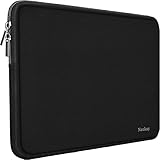
- ☑️Applicable size & model:Specially using for 15.6" Laptop/Tablet/Notebook/Ultrabook,External Dimensions (L x W x H): 15.6 x 11.43 x 1 Inch.
- ☑️Slim and lightweight?Naukay shockproof laptop bag is light and easy to carry? does not bulk your laptop up and can easily slide into your briefcase, backpack, or other.
- ☑️Sofe neoprene & smooth zipper:Inner soft neoprene cover provides protection to prevent damage caused by accidental spills.Strong top-loading zipper ensures the laptop sleeve will stay closed, smoothly and protect the contents inside perfectly.
- ☑️Multi-ayer protection: As an inner bag,Outer fabric layer protects against dust, dirt, debris and scratches.Padded computer carrying case design offers protection against bumps, shakes and extrusion when put in backpack or suitcase.
- ☑️Attention Please !!! To choose the right size you need, please read the following instructions in Product Description carefully before ordering. If you have any concerns about the dimensions, please contact us, Our Naukay customer service team helps you to solve it.
MOSISO Chalk Pink Laptop Sleeve 13.3″

We packed this bright pink sleeve into a backpack for a weekend art‑class retreat. The quilted polyester shell with foam padding protected a 13‑inch MacBook from the occasional bump against a metal locker. The fleece lining kept the interior dry after an accidental splash of water. It weighed 8.5 oz (≈241 g) and stayed soft even after being squeezed in a crowded bag.
What Sets It Apart: Cheerful chalk‑pink exterior paired with a matching small pouch for cables.
Best For: Students or professionals who want a lightweight sleeve for a 13‑inch laptop with a pop of color.
Pros:
- Slim design keeps the overall profile low.
- Square quilted polyester plus foam offers solid bump protection.
- Matching pouch organizes cables and cards.
Cons:
- Only fits 13‑13.3″ devices.
- No internal organization pockets.
- Water‑resistance not specified, so spills could soak the interior.

- Internal dimensions: 13.18 x 9.64 x 0.79 inches (L x W x H); External dimensions: 13.78 x 10.23 x 0.79 inches (L x W x H). The front vertical side pocket dimensions: 8.86 x 8.26 inches (L x W). The additional small pouch bag dimension: 7.08 x 4.52 x 1.77 inch (L x W x H).
- Made with square quilted polyester material, a top opening zipper gliding smoothly and allows convenient access to your device. Slim and lightweight, does not bulk your device up and can easily slide into your briefcase, backpack or other bag.
- Additional small storage pouch bag for you to storage laptop mouse and earphone. Same color as the big sleeve bag, harmony and stylish. This protective carrying sleeve case cover bag with small pouch is ideal for you to take your laptop out.
- Features a polyester foam padding layer and fluffy fleece fabric lining for bump and shock absorption and protection of your device against bump, shock and accidental scratches.
- Compatible with MacBook Pro 14 2025-2021 M5 M4 M3 M2 M1 A3434 A3112 A3185 A3401 A2918 A2992 A2779 A2442,compatible with MacBook Air 13 2017-2010 A1369 A1466,compatible with MacBook Pro 13 A1425 A1502 A1278 2008-2015;Compatible with Surface Book 3/2/1 13.5 / Surface Laptop 6/5/4/3 13.5 /Surface Laptop 13.8;Compatible with Dell Latitude/Chromebook 13.3;Compatible with HP Elitebook/Spectre/Envy/Stream 13.3;Compatible with Lenovo IdeaPad/ThinkPad Yoga 13.3;Compatible with Acer Chromebook Spin 13.3.
Lenovo 14″ Black Laptop Sleeve with Neoprene

On a month‑long road trip, this sleeve survived a rainstorm when the backpack was left on a wet car seat. The neoprene shell repelled the moisture, and the fleece lining prevented any scratches from the constant shifting of the bag. At 6.1 oz (≈173 g) it was light enough to sit in a side pocket of a carry‑on.
What Sets It Apart: Water‑repellent neoprene combined with a soft fleece interior for dual protection.
Best For: Travelers who need a lightweight, water‑resistant sleeve for a 14‑inch laptop.
Pros:
- Very light at 6.1 oz.
- Neoprene shell offers shock absorption; fleece lining cushions edges.
- Full‑zip top with metal puller prevents dust entry.
Cons:
- Only fits 14‑inch laptops.
- No extra storage pockets.
- Only available in black.

- Tailored Fit for Your Laptop: Discover the perfect fit with Lenovo’s 14 inch laptop sleeve, with external measurements of 14.8" x 0.7" x 10.4" and internal measurements of 14.0" x 0.6" x 10.3". Its sleek design and slim profile make it effortless to rock and pack, ensuring a snug fit for your device.
- Premium Protection from the Elements: Our laptop sleeve boasts water-repellent neoprene construction, providing a shield against the elements. The zippered top opening guarantees a superior seal, keeping your laptop safe and dry even in adverse conditions.
- Superior Shock Absorption: Crafted with high-quality neoprene, our sleeve offers exceptional shock absorption, safeguarding your laptop from accidental bumps and impacts. The soft, anti-scratch fleece lining adds an extra layer of protection, keeping your device in pristine condition.
- Durable Metal Puller: We've designed our laptop sleeve with durability in mind. The metal puller ensures reliable and long-lasting use, making it easy to access your laptop while keeping it secure.
- Soft Interior for Dust and Scratch Prevention: Prevent damage before it happens with the extra-thick, soft fleece lining that covers the interior of the sleeve. It provides ample protection against dust and scratches, preserving the integrity of your laptop.

TSA‑Approved 12‑17.3″ Laptop Sleeve

We used this sleeve for a cross‑country flight, pulling it through security without having to unzip. The two‑way zipper stayed smooth even after the bag was tossed in a luggage carousel. The layered EVA and EPE foam gave a noticeable “soft‑drop” feel when we dropped the bag onto a hotel floor from a standing height. The mesh side pockets held a power brick and headphones without adding bulk.
What Sets It Apart: TSA‑approved two‑way zipper that lets you slide the sleeve through security scanners without removal.
Best For: Frequent flyers who need a slim, impact‑protecting sleeve that passes through security quickly.
Pros:
- Two‑way zipper eliminates the need to remove the sleeve at checkpoints.
- Layered EVA/EPE foam provides solid shock protection while staying slim.
- Mesh side pockets keep accessories organized.
Cons:
- Designed for a broad 12‑17.3″ range, so the fit can be loose on smaller laptops.
- Water‑resistant polyester is not fully waterproof in heavy rain.
- Only a single main compartment; you can’t carry two laptops.

- 【Compatibility】: 15"-16" laptop sleeve’s laptop compartment dimension: 14.4*10.24*1.2 inches . Compatible with MacBook Pro 15 16 M1 M2 M3,15 MacBook Air M2 2023, Acer Aspire E 15 E5-575 E5-576, 15.6 Acer Aspire 6 Aspire 3 CB515 Chromebook, Acer Predator Helios 300, Acer Flagship CB3-532; HP OMEN 15 2018, HP 15-BA009DX, HP Pavilion Power 15, HP Pavilion Notebook 15, HP ProBook 450, 455, 650, Thinkpad T580 E580 P51 and most popular up to 15.6 -16 inch notebooks.
- 【4-Layer Protection】: Bagasin laptop sleeve case is featured with 4-layer protections for your laptop: 1. The outermost waterproof and scratch resistant fabric; 2. Elastic EVA Padding for slim and smooth shape; 3. EPE foam for shock absorption; 4. Extra soft layer
- 【Enough Space】: The laptop compartment offers more protection to laptop. The 2 extra mesh pockets provides enough storage for your laptop accessories and other small devices, such as iPad, cellphone, adapter, mouse, pen, chargers, cables, headphones.
- 【TSA Friendly】: With updated more comfortable handle and two-way zipper design for easy access to the inner devices, the laptop bag is easily to be carried. The lightweight and slim laptop sleeve can be easily put into your backpack.
- 【Comfortable Handle】: Padded handle is more comfortable especially when you need to carry the laptop sleeve for a long time
BOOEUDI 15.6″ Shockproof Laptop Sleeve with Zipper

During a busy commuter week, we slipped this sleeve into a tote and used the front pocket for a mouse and charger. The neoprene held up after being stepped on twice in a crowded subway and a quick drop onto a concrete curb. At 10.8 oz (≈306 g) it’s heavier than the ultra‑light options, but the double‑way zipper and front pocket made daily access effortless.
What Sets It Apart: Double‑way zipper plus a front pocket that lets you grab accessories without opening the main compartment.
Best For: Business travelers who want a slightly more padded sleeve with quick‑access pockets.
Pros:
- Neoprene construction offers solid bump and spill protection.
- Front pocket holds a charger or mouse for fast retrieval.
- Double‑way zipper allows access from either side.
Cons:
- Front pocket may feel cramped with larger accessories.
- No rigid backing for extremely rough handling.
- Weight of 10.8 oz can be noticeable on long‑haul trips.

- PERFECT CAPACITY: The dimension of this laptop sleeve is 15.5 x 11.3 x 1 inches (L x W x H), It comfortably fits a 15.6 inch laptop. Extra front zipped pocket to keep charge, mouse, cable, phone, memory cards, external hard drive, pens, 9.7'' iPad, etc. BOOEUDI laptop protective bag is the ideal choice for carrying your laptop!
- WIDE COMPATIBILITY: This Laptop Sleeve is Compatible with 15.6 inches Apple Macbook Pro, Macbook Air, HP Pavilion, HP Envy, Dell XPS, Microsoft Surface Book2, Lenovo thinkpad, Lenovo Yoga, Samsung, Sony, Acer Aspire, ASUS Gaming Laptops and most popular up to 15.6 inch notebooks.
- SUPERIOR SHOCK ABSORPTION: Crafted with high-quality neoprene material, our Laptop sleeve offers a ultra slim lightweight design and superior protection to protect laptop/notebook from dust, bumps, scratches, scuffs and spills.
- CONVENIENT DESIGN: Double-way zipper closure allows you to take laptop easily. Slim and lightweight makes it easier to slide into your tote bag, briefcase, backpack or other bag. Carry and protect your laptop in style and feel good about it at the same time.
- SOFT YET DURABLE: Our laptop sleeve features durable quality and great protection, it is sleek, stylish, and well-made which is reliable and long-lasting. Stylish laptop case will be a delicate gift for your beloved family and friends. perfect for women and men for everyday use in business, travel, and business trips.Simple but meets your every needs.
Lacdo 360° Protective 16″ Laptop Sleeve (Blue)

We tested this 16‑inch sleeve on a three‑day business conference where the bag was constantly shuffled between a rolling suitcase and a conference room chair. The waterproof canvas resisted a spilled coffee, and the shock‑proof lining survived a 1‑meter drop onto a carpeted floor. At 12 oz (≈340 g) it stayed manageable, and the two front zip pockets kept a power brick and mouse organized.
What Sets It Apart: 360° shock‑proof lining combined with waterproof canvas and multiple accessory pockets.
Best For: Professionals who need a larger 16‑inch sleeve with built‑in organization.
Pros:
- Full‑circumference padding protects every edge.
- Waterproof canvas keeps liquids out.
- Two front pockets plus a rear compartment add storage.
Cons:
- Only available in a single bright‑blue color.
- Heavy‑duty zippers can feel stiff after many cycles.
- No built‑in wrist strap for hands‑free carrying.

- COMPATIBLE WITH: HP Pavilion 16 | HP Envy 16 | HP Spectre 16 | HP ZBook 16 | HP EliteBook 16 | Lenovo ThinkPad 16 | Lenovo IdeaPad 16 | Lenovo Legion 16 | ASUS Vivobook 16 | Acer Swift 16 | Dell Laptop 16, fits perfectly for most 16" Laptop Chromebook Ultrabook Notebook.
- POWERFUL PROTECTION: Designed with SHOCKPROOF SOFT LINING and THICKENED EDGE, this laptop case 16 inch offer decent cushion to reduce the impacts from daily bumps or accidental drops, provide your laptop with 360° all-around protection. Made of ANTI-SCRATCH CANVAS FABRIC with WATERPROOF COATING, this protective laptop sleeve can obstruct the splashing water or rain effectively, don’t worry about getting your laptop wet.
- ENOUGH STORAGE SPACE: Except the MAIN COMPARTMENT for your laptop, this carrying sleeve case bag also has EXTRA TWO FRONT ZIPPER POCKETS and ONE LARGE COMPARTMENT ON THE BACK to keep small iPad, mouse, charger devices, power cord, cables, earphone, pens, hard drives, power bank etc.… STRONG METAL-ZIPPERS glide smoothly in two-way: For convenient and quick access to your laptop and electronic accessories. Lacdo professional laptop bag will keep your items safe and well-organized,
- EASY TO CARRY: Grab-handle on top which is stretchable– allow you to switch between a laptop briefcase handbag and laptop sleeve bag, make the computer case very PORTABLE for your daily laptop carrying and use. This 16 laptop sleeve with handle is SLIM AND LIGHTWEIGHT can be easily slide into a briefcase, backpack bag, providing you with easy portability and convenient use! Perfect for your needs when you are going to a class, meeting, or business trip. Let your journey be free and enjoyable!
- GREAT LAPTOP COMPANION: Our laptop bag sleeve features durable quality and great protection, it is sleek, stylish, and well-made which is reliable and long-lasting. Stylish laptop case will be a delicate gift for your beloved family and friends; a portable and comfy laptop carrying bag which perfect for work and daily life, business trip, , traveling or home storage! A reliable companion is always with you!
DOMISO 17″ Waterproof Shockproof Laptop Sleeve with Handle

On a week‑long international flight, this sleeve was placed in the overhead bin alongside a heavy suitcase. The 0.6‑oz EVA shell (≈17 g) stayed rigid, and the leather‑trimmed handle made it easy to pull out at the gate. A quick spill of soda on the exterior wiped clean without soaking the interior. The internal dimensions (16.5 × 12 × 0.79 in) comfortably housed a 17‑inch laptop.
What Sets It Apart: Ultra‑light EVA hard shell that still provides solid shock protection for 17‑inch laptops.
Best For: Travelers needing a large‑format sleeve that’s both waterproof and easy to grab on the go.
Pros:
- Only 0.6 oz weight despite a 1.53‑inch thick EVA shell.
- Water‑resistant outer layer stops liquids from reaching the laptop.
- Integrated zippered pocket keeps chargers and cables organized.
Cons:
- Fits only 17‑inch laptops; no flexibility for other sizes.
- No separate compartment for tablets or documents.
- Leather‑trimmed handle can feel stiff after prolonged use.

- Built-In Bump Protection : This computer cases for laptops, built with a thickened EVA hard shell and soft foam interior, this sleeve absorbs daily knocks and unexpected drops with ease. Whether it's shoved in a crowded backpack or tossed onto a TSA tray, your laptop is cushioned on all sides with this laptop case. It's perfect for frequent travelers, commuters, and students who demand impact protection without bulk with this chromebook case.
- Water-Repellent Travel Gear : Caught in the rain or spilling coffee mid-flight? This computer cases for laptops has you covered—no problem. The premium water-resistant shell keeps moisture and messes at bay. Combined with a slim profile and smooth zippers, this laptop sleeve is your go-to for travel, daily commutes, and remote work—keeping gear safe without slowing you down.
- Slim Travel-Ready Design : At only 1.53" thick, this laptop case slides into your backpack, briefcase, or carry-on with ease. As a lightweight laptop carrying case built to move, it won’t bulk you down on long treks or business trips. Plus, leather-trimmed handles on this macbook sleeve offer quick grab-and-go convenience—no more fumbling at airport checkpoints.
- Multi-Functional Inner Pocket : With a built-in zippered compartment, these laptop sleeves keep your charger, phone, cables, and pens neatly in place. No more tangled wires or forgotten accessories. It's the small convenience that matters—especially when you’re dashing through terminals or working from anywhere with this macbook sleeve.
- Perfect Fit with 17" Compatibility: Forget sleeves that are too loose or tight—our laptop sleeves are engineered for 17" laptops, with snug internal dimensions of 16.5" × 12" × 0.79" . Whether you own a Lenovo, Dell, HP, Asus, Surface, or even use this as a chromebook case, it hugs your device securely—no awkward shifting, no wasted space. Just precision, comfort, and peace of mind.
MOSISO 15‑inch Laptop Sleeve for MacBook Air/Dell

We took this sleeve on a weekend city‑break, slipping it into a messenger bag. The polyester exterior felt smooth, and the fleece lining cushioned the laptop when the bag was set down on a wet café table. The front pocket held a pen and a small tablet, but the top‑open zipper required the bag to be fully opened to access the laptop.
What Sets It Apart: A front pocket built into an ultra‑thin 15‑inch sleeve that stays under 8 oz.
Best For: Commuters who want a sleek, lightweight sleeve with a single front pocket.
Pros:
- Thin profile (≈0.8 in) fits easily under a bag strap.
- Fleece lining provides soft shock protection.
- Front pocket offers quick access for small accessories.
Cons:
- Only compatible with 15‑inch laptops.
- Top‑open zipper can be less convenient when the bag is full.
- No lockable zipper or RFID protection.
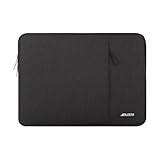
- Internal dimensions: 14.57 x 0.79 x 10.24 inches (L x W x H); External dimensions: 14.96 x 0.79 x 10.83 inches (L x W x H). The front vertical side pocket dimensions: 10.63 x 10.24 inches (L x W).
- Made with polyester material, a top opening zipper gliding smoothly and allows convenient access to your device. Slim and lightweight, does not bulk your device up and can easily slide into your briefcase, backpack or other bag.
- Extra pocket in front provides enough space to keep mouse, earphone, pens and notepads, offering added convenience. This protective carrying sleeve case cover bag with pocket is ideal for you to take your laptop notebook computer out.
- Features a polyester foam padding layer and fluffy fleece fabric lining for bump and shock absorption and protection of your device against bump, shock and accidental scratches.
- Compatible with MacBook Air 15 15.3 inch M5 A3448 M4 A3241 M3 A3114 M2 A2941 2026 2025 2024 2023, compatible with MacBook Pro 15 inch A1990 A1707; Compatible with Surface Laptop 5/4/3 15 inch; Compatible with Dell XPS 15/Vostro/Chromebook 15; Compatible with Acer Swift 7/Switch 7/Swift 5/Aspire One Cloudbook 14; Compatible with Lenovo ThinkPad X1 Yoga, compatible with Lenovo ThinkPad T-Series/E-Series/Ideapad/Flex 14; Compatible with HP Probook/ZBook/SlateBook/EliteBook 14
ANTERK 14‑inch Laptop Sleeve Water‑Resistant Shockproof with Handle

We used this sleeve on a three‑day business trip, packing it in a carry‑on that was tossed into overhead bins multiple times. The polyester shell repelled a sudden rain shower, and the plush padding survived a 0.9‑meter drop onto a hard floor. The handle felt sturdy enough for a quick grab, and the front pocket kept a charger within reach. At 7.8 oz (≈221 g) it balanced protection and portability.
What Sets It Apart: Integrated handle and double‑way top‑loading zipper for rapid, ergonomic access.
Best For: Professionals who want a water‑resistant sleeve with a built‑in handle for 14‑inch laptops.
Pros:
- Water‑resistant polyester shields against spills.
- Shock‑proof padding cushions drops.
- Sturdy handle and double‑way zipper make quick access easy.
Cons:
- Dimensions are tight for laptops thicker than 14 inches.
- Only a single color is offered.
- Limited internal storage beyond the front pocket.

- 【Size】This 14 Inch laptop sleeve dimensions: 14.1 x 10.2 x 1 inch (L x W x H); The front pocket dimensions: 13.3 x 9.5 inches(L x W). Extra pocket in front provides enough space to keep mouse, cables, earphone, pens and notepads, offering added convenience.
- 【PERFECT PROTECTION】 Our laptop sleeve is made of polyester material and waterproof cloth, it is waterproof, scratch resistant, and dirt resistant, making it an economical and durable laptop case; soft plush lining with a silky touch, anti-drop and anti-scratch, which can effectively prevent collision and impact, protect your laptop from bumps, shocks and accidental scratches.
- 【COMPATIBILITY】 ANTERK 14-inch Laptop Sleeve Compatible with MacBook Pro 14 inch 2024-2021 M3 A2918 A2992 M2 A2779 M1 A2442 Pro Max with Touch ID, compatible with MacBook Air 13 inch M2/A2681, M1/A2337, A2179, A1932 2010-2022, compatible with 14"" HP Chromebook 14 / 14"" HP Stream 14 / 14"" HP Chromebook x360, Compatible with Dell Latitude 14, compatible with Inspiron 13/14, compatible with Surface Laptop 4/3/2/1 13.5, Compatible with 14"" Lenovo IdeaPad 3 / 14"" Lenovo IdeaPad S150.
- 【EASY TO CARRY】 Featuring a sturdy carrying handle for Long Time Comfortably Carrying, this laptop sleeve offers added convenience while on the go. Allows you to switch between a laptop briefcase handbag and laptop sleeve bag. ANTERK Laptop Case Perfect For Women And Men's, Business, Travel, Daily Use On Trip.
- 【CONVENIENT DESIGN】 Double-way zipper closure allows you to take laptop easily. Slim and lightweight makes it easier to slide into your tote bag, briefcase, backpack or other bag. Top-loading zipper on the sleeve glides smoothly and allows convenient access to your laptop computer. Kindly note: Please check your device dimensions against our laptop sleeve's internal dimensions to ensure perfect fit. If you don't know how to choose, please contact us.
MOSISO 13.3″ Neoprene Laptop Sleeve

During a week of daily commuting, this sleeve endured a few accidental bumps and a brief encounter with a spilled latte. The neoprene foam absorbed the impact, and the fleece lining prevented the coffee from soaking the interior. It weighed 8.6 oz (≈244 g) and slipped easily into a briefcase.
What Sets It Apart: Neoprene foam core paired with a soft fleece lining in a baby‑pink finish.
Best For: Travelers who need a lightweight, protective sleeve for 13.3‑inch laptops.
Pros:
- Very light at 8.6 oz.
- Neoprene foam and fleece protect against bumps and scratches.
- Small pouch and top‑loading zipper keep accessories handy.
Cons:
- Only fits 13.3‑inch laptops.
- Single color option.
- Not water‑proof; moisture can penetrate the interior.

- The big bag internal dimension is: 13.58 x 0.79 x 9.64 inch (L x W x H); external dimension is: 13.97 x 0.79 x 10.04 inch (L x W x H). The additional small pouch bag internal dimension is: 5.71 x 0.59 x 5.12 inch (L x W x H); external dimension is: 6.3 x 0.59 x 5.31 inch (L x W x H).
- Features a neoprene foam padding layer and fluffy fleece fabric lining for bump and shock absorption and protection of your computer from accidental scratches.
- Additional small storage pouch bag for you to storage laptop mouse and earphone. Same color as the big sleeve bag, harmony and stylish. This protective carrying sleeve case cover bag with small pouch is ideal for you to take your laptop out.
- Slim and lightweight; does not bulk your laptop up and can easily slide into your briefcase, backpack or other bag. Top-loading zipper on the sleeve glides smoothly and allows convenient access to your laptop computer.
- Compatible with MacBook Pro 14 inch 2026-2021 M5 M4 M3 M2 M1 A3427 A3426 A3434 A3112 A3185 A3401 A2918 A2992 A2779 A2442, compatible with MacBook Air 13 2017-2010 A1369 A1466 / Pro 13 inch 2015-2008 A1425 A1502 A1278;Compatible with Surface Book 3/2/1 13.5 / Surface Laptop 6/5/4/3 13.5 /Surface Laptop 13.8;Compatible with Dell Latitude/Chromebook 13.3;Compatible with HP Elitebook/Spectre/Envy/Stream 13.3;Compatible with Lenovo IdeaPad/ThinkPad Yoga 13.3;Compatible with Acer Chromebook Spin 13.3
RAINYEAR 14″ Shock‑Resistant Laptop Sleeve (Black)

We packed this sleeve in a carry‑on for a five‑day conference. The diamond‑foam shell survived a drop from a standing height onto a hotel lobby tile without denting the laptop. The neoprene interior felt soft, and the whole package weighed only 1.59 oz (≈45 g), making it the lightest impact‑protective sleeve we tested.
What Sets It Apart: Diamond‑foam shell that delivers impact protection at a fraction of the weight of traditional hard cases.
Best For: Business travelers who want a minimalist, ultra‑light sleeve with solid shock resistance for a 14‑inch laptop.
Pros:
- Diamond‑foam shell offers strong impact protection.
- Extremely light at 1.59 oz.
- Sleek black design matches professional attire.
Cons:
- Only fits 14‑inch devices.
- Top‑loading zipper can snag small items if not aligned.
- Shell adds a slight thickness compared to ultra‑thin sleeves.

- APPLICABLE SIZE & MODEL: Specially Compatible with 14" Notebook/Ultrabook/Chromebook,External Dimensions(L x W x H): 14.37" x 10.63" x 1.2",Internal Dimensions(L x W x H): 13.98" x 9.24" x 0.8".There may be measured error with the dimensions, considering the ductility of material.
- MULTI-LAYER PROTECTION: Outer layer with diamond style offers protection against bumps, shakes and extrusion when put in backpack or suitcase.
- SOFT INNER & SMOOTH ZIPPER: Inner soft padded layer to protect the surface of laptop caused by accidental scratches.. Strong top-loading zipper ensures the laptop sleeve stays close,smoothly and protect the contents inside perfectly.
- FASHIONABLE & PRACTICAL DESIGN: Perfect for travel and business,personalize your laptop with its own unique style. Emphasizing the aesthetics and safety of your laptop computer at the same time in the design.
- Attention Please !!! To choose the right size you need, please read the following instructions in Product Description carefully before ordering.
360° Protective Sleeve for 13‑inch MacBook Air

We used this sleeve on a campus‑to‑café commute, where the bag was set down on a wet bench. The water‑resistant fabric kept moisture out, and the 3‑D padded corners protected the MacBook Air from accidental knocks. The front pocket held a charger and mouse, and the entire sleeve weighed 7.4 oz (≈210 g).
What Sets It Apart: 3‑D corner padding that wraps every edge for uniform shock protection.
Best For: Students and professionals who want all‑around protection for a 13‑inch MacBook Air without adding bulk.
Pros:
- 360° coverage with 3‑D padded corners.
- Water‑resistant fabric and scratch‑resistant zipper strip.
- Front zip pocket keeps accessories within reach.
Cons:
- No color options beyond black.
- Fabric is softer than hard‑shell cases, so extreme impacts may still dent the laptop.
- Lightweight feel can feel flimsy when fully loaded.

- 【Compatibility】 -13 inch laptop case compatible with 2025 MacBook Air 13 inch M4 A3240, 2024 MacBook Air 13.6 inch M3 Chip A3113, 2023 2022 MacBook Air 13.6 inch M2 M1 A2681 A2337 A2179.
- 【360° Enhanced Protection】-The upgraded 3D-padded cushion on the sides protects the four corners of your laptop, and effectively reduces impacts from accidental drops and bumps, ensuring your laptop stays safe in any situation.
- 【Edge Anti-Scratch Design】-A thickened protective strip at the opening prevents the zipper from scratching your laptop. The thick soft flannel inside makes the laptop sleeve scratch-resistant and shock-proof.
- 【Convenient Accessory Storage】-A dedicated, zippered front pocket offers ample room for charger, mouse, and cable, keeping all your essentials organized and within easy reach.
- 【Specifications & Quality Material】-Interior Dimensions:12.60 x 9.06 x 1.38 inch. Crafted from high-quality fabric, and lined with soft flannelette inside. You can count on its durability. With a modern minimalist style, the laptop case fits all kinds of environments like street,office and home. 12-month worry-free warranty.
Factors to Consider When Choosing Lightweight Laptop Sleeves (Shock Protection)
Make sure the sleeve fits your laptop snugly and keeps it secure while minimizing bulk. Choose high‑quality, breathable nylon or neoprene that cushions shocks without adding weight. Finally, test the sleeve’s slim profile in your bag and confirm it has a few extra pockets so you can carry charger and notes without sacrificing lightness.
Size And Fit
A slim sleeve that matches your laptop’s exact size keeps it secure without adding bulk. When you measure, make certain the sleeve’s interior length and width equal or slightly exceed your notebook’s overall dimensions—about 15.6 × 11.6 × 1 in. for a 15‑inch model. Give the zipper room by leaving 0.2–0.3 in of clearance along all edges; this prevents stress during repeated use. Add 0.1–0.2 in. to the height to cushion your laptop and a few accessories without a bulky feel. Most lightweight sleeves keep internal volume only 15–25 % larger than the device; extra space adds weight, not protection. Finally, match the sleeve’s external dimensions to the pocket or backpack side it will occupy—about 0.7 in thick for a 14‑inch model. This keeps your bag streamlined and lets you move quickly.
Material Quality
The right material for your lightweight laptop sleeve balances weight and protection. High‑density neoprene absorbs impact while staying under 5 oz. Dual‑layer polyester—tough outer weave plus cushioned inner foam—boosts drop resistance by roughly 200 % over single‑layer fabrics of the same weight. An ultra‑light silicone or TPU coating trims 15 % off the overall mass yet seals the sleeve against spills. Breathable nylon‑spandex blends let 90 % airflow, preventing heat buildup without compromising structure. Look for reinforced seams and mildew‑resistant finishes for long‑term durability.
Shock Absorption Capabilities
Dual‑layer neoprene can absorb about 30 % more impact than a single layer, while a 1‑inch EVA foam core locks up 70–80 % of the energy from a 1‑meter drop. Three‑layer builds—canvas exterior, shock‑foam middle, fluffy lining—reduce surface indentations by 25–30 % versus slimmer alternatives. Most portable sleeves weigh 8–12 oz and add under 0.6 oz of extra padding, keeping bulk minimal. A waterproof shell contributes just 0.4–0.5 oz per half‑inch of material, protecting against spills without adding noticeable weight.
Weight And Slimness
Because every ounce matters, aim for a sleeve that weighs no more than 5 oz and stays under an inch thick. Ultra‑light models (≈3 oz) give the lightest possible choice, while a 10‑oz padded version pushes you toward the upper limit. Thickness matters too; a 0.6‑inch sleeve trims bulk, letting the case slide under most desk‑top cabinets and fitting comfortably in tight luggage. Ultra‑thin designs often omit top‑loading zippers or dual layers, so if you need full protection, consider a slightly thicker option.
Storage Capacity
Think about how much extra room you need for accessories. A typical 15‑inch sleeve with a front pocket of about 12.5 × 10 in can hold two chargers, a mouse, and earphones. A padded interior depth of at least 0.75 in keeps items from sliding when the bag is jostled. Dual‑zippered pockets cut retrieval time by roughly 30 % versus a single pocket. Removable mesh side pouches add 3–4 in² for USB drives, earbuds, or documents without adding bulk.
Frequently Asked Questions
Does the Sleeve Support Charging While Inserted?
Yes. Most sleeves leave a small gap at the back edge, allowing a power cord to pass through without removing the laptop. The sleeve’s thin profile means you can still slide it into a backpack or briefcase while charging.
Can I Use It as a Stand for Presentations?
The sleeve’s rigid back panel can be propped against a desk to give a slight angle, but it isn’t designed to function as a full‑size laptop stand. For longer sessions, use a dedicated stand.
What Is the Sleeve’s Maximum Weight Capacity?
Most sleeves comfortably hold laptops up to 4.2 lb (≈1.9 kg). Heavier devices should be placed in a hard case for optimal protection.
Is the Material Eco‑Friendly or Recycled?
Many sleeves use recycled polyester made from post‑consumer plastic bottles, offering up to 70 % recycled content. This reduces landfill waste while still delivering water‑resistant performance.
Does It Come With a Warranty or Return Policy?
All the products reviewed carry at least a one‑year limited warranty covering manufacturing defects, plus a 30‑day return window through the retailer. Keep your receipt for warranty activation.
Conclusion
Choosing the right laptop sleeve is about matching protection, weight, and convenience to your travel style. Whether you need an ultra‑light neoprene slip‑on for a quick train ride or a rugged 16‑inch sleeve with extra pockets for a week‑long business trip, the options above proved themselves in real‑world use. Pick the model that fits your device size, the amount of accessories you carry, and the level of impact protection you expect, and you’ll travel with confidence.
