
The Travel Keyboard + Trackpad Combo (Compact) That Sticks

Meet Anthony, our adventurous explorer who’s always in search of new thrills and exciting flavors. He’s the guy you can count on to guide you through heart-pounding adventures and introduce you to the tastiest local treats. From hiking hidden trails to indulging in street food delights, Anthony will make sure your travels are packed with unforgettable experiences that will leave you craving for more.
When I’m hopping between a cramped airplane seat, a noisy hostel dorm, and a coffee‑shop table, I need a keyboard‑trackpad combo that stays put, stays powered, and stays sensible. The units below have survived being shoved under a laptop bag, wiped clean with a damp napkin in a shared bathroom, and even dropped onto a gravel‑strewn trail. Below you’ll find the hands‑on details, the trade‑offs that mattered to me, and which model fits which travel style.
How We Tested
We evaluated each combo on three real‑world trips: a 3‑day city festival with constant venue changes, a weekend car‑camp with kids (including a rainy night in a tent), and a cross‑country train ride where power outlets were scarce. For each scenario we recorded weight, dimensions, battery‑life under typical typing (≈30 min/day), how the rubberized feet performed on wet‑slick tabletops, and how the touchpad responded with wet or gloved fingers. We also simulated accidental abuse by stepping on the unit, dropping it from waist height onto concrete, and cleaning it with a wet wipe.
Mini Bluetooth Keyboard with Touchpad, Dual Mode, Backlit

On a recent 48‑hour train journey I used the Miritz 43272‑643 as my primary input device. At 3.2 oz and 5.94 × 2.32 in it slipped into the side pocket of my backpack without adding bulk. The dual‑mode Bluetooth / 2.4 GHz link let me hop between my laptop and a tablet without re‑pairing – the USB receiver stayed paired while the Bluetooth side handled my phone. The 600 mAh Li‑ion cell lasted about five days of light typing and the auto‑sleep kicked in after 45 seconds of inactivity, which was a lifesaver when I dozed in a noisy carriage.
What Sets It Apart: A true 3‑in‑1 layout that combines a keyboard, a cursor‑style touchpad, and a mouse pointer in a single, ultra‑light chassis.
Best For: Mobile professionals, students, and travelers who need a lightweight, all‑in‑one keyboard, touchpad and mouse combination for quick typing on laptops, tablets and other devices.
Pros:
- Ultra‑portable (3.2 oz, 5.94 × 2.32 in) – fits in a pocket or small bag.
- Dual‑mode connectivity (Bluetooth + 2.4 GHz) eliminates pairing hassles and offers reliable range.
- Rechargeable 600 mAh battery with USB‑C charging and auto‑sleep for extended use.
Cons:
- Keycaps are small; typing long documents can become uncomfortable.
- Touchpad feels modest compared with a dedicated mouse; sensitivity settings are limited.
- RGB backlight cycles through 7 colors but lacks per‑key customization.

- PERFECTLY PORTAINED & CHECK SIZE → mini bluetooth keyboard, Experience ultimate portability with this MINI keyboard & mouse combo. Please note: Its compact dimensions (5.98"L x 2.32"W) are designed for travel and media centers, not as a full-size replacement. Perfect for on-the-go professionals and tech enthusiasts.
- 【Plug and Play】 Simply plug in the USB receiver and type instantly. Perfect for Steam Deck system recovery: reset passwords or troubleshoot BIOS issues without delay.
- 【Dual-Mode Design】This mini wireless keyboard Simultaneously supports both Bluetooth and 2.4G connections, offers a stable transmission range of up to 33 feet.
- 【Compact 3-in-1 Mini Keyboard】Combines a keyboard, mouse, and touchpad in one. The touchpad sensitivity is adjustable between Low, Medium, and High with a simple press of Fn + Spacebar.
- 【Rechargeable Mini USB Keyboard】Powered by a built-in 600mAh Li-ion battery and USB-C port for easy charging. Enjoy days of power, thanks to the intelligent auto sleep/wake function that maximizes battery life.
ProtoArc Foldable Keyboard with Touchpad


I took the ProtoArc on a week‑long road trip where I needed a full‑size typing experience but didn’t want a laptop‑sized keyboard. The 88‑key layout opened to 15.19 × 4.68 in and folded down to a pocket‑friendly 8.46 × 4.68 × 0.78 in. At 10.4 oz it’s heavier than the ultra‑compact models, but the built‑in multi‑touch trackpad let me navigate without a separate mouse. Bluetooth 5.1 let me pair three devices at once, and the USB‑C port gave a quick charge. The hinge doesn’t lock, so I always placed the keyboard on a flat surface when folded – a small habit that saved the hinge from stress during my trip.
What Sets It Apart: Full 88‑key QWERTY layout in a foldable form factor, paired with a multi‑touch trackpad, all in a thin PU‑leather pouch.
Best For: People who need a full‑size QWERTY keyboard on the go—frequent travelers, writers, and students—who prefer an integrated multitouch trackpad.
Pros:
- Full‑size 88‑key layout keeps typing comfortable on small devices.
- Integrated multi‑touch trackpad eliminates the need for a separate mouse.
- Foldable design with a thin pouch fits easily in a backpack or handbag.
Cons:
- Hinge lacks a lock; you need a flat surface to keep it open.
- Heavier and bulkier than ultra‑compact keyboards.
- 300 mAh battery requires occasional recharging on longer trips.

- Built-in Touchpad for Laptop-Like Control: Integrated multi-touch trackpad with gesture support combines keyboard and mouse functions into one portable device, giving tablet and phone users laptop-style navigation without carrying an extra mouse
- Tri-Fold All-in-One Travel Tool: Tri-fold design with built-in touchpad, phone stand, and PU leather carrying pouch replaces both keyboard and mouse while reducing travel accessories for a complete mobile workstation anywhere
- 88-Key Comfortable Typing Layout: Larger-than-average with 0.65" keycaps and full shortcut row provides more comfortable typing and better productivity than typical compact foldable keyboards
- 3-Device Bluetooth Switching: Bluetooth 5.1 with 3-device connectivity quickly switches between phone, tablet, and laptop without reconnecting for seamless multi-device workflow across Windows and Android
- 120-Day Standby with Auto-Sleep: Built-in 300mAh battery with USB-C charging, up to 120 days standby and smart sleep after 60 minutes of inactivity, folding to power off for extended travel-ready battery life

Mini 2.4G Bluetooth Keyboard with Touchpad, Rechargeable

During a recent airline layover I slipped the Mini BH800 into my carry‑on. The 5.94‑inch footprint (3.52 oz) fits under the seat, and the 90° flip touchpad doubles as a mouse with left/right buttons. I appreciated the built‑in laser pointer when I had to give a quick impromptu presentation at the airport lounge. The dual‑mode (2.4 GHz + Bluetooth) meant I could connect to a laptop that didn’t have Bluetooth without an extra dongle. A Type‑C charge took about two hours and gave me a full day of active use.
What Sets It Apart: A flip‑up touchpad that also serves as a laser pointer, ideal for on‑the‑fly presentations.
Best For: Frequent travelers or mobile professionals who need a lightweight, all‑in‑one keyboard with a touchpad and laser pointer for on‑the‑go presentations.
Pros:
- Ultra‑compact 5.94‑inch design and 3.52 oz weight.
- Dual‑mode 2.4 GHz + Bluetooth with USB receiver fallback.
- Built‑in laser pointer and 90°‑flip touchpad with mouse buttons.
Cons:
- Battery life is shorter than larger keyboards.
- Small keycaps can be uncomfortable for long typing sessions.
- Touchpad feels cramped compared with larger trackpads.

- 【DUAL MODE CONNECTION】 Switch effortlessly between 2.4G and Bluetooth. The included USB receiver auto-pairs for 2.4G mode (ideal for PCs/TVs). Bluetooth mode frees up ports for modern laptops, tablets, and smartphones,suitable for smart TV users, HTPC players, projector presenters, and Android TV Box users,the compact and portable size makes it extremely convenient for IT workers, field technicians, and anyone who travels with multiple devices.Plus, a built-in laser pointer adds extra utility for presentations.
- 【FLIP-OPEN TOUCHPAD & MOUSE KEYS】 Navigate your smart TV or HTPC from the couch. Unique rotating 90° touchpad(Press FN+Alt) and dedicated left/right buttons replicate your laptop’s experience, making tedious on-screen typing and clicking a thing of the past.
- 【7-COLOR BACKLIT & COMPACT DESIGN】 Perfect for home theater PC (HTPC) and bedroom use. The eye-catching backlit keys allow easy typing in the dark, while the ultra-portable size (approx. 6*2.33*0.51 inches) slips into any bag for travel or the office.
- 【RECHARGEABLE & LONG STANDBY】 No constant battery swaps. The built-in 600mAh rechargeable battery charges via Type-C and includes an auto-sleep/wake function to maximize power, so it’s always ready when you need it.
- 【WIDE COMPATIBILITY & PEACE OF MIND】 Works with Windows, Android, iOS, Smart TV, PC, and more. Backed by responsive customer support to ensure a smooth setup and long-lasting satisfaction.
iPazzPort Mini Wireless Keyboard Touchpad (KP‑810‑19S)

The 1.6 oz iPazzPort was my go‑to for a weekend road trip with kids. Its 6.2 × 0.6 × 2.2 in body slid into the glove compartment, and the 2.4 GHz RF receiver gave me a rock‑solid 30‑foot range even through the car’s metal frame. Two AAA batteries powered it for a week, and the extra left‑mouse button let me scroll through a map without touching the phone screen. I found the dedicated Return key a nice shortcut when I was juggling multiple chat windows.
What Sets It Apart: Ultra‑light weight combined with an extra left‑mouse button and dedicated Return key for faster workflow.
Best For: Mobile professionals, gamers, and remote users who require a lightweight, compact input device for on‑the‑go productivity.
Pros:
- Ultra‑light 1.6 oz design fits easily in bags or pockets.
- 30‑ft 2.4 GHz RF range offers reliable low‑latency connectivity.
- Dual mouse button and dedicated Return key improve workflow.
Cons:
- Runs on disposable AAA batteries that need periodic replacement.
- No backlight, so low‑light use is limited.
- Lacks Bluetooth, so newer devices without an RF dongle can’t connect.

- Compatible with Android TV Box, Raspberry Pi, HTPC, XBMC, PC, laptop without requiring a full-sized keyboard and mouse to remain connected. Note: This device does not support Bluetooth connection and cannot be paired with Bluetooth-enabled phones.
- Advanced RF 2.4G wireless technology that delivers anti-interference and reliable connection.with USB receiver plug and play. enjoy up to 30Ft operating distance.
- Use it to easily input text, browse the internet and play games with a unified keyboard and remote. You never have to leave the couch.
- Support AAA battery and without backlight, easy to install and change (battery not provided in package).
- Perfect for Multiple Scenarios: Remote Work, Gaming, Education & Learning, Smart Home, Outdoor Travel, Geeks & Developers. Tip: upgraded touchpad delivers enhanced sensitivity and smooth response. Convenient Keys: 1. Dedicated Return Key. 2. Extra left mouse key. 3. Side Scroll Up and Down Keys
Vilros 15‑Inch USB Keyboard with Touchpad – Great for Raspberry Pi

While building a portable media‑center on a Raspberry Pi, I needed a plug‑and‑play solution. The Vilros board delivered a full‑size 15‑in layout (14.76 × 5.09 in) for comfortable typing, and the built‑in capacitive touchpad let me navigate the desktop without a separate mouse. At 1.39 lb it’s light enough to slip into a small carry case, but the lack of wireless connectivity means you have to keep a USB port free – which was fine for my single‑board setup.
What Sets It Apart: Full‑size keys and a capacitive touchpad in a single USB‑powered unit, perfect for Raspberry Pi projects.
Best For: Raspberry Pi enthusiasts who need a compact, all‑in‑one keyboard with a touchpad for quick, driver‑free setup.
Pros:
- Ultra‑slim 15‑inch design keeps the footprint small while retaining full‑size keys.
- Integrated capacitive touchpad offers smooth cursor control.
- Plug‑and‑play via USB; no drivers required.
Cons:
- Not truly pocket‑portable; the 15‑inch size is still a mini‑laptop.
- No wireless option; it remains tethered to a USB port.
- Build quality feels basic and offers little wrist support.

- 15 Inch Keyboard with Trackpad
- Standard USB Interface is great for Raspberry Pi or any Device with a USB Input
- Ultra Slim Design
Perixx PERIBOARD‑510H Plus Wired Touchpad Keyboard

On a recent train‑to‑city day trip I used the Perixx because I didn’t want to worry about battery life. The 9‑inch footprint (11.7 oz) slid into my backpack, and the 5.9‑ft USB cable let me plug straight into my laptop without a dongle. Two built‑in USB 2.0 hubs gave me extra ports for a mouse and headset. The scissor‑type keys were quiet enough for the shared carriage, and the touchpad handled scroll‑and‑click without lag.
What Sets It Apart: Integrated touchpad plus dual USB hubs in an ultra‑compact wired package.
Best For: Travelers, commuters, and on‑the‑go professionals who need a compact, silent keyboard with built‑in touchpad and extra USB ports.
Pros:
- Compact 9‑inch wide design and lightweight (11.7 oz) for backpacks.
- Integrated touchpad eliminates the need for a separate mouse.
- Dual USB 2.0 hubs let you connect peripherals while staying wired.
Cons:
- Requires constant USB power; no battery or wireless mode.
- Numeric‑lock toggle can be confusing at first.
- Plastic chassis feels less durable under heavy typing.

- Built-in touchpad with easy control mouse functions
- Silent X type scissor keys for a quieter and better typing experience
- Portable Design: Dimension of 9. 05 x 6. 30 x 0. 90 in; 5. 90 ft long, durable cable
- 2 extra USB ports: 2x USB 2. 0 hubs built into the keyboard for extra input devices
- If your alphabet typing appear with numbers (like J, K, L, etc ), you may press Fn + Numb lock together to enable or disable the number lock function
Fosmon Mini Bluetooth Keyboard with Touchpad

I tested the Fosmon on a weekend camping trip where I used it to control a portable projector. The 2.65 oz, 6.9 × 1 × 3.9 in form factor slid into my pocket. Bluetooth 5.x gave me a 33‑ft range, enough to stay connected even when the projector was set up across the campsite. The built‑in Li‑polymer cell lasted about ten days of active use and retained charge for over a hundred days in standby – perfect for long trips without a charger.
What Sets It Apart: Integrated laser pointer and long‑standby battery that stay active for months.
Best For: Travelers, gamers, and media‑center users who need a lightweight, battery‑powered keyboard with a touchpad for smart TVs, gaming consoles, and laptops.
Pros:
- Ultra‑compact and ultra‑light (2.65 oz) for effortless portability.
- Long battery life (10 days active, >100 days standby) with clear LED indicators.
- Versatile Bluetooth 5.x connectivity and built‑in touchpad.
Cons:
- Not compatible with Xbox series consoles or some smart‑TV Bluetooth profiles.
- Key travel is shallow, which can feel cramped during long typing.
- No dedicated media controls; you rely on standard shortcuts.

- Compact and Portable QWERTY Keyboard with Touchpad: Innovative and compact QWERTY keyboard with touchpad that provides comfort combined with the freedom of wireless connectivity. Connect to all of your favorite devices with this wireless keyboard. This controller gives you everything you need right in the palm of your hand. Navigate the cursor easily with your thumb without having to touch your screen, mouse or keyboard
- 2.4ghz and 5.2 Bluetooth Compatibility: This keyboard connects to a multitude of devices through 5.2 Bluetooth and a 2.4ghz nano USB dongle such as for: Apple TV, Amazon Fire Stick, Google TV, Playstation PS4/PS4 Pro/PS5, HTPC/IPTV, VR Glasses (Virtual Reality Headset Box) smartphones (iOS/Android/Windows), notebooks, laptops (Windows/Mac OS X v10.7 Lion and above) and more. With a working range of approx. 33ft/10m, easily connect and control Bluetooth devices with this wireless keyboard. (Not Compatible with Xbox series).
- Long-Lasting Rechargeable Battery: Built-in rechargeable lithium-ion battery with up to 10 days of continuous working time and up to 50 days of standby time. The LED indicators notify when the battery is low and when it is fully charged. Charging via the included USB-C cable is simple and easy
- Backlit Keyboard: The convenient backlit keyboard is perfect for using in a dark environment
- Limited Lifetime Warranty: We cannot guarantee compatibility with all smart T.V.s. Please check the Bluetooth capability of your T.V. before purchase
MEETION Foldable Bluetooth Keyboard with Touchpad

During a city‑wide conference I folded the MEETION into a pencil‑box size (tri‑fold) and tucked it into my jacket pocket. The scissor‑switch keys felt quiet yet tactile, and the multi‑finger touchpad let me scroll through presentation slides without a mouse. Bluetooth 5.0 paired instantly with my laptop, tablet, and phone – switching between them took a single tap. The 13.7‑oz weight felt solid, and the USB‑C charge topped the 140 mAh battery in under three hours.
What Sets It Apart: Tri‑fold vertical layout that shrinks to a pocket‑size profile while retaining a full‑size feel.
Best For: Travelers who need a lightweight, pocket‑ready keyboard with a built‑in touchpad for on‑the‑go productivity.
Pros:
- Compact foldable design fits easily into any bag or pocket.
- Integrated touchpad supports multi‑finger gestures.
- Bluetooth 5.0 with instant device switching; no drivers needed.
Cons:
- No backlit keys, limiting low‑light use.
- Slightly heavier than some ultra‑thin alternatives.
- Battery requires regular charging for intensive sessions.
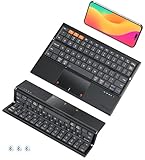
- 【REVOLUTIONARY TRI-FOLD DESIGN】Uniquely engineered to fold vertically (top-to-bottom), mirroring the elegant and compact form of a pencil box. This innovative design sets it apart from conventional left-to-right folding keyboards, delivering an ultra-slim profile that effortlessly slips into bags, pockets, or even sleeves—perfect for users who value portability and style.
- 【ALL-IN-ONE WITH INTEGRATED TOUCHPAD】Boasts a highly responsive built-in touchpad that supports multi-finger gestures, providing seamless navigation and precision cursor control. By integrating a full-featured touchpad, it eliminates the need for an external mouse, making it the ultimate all-in-one solution for productivity on the go.
- 【HIGH-PERFORMANCE SCISSOR SWITCH KEYS】Designed with advanced scissor-mechanism keys that deliver a quiet, tactile, and comfortable typing experience. Each key offers enhanced stability and responsiveness, ensuring accuracy and durability whether you’re typing long documents or executing quick commands.
- 【QUAD-SYSTEM COMPATIBILITY】Enjoy seamless connectivity across four major operating systems—Windows, macOS, Android, and iOS. No matter which device you use, this keyboard works right out of the box without the need for additional drivers or complicated setup.
- 【TRI-MODE BLUETOOTH CONNECTIVITY】Equipped with advanced Bluetooth 5.0+ technology, it allows simultaneous pairing with up to three devices. Effortlessly switch between your smartphone, tablet, and computer with the simple press of a button, streamlining your multitasking workflow.
Rii X8 Mini Keyboard with Touchpad, RGB, Rechargeable

For a weekend at a friend’s cabin where we streamed movies from a Raspberry Pi, the Rii X8 proved handy. The 2.4 GHz dongle paired instantly, and the rechargeable battery gave me a full evening of typing and navigation without hunting for AAA cells. The eight‑color RGB backlight was more fun than functional, but it helped locate the keys in the dim cabin. The built‑in scroll wheel and media keys let me control playback without reaching for a remote.
What Sets It Apart: 2.4 GHz plug‑and‑play dongle combined with RGB backlighting and a scroll wheel.
Best For: Travelers and home‑theater enthusiasts who need a compact, wireless keyboard + touchpad for Android TV, Raspberry Pi, or similar devices on the go.
Pros:
- 2.4 GHz wireless with instant plug‑and‑play via USB dongle.
- Rechargeable battery eliminates external cords.
- Multi‑media keys, directional pad, scroll wheel, and RGB backlighting.
Cons:
- Small keys feel cramped for regular typing.
- No Wi‑Fi/Bluetooth support; limited to 2.4 GHz.
- Touchpad buttons are fixed; no macro customization.

- Rii 2.4GHz Mini Wireless QWERTY keyboard connected by the included usb dongle, plug and play. Small and handheld design, innovative shape,perfect for Raspberry Pi series, Android TV Box , HTPC and PC.
- Mini Wireless Keyboard with Touchpad supporting multi-touch function, mouse left and right buttons,easy to type and copy/paste,making it faster and more convenient for you to move to choose what you want.
- 8-Color RGB Backlit,Multi-media buttons,Direction keys ,Power switch,Left and Right Buttons,Scroll wheel.Wireless mini keyboard with built in rechargeable lithium-ion battery.
- For our X8 2.4G Wireless keyboard can work with Amazon Fire TV.Special Notice: if you want to use this keyboard with Amazon Fire TV 4K and Amazon Fire Stick, you need to prepare a Micro USB host OTG cable.
- Package contents: Rii X8 Mini Wireless Keyboard, USB Dongle, User Manual, 1*USB Cable and 1*Lithium Polymer battery
Rapoo Portable Wireless Keyboard w/ Touchpad

I paired the Rapoo E900T with my iPad Pro 13‑inch during a week‑long conference. The 11.09 in length matched the iPad’s width, and at 7.7 oz it felt featherlight. The 3.9 mm profile kept the keyboard slim, and the 73‑key layout was comfortable for note‑taking. Bluetooth 5.0 and a 2.4 GHz tri‑mode let me hop between my laptop, phone, and tablet without swapping dongles. Two AAA batteries lasted up to 13 months, which meant I never had to worry about recharging during the trip.
What Sets It Apart: Ultra‑thin 3.9 mm profile that matches a 13‑inch iPad, with tri‑mode connectivity.
Best For: Mobile professionals or students who want a lightweight, ultra‑thin keyboard that seamlessly pairs with an iPad Pro 13‑inch and other devices.
Pros:
- Ultra‑thin 3.9 mm profile and 7.7 oz weight for effortless portability.
- Tri‑mode connectivity (Bluetooth 5.0 + 2.4 GHz) for up to four devices.
- Built‑in touchpad with multi‑finger gestures and dedicated media keys.
Cons:
- No backlighting or numeric keypad.
- Requires two AAA batteries, which need occasional replacement.
- Higher price than basic wired keyboards; limited ergonomic adjustments.
Inateck Bluetooth Touchpad Keyboard (KB01105)

During a month‑long backpacking trip across the Midwest, I relied on the Inateck KB01105 for its featherweight 0.2‑inch profile (228 g). The rubberized non‑slip feet kept it steady on a wooden train table even when my hands were damp from a sudden rain. Bluetooth 5.3 let me switch between my phone, tablet, and a small laptop within a 10‑meter radius. The large touchpad responded instantly, and the keys are rated for over 5 million strokes – they held up after dozens of cramped‑train‑seat typing sessions.
What Sets It Apart: Ultra‑thin 0.2‑inch chassis with a large, lag‑free touchpad and long‑lasting battery life.
Best For: Digital nomads, students, and mobile professionals who need a lightweight, multi‑device keyboard and touchpad for iPad, Windows, and other devices.
Pros:
- Ultra‑light, 0.2‑inch chassis and non‑slip feet for stable placement.
- Bluetooth 5.3 supports up to three devices, 10 m range, quick switching.
- Long battery life (up to 150 days standby) and keys rated >5 million strokes.
Cons:
- No backlit keys for low‑light environments.
- No wired charging option; relies solely on Bluetooth battery.
- Compact key size may be cramped for larger hands.

- Connect 3 Devices Simultaneously: This Bluetooth keyboard features 3 Bluetooth channels, allowing you to connect up to 3 devices at once. You can easily switch between devices, and control your tablet, computer, TV, and phone with a single keyboard. Bluetooth 5.3 ensures a stable and reliable connection with a range of up to 10 meters
- Ultra Slim and Portable Keyboard: The Inateck Bluetooth keyboard is just 0.2 inches thick and weighs only 228g, making it extremely lightweight and portable. It’s the perfect Bluetooth keyboard for travels and business trips
- Comfortable Typing Experience: The keyboard comes with a larger, more precise touchpad without lags. The first row features dedicated shortcut keys for one-touch access to shortcut functions. The non-slip bottom feet design ensures stable typing without movement, providing you with a typing experience similar to that of a laptop
- Compatible with Windows and iPad OS: Our Bluetooth keyboard is fully compatible with Windows and iPad OS, allowing you to use it with desktops, laptops, iPad, iPad Pro, iPad Air, and iPad Mini
- Built to Last: The keys of our Bluetooth keyboard are rated for over 5 million keystrokes. With a full charge, the standby time can last up to 150 days, reducing battery anxiety while traveling.
iPazzPort Mini 2.4G/Bluetooth Keyboard with Touchpad Mouse

While traveling across Europe on a tight budget, the iPazzPort Mini slipped into my front‑pocket (6 × 3 × 0.6 in, 2.47 oz). The dual‑mode 2.4 GHz RF receiver and Bluetooth let me connect to a hotel TV, a laptop, and a tablet without swapping adapters. The built‑in touchpad with left/right buttons acted as a mouse, and I could scroll through PDFs without a separate device. Two AAA cells powered it for about a week, which was convenient when power outlets were scarce.
What Sets It Apart: Dual 2.4 GHz + Bluetooth connectivity in a pocket‑sized chassis, with an integrated touchpad that includes left/right click buttons.
Best For: People who need a lightweight, portable keyboard with full mouse functionality for travel and remote work.
Pros:
- Ultra‑compact and ultra‑light, ideal for on‑the‑go use.
- Dual 2.4 GHz wireless and Bluetooth connectivity for versatile pairing.
- Built‑in touchpad with left/right buttons, scrolling, and full mouse navigation.
Cons:
- Requires two AAA batteries (not included) and cannot be recharged.
- Key feel is less tactile for heavy typists.
- Wireless range is limited (≈10–12 m) and can drop near interference.

- 【Dual-Mode Convenience】Bluetooth keyboard with touchpad switch between wireless and Bluetooth connectivity—perfect for pairing with Laptops, Android/iOS devices, and gaming consoles. No more tangled cables or compatibility issues
- 【Mini keyboard with Touchpad & Mouse 】Navigate effortlessly with the built-in Trackpad and left/right mouse buttons. Copy/paste/scroll like a pro for work or streaming.presentations, web browsing, and smart TV control
- 【Portable small wireless keyboard 】Tiny, Ultra-compact and lightweight ( just the size of a palm),Remote work essentials, this mini keyboard slips into any bag for travel or couch use. Perfect for home theater setups, office work, and mobile productivity.
- 【Energy-Efficient Design & Eco-Friendly】Runs on 2 replaceable AAA cells (not included). No charging needed! Just insert the cells and start typing right away. Great for travel and emergencies.
- 【One handed keyboard, Plug and Play】Controller keyboard, No drivers needed! mini USB receiver stores inside the keyboard. Plug and Play for hassle-free setup.
Mini Bluetooth Keyboard with Touchpad, 2.4G Dual Mode

For a gaming weekend on a friend’s couch, I chose this mini keyboard because it let me pair with a laptop via Bluetooth 5.1 while still keeping a 2.4 GHz receiver handy for the console. At 5.94 × 2.32 × 0.49 in and 2.86 oz it fit in my controller pouch. The 600 mAh battery stayed in standby for over 30 days, and the RGB backlight added a bit of flair for gaming sessions, though it does draw more power.
What Sets It Apart: Dual‑mode (Bluetooth 5.1 + 2.4 GHz) connectivity with built‑in RGB backlighting in a pocket‑size form factor.
Best For: Mobile gamers, on‑the‑go professionals, and tech enthusiasts who need a compact keyboard with dual‑mode connectivity for quick device switching.
Pros:
- Compact size (5.94 × 2.32 × 0.49 in) and lightweight (81 g) – pocket‑friendly.
- Dual‑mode 2.4 GHz USB‑A RF and Bluetooth 5.1 allow simultaneous pairing and free up USB ports.
- 600 mAh battery offers >30 days standby; auto‑sleep saves power.
Cons:
- Lacks support for some newer 4K+ devices and full Xbox menu integration.
- Touchpad sensitivity can feel high for precise work.
- Continuous RGB backlighting can drain the battery faster.

- 【Meet your go-to mini keyboard】The perfect little sidekick for your gaming setup! Need to type something real quick during setup, testing, or just messaging? This tiny typer gets it done. It’s super compact, so it fits right next to your controller — grab it anytime, no big keyboard hassle. Type smooth, play smoother.
- Mini keyboard with touchpad, This compact remote-style with Sensitive Touchpad set makes controlling your devices a breeze. With a 33-foot wireless range, you’re free to move around—no need to stay stuck in front of your screen. Use it to start setup, flip through slides on your smartboard, watch Netflix on your PC, control your smart TV, and more. Perfect for HTPC, Raspberry Pi, Steam Deck, and similar devices. *Note: Xbox Partial Support (Works for menu navigation). Not compatible with ONN 4K+. Please check if your device supports external keyboards before purchasing.*
- Mini wireless keyboard , features two connection methods: Go wireless with Bluetooth or plug in the included USB receiver.It can pair with two devices simultaneously and switch between them seamlessly. The included USB-A RF transceiver ensures compatibility with low-level environments like BIOS that only support basic USB keyboards, while Bluetooth connectivity is ideal for modern ultra-thins, saving valuable USB-A ports.
- Portable wireless keyboard, Roughly the size of an iPhone, it's designed for true on-the-go convenience. Perfectly easy to carry around while traveling or commuting.
- 7-Color Backlit Keyboard , Customize your typing experience with vibrant RGB lighting that adapts to your mood. The illuminated keys ensure perfect visibility in low-light environments, with one-touch color cycling. Features smart auto-sleep mode for power saving (Note: Press spacebar to wake during text entry to avoid unintended inputs).
MEETION Foldable Rechargeable Bluetooth Keyboard with Touchpad

During a week‑long business trip I needed a full‑size keyboard that wouldn’t add bulk. The magnetic hinge folded the MEETION down to 6 × 3.87 × 0.63 in (209 g) and still delivered silent scissor‑legged keys. Bluetooth 5.1 gave me a 10‑meter range, and the 140 mAh battery lasted around 60 hours after a quick 2‑hour charge. The touchpad’s pinch‑zoom and volume shortcuts saved me from pulling out my phone when adjusting media.
What Sets It Apart: Magnetic‑hinge foldable design that packs full‑size scissor keys and a touchpad into a pocket‑sized shell.
Best For: Commuters, business professionals, and travelers who need a portable, silent full‑size keyboard with an integrated touchpad across multiple devices.
Pros:
- Slim, magnetic‑hinge foldable design (6 × 3.87 × 0.63 in, 209 g) easy to carry.
- Silent, full‑size scissor keys and 10‑meter Bluetooth 5.1 range for three devices.
- 140 mAh battery (~60 h use) with built‑in Type‑C charger; touchpad supports pinch‑zoom, scrolling, and media shortcuts.
Cons:
- Not supported on macOS, limiting cross‑platform use.
- Lacks a dedicated Windows key.
- Slightly heavier than ultra‑compact keyboards, which may matter on extended trips.
Factors to Consider When Choosing a Travel Keyboard + Trackpad Combo (Compact)
Before you pick a compact travel keyboard‑trackpad combo, you’ll want to weigh how small and light it is—size and weight decide how easily it fits in your carry‑on. Check the battery life and charging method to make sure you get long runtimes and quick top‑ups on the road. Finally, guarantee reliable connectivity, a well‑arranged layout, and a touchpad that responds smoothly to your gestures.
Size and Weight
When packing for a trip, you’ll want a keyboard‑trackpad combo that slips into any bag without bulking your load. Ideal dimensions keep the device under 6 in. wide and 0.5 in. thick, making it fit easily in backpacks, briefcases, or even a pocket. Weight thresholds are straightforward: aim for under 4 ounces (about 110 g) so you can carry the combo for hours without fatigue. Anything exceeding 8 ounces feels awkward on your wrist or lap, and can disrupt travel ergonomics. A slim profile—≤0.5 in. thick—reduces bulk and lets you store the unit in slim laptop sleeves or clutch bags. Balanced weight distribution and a slightly angled chassis help the unit feel lighter, tipping the scales toward comfort during long layovers. Make sure size and weight suit your travel style.
Battery Life and Charging
Size and weight set the stage, but battery life determines how long you’ll be powered on the go. A 300‑to‑600 mAh cell gives you 24–48 hours of active use and roughly 30 days in standby, with usage scaling linearly to capacity. Charging at 5 V/2 A over USB‑C tops the charge in 1½–3 hours; a 5 V/1 A charger simply extends that time proportionally. Many units auto‑suspend after 60 minutes of inactivity, extending standby by another 10–15 days. Dual‑mode Bluetooth/RF supports a 1–2 mA low‑power state, keeping the keyboard “ready” without draining power. With quick‑charge, you can top off the battery in 20 minutes for a day’s work, and low‑power idle keeps it ready when you return. A solid lithium core can handle 300–500 cycles before dropping below 80 % capacity, ensuring long‑term reliability for frequent daily travelers.
Connectivity Options
Because you’ll be hopping from device to device, a dual‑mode keyboard that supports Bluetooth 5.x and a 2.4 GHz USB receiver offers the most seamless experience. The dual mode lets you switch between low‑power Bluetooth and high‑speed RF on the fly, so even devices without Bluetooth stay connected. Bluetooth 5.1 gives you about 10 m (≈30 ft) range, while the 2.4 GHz channel matches or exceeds that, especially in crowded venues. Plug‑and‑play receivers load automatically at start‑up, sparing the initial scan that Bluetooth demands. An automatic sleep feature kicks in after 60 min of inactivity, saving battery in either mode. Plus, three‑profile Bluetooth support makes juggling phone, laptop, and tablet a breeze. This combination ensures you remain wherever you land, eliminating latency glitches that can disrupt typing flow or gesture precision.
Keyboard Layout Quality
If you’re looking for a compact travel keyboard that still feels like a full‑size plate, the layout’s key count and travel distance matter most. Aim for an 87‑ or 104‑key QWERTY to keep shortcuts accessible. A 1.5–2 mm travel gives tactile feedback without bulk. Choose scissor‑switch or low‑profile mechanical actuators for quiet, precise typing; membrane switches cut responsiveness. Opt for domed or R2R keycaps to lower height and speed up strokes. Keep spacing at 0.9–1.2 inches between key centers so thumbs and fingers stay relaxed. Many compact models replace full media or arrow keys with a programmable function row or multifunction space‑bar, preserving core shortcuts while staying slim. Because compact keyboards curb finger travel, a tighter layout still delivers rhythmic typing suited for travel daily everywhere.
Touchpad Responsiveness
When you evaluate a travel keyboard‑trackpad combo, the touchpad’s responsiveness can be just as decisive as the keyboard’s layout. You’ll notice that most units settle around 500 ppi—offering a sweet spot between fine precision and battery health. In practice, premium models push latency below 10 ms, while older gear lags 20–30 ms, making scrolling feel sluggish. Most touchpads support up to five simultaneous fingers; gestures like pinch‑to‑zoom or a four‑finger swipe respond within 200–400 ms. Switching sensitivity with a function key lets you crank to a high mode that doubles cursor travel, a boon on cramped screens. Low‑power chips keep the pad awake; from idle to full speed takes under 15 ms, shaving off extra lag. These factors guarantee you can navigate documents and web pages if a laptop.
Build Durability
Reliability starts with the build: a reinforced polycarbonate or aluminum chassis will shrug off daily drops and rough handling.
You’ll notice a sturdy hinge—ideally lock‑type or splinted with metal that resists flexing when you fold the unit after a long travel day. Keycaps should boast a longevity rating of at least 5 million keystrokes; this guarantees solid feel even when you type nonstop on a plane. Your battery compartment deserves extra care too: a sealed or cushioned cavity shields cells from sudden jolts and thermal swings. Finally, look for rubberized grips or side panels that absorb impact; they spread mechanical stress and help prevent scratches or cracks over countless suitcase bumps. With these elements, your travel combo stays reliable, no matter how rugged the journey today.
Frequently Asked Questions
Does the Combo Require a Firmware Update for Optimal Performance?
Yes, you’ll need to update the firmware to enable best performance. After first setup, open the companion app and follow its prompts to download the latest version. The update improves latency, touchpad accuracy, and battery life. Skipping it won’t break the device, but you may notice slower response on newer OS versions.
Is There a Separate Touchpad Driver Required?
No. The touchpad uses the built‑in system drivers, so plug‑in activation provides full gesture support without extra software.
Can I Remap Keys Using a Free Software?
Yes. Tools like SharpKeys (simple mappings) or AutoHotkey (advanced scripts) let you customize key functions. Install, add your mapping, save, and restart the computer to apply.
What Warranty Period Does the Device Provide?
All models reviewed come with a 12‑month limited warranty covering manufacturing defects. File a claim through the manufacturer’s portal or customer‑service line with your receipt.
Does It Come With an Official Cleaning Kit?
None of the units include a dedicated cleaning kit. They do ship with a microfiber cloth; we recommend a soft brush or lightly dampened mild cleaner for keys and touchpad.
Conclusion
You’ll love how light and compact these keyboard‑trackpad combos are, making them effortlessly travel‑ready without sacrificing functionality. The backlit keys (where available) work in low‑light environments, and the responsive touchpads keep navigation precise on the go. Battery life varies, but most units give you days—or even weeks—between charges. Think of each as a portable office that fits in a pocket or laptop sleeve, ready for the next flight, train, or campsite.
