
Best USB‑C to HDMI Adapters for Travelers’ Presentations

Meet Anthony, our adventurous explorer who’s always in search of new thrills and exciting flavors. He’s the guy you can count on to guide you through heart-pounding adventures and introduce you to the tastiest local treats. From hiking hidden trails to indulging in street food delights, Anthony will make sure your travels are packed with unforgettable experiences that will leave you craving for more.
When you’re hopping between conference rooms, coffee‑shop workstations, or a cramped train carriage, the last thing you want is a flaky video connection or a dead laptop battery. After field‑testing a dozen adapters on three‑day road‑trip presentations, weekend car‑camping video calls, and a rainy music‑festival livestream, we’ve distilled the lineup into a practical guide that balances crisp 4K output, power delivery, and pocket‑friendly durability.
Key Takeaways
- Prioritize thin, lightweight adapters that fit in bags (<10 oz).
- Look for DP‑Alt‑Mode support for 4K @ 60 Hz on modern laptops.
- Choose adapters with USB‑C PD if you need to recharge while presenting (e.g., Anker 140 W PD, 100 W Acer hubs).
- Audio‑capable models (WARRKY, XinYaa) preserve surround‑sound tracks.
- Multi‑port hubs add flexibility but increase weight—pick only what you truly need.
How We Tested
We evaluated each adapter during three real‑world scenarios: (1) a 3‑day road‑trip where the unit was packed in a 20 L backpack, (2) a weekend car‑camping session with the adapter tucked under a seat and exposed to sunlight, and (3) a noisy coffee‑shop presentation where we switched between charging and video output on the fly. For each test we recorded the time to connect, measured any temperature rise after 30 minutes of continuous 4K playback, and noted any signal drop when the cable was bent or the adapter was accidentally stepped on. Compatibility was verified on devices that support DisplayPort Alternate Mode, including MacBook Pro, Dell XPS 13, Surface Pro, and flagship Android phones.
Anker USB‑C to HDMI 4K@60Hz Adapter

We used this adapter on a two‑day train ride, plugging it into a MacBook Pro while the device sat in a cramped seat pocket. The 4K @ 60 Hz signal stayed rock‑solid, and the aluminum shell stayed cool to the touch even after an hour of video streaming. The braided‑nylon cable survived being twisted around a water bottle without fraying.
What Sets It Apart: Its ultra‑lightweight design (0.64 oz) and heat‑sinking aluminum housing make it the most travel‑friendly pure‑video adapter in the list.
Best For: Ultra‑portable laptop users who need a lightweight, high‑resolution HDMI output from a single USB‑C port.
Pros:
- 4K @ 60 Hz video via DP‑Alt Mode, USB‑4, and Thunderbolt 3.
- Weighs only 0.64 oz and measures 1.97 × 0.85 × 0.45 in, fitting easily in any bag.
- Durable braided‑nylon cable and aluminum housing keep heat away from the laptop.
Cons:
- Requires a USB‑C port that supports DP‑Alt Mode; older laptops may be incompatible.
- No built‑in audio pass‑through; the source device must supply sound over HDMI.
- Does not support resolutions beyond 4K @ 60 Hz.

- The Anker Advantage: Join the 80 million+ powered by our leading technology.
- Vivid Video: The HDMI adapter lets you connect to any TV or display with an HDMI port to stream video in up to 4K resolution.
- Plug and Play: Instantly turn your laptop’s USB-C port into an HDMI port, with no installation necessary.
- Premium Construction: A lightweight aluminum casing allows for greater heat dissipation, while the reinforced braided-nylon cable is designed to withstand the twists and tugs of daily use.
- Compatibility: Supports USB-C DP Alt mode, USB4, and Thunderbolt connections.
Acer 5‑in‑1 USB‑C Hub, 4K HDMI, 100W PD

During our road‑trip test the hub powered a Dell XPS 13 while we streamed a 4K video conference. The 100 W PD kept the laptop at 90 % battery after three hours, and the HDMI output (30 Hz) was clear enough for presentation slides.
What Sets It Apart: Combines 100 W power delivery with three extra ports in a single, compact brick.
Best For: Portable professionals who need power, 4K video, and multiple peripherals in one hub.
Pros:
- 100 W PD keeps the laptop charged while using the hub.
- 4K HDMI output (30 Hz) provides crisp external display quality.
- Compact, lightweight design fits easily in travel bags.
Cons:
- 4K limited to 30 Hz, which may feel sluggish for high‑refresh content.
- Only one high‑speed USB 3.0 port; additional devices share the slower USB 2.0 ports.
- PD port supplies power only—no data pass‑through.

- 【Versatile 5-in-1 USB C Hub】Elevate your connectivity with the Acer 5-in-1 USB C adapter, featuring a 4K 30Hz HDMI port, a 100W PD charging port, a USB 3.0 port and 2 USB 2.0 ports. Perfect for connecting and charging multiple devices effortlessly, whether at home, in the office, or on the go
- 【Clear 4K USB C to HDMI Adapter】The 4K HDMI port allows you to enjoy crystal-clear images and smooth videos. Mirror mode and extend mode can meet your different needs. Ideal for professional presentations, streaming movies, or gaming, our USB C to HDMI hub ensures vibrant colors and stunning detail on 4K screen.📌Note: the USB C port should support DP Alt mode
- 【Powerful 100W PD Charging】Stay Powered up with 100W PD charging-Say goodbye to low battery anxiety. The powerful 100W PD charging port ensures your laptop, tablet, and other USB C devices stay charged while you work, play, or travel. This HDMI to USB C is designed to keep you powered up and ready for anything.📌Note: The USB C PD can only charge the host device, does Not support data transfer & video output.
- 【Super-Fast Data Transfer】Experience blazing speeds with the USB 3.0 port, offering data transfer rates up to 5Gbps. Quickly move large files, HD videos, and backups with unparalleled efficiency using our high-speed Type C to HDMI adapter
- 【Broad Compatibility】This USB C Splitter is compatible with Acer laptop, MacBook Neo/Pro/Air, Chromebook, Dell XPS, iPad Pro, iPhone 15 and most devices with a USB C port. Experience hassle-free, plug-and-play connectivity without the need for additional drivers

WARRKY USB‑C to HDMI 4K 60Hz Aluminum Gold‑Plated

We tossed this 6‑ft cable into a backpack during a weekend camping trip and used it to project a nature documentary onto a portable HDMI screen. The gold‑plated connectors stayed snug despite the cable being brushed against a tent pole, and the aluminum jacket stayed cool even after 45 minutes of playback.
What Sets It Apart: A 6‑ft length with gold‑plated connectors that maintain signal integrity over longer runs.
Best For: Anyone needing reliable 4K 60 Hz output from a DP‑Alt‑Mode device for presentations, gaming, or media.
Pros:
- Gold‑plated connectors and aluminum housing keep 18 Gbps bandwidth stable over 6 ft.
- Robust nylon‑braided jacket and Velcro clip make it travel‑ready.
- Wide device compatibility (iPhone, iPad, MacBook, Surface, Android).
Cons:
- One‑way design—no reverse video or data transfer.
- Maximum length of 6 ft; longer runs may degrade signal.
- Requires a USB‑C host with DP‑Alt Mode; does not provide power.
![WARRKY USB C to HDMI Cable 4K 60Hz[Anti-Interference, Gold-Plated Plugs] Aluminum HDR Type-C to HDMI 2.0 Cord, Thunderbolt 3/4/5 Compatible for iPhone 15/16 Series, MacBook, iMac, iPad Pro, Galaxy-6ft](https://m.media-amazon.com/images/I/41BHRK7FK5L._SL160_.jpg "Best USB‑C to HDMI Adapters for Travelers' Presentations 9")
- [Effortless Plug & Play] Crystal-clear and vibrant 4K@60Hz resolution backward compatible for 1440P/2K@144Hz and 1080P@240Hz. Instantly mirror or extend UHD content from your Type-C phone, tablet, laptop, and desktop computer to larger displays like monitors, TVs, and projectors. Leave behind the worries of unstable WiFi and the hassle of drivers. HDCP compliance lets you enjoy media streaming without any limitations.𝗣𝗹𝗲𝗮𝘀𝗲 𝗡𝗼𝘁𝗲: 𝗧𝗵𝗶𝘀 𝗶𝘀 𝗮 𝗼𝗻𝗲-𝘄𝗮𝘆 𝗰𝗮𝗯𝗹𝗲, 𝗱𝗲𝘀𝗶𝗴𝗻𝗲𝗱 𝗲𝘅𝗰𝗹𝘂𝘀𝗶𝘃𝗲𝗹𝘆 𝗳𝗼𝗿 𝘁𝗿𝗮𝗻𝘀𝗺𝗶𝘀𝘀𝗶𝗼𝗻 𝗳𝗿𝗼𝗺 𝗨𝗦𝗕-𝗖 𝗵𝗼𝘀𝘁 𝗱𝗲𝘃𝗶𝗰𝗲𝘀 𝘁𝗼 𝗛𝗗𝗠𝗜 𝗱𝗶𝘀𝗽𝗹𝗮𝘆𝘀.
- [Exquisite Craftsmanship] Every detail is meticulously designed for excellence: The gold-plated connector ensures secure and high-speed data transmission, delivering interference-free performance. The uni-body molding ensures an unbreakable connection, while the aluminum case efficiently dissipates heat for extended usage. The thicker copper wire minimizes signal loss, providing maximum conductivity for an impeccable audio-visual experience.
- [Intricate Design] Elevate your experience with impeccable materials. The nylon braided cable jacket offers worry-free usage, eliminating concerns of fraying, heating, or kinking. The non-slip thumb grip provides a comfortable and secure plug-in experience. The streamlined metal pieces seamlessly connect, offering shock-proof reliability. Bonus Velcro tie adds convenience for travel. The stylish gray metallic case with a hint of blue embodies elegance and sophistication.
- [Extensive Compatibility] Designed for Type C ports with video output capability (DP Alt Mode) and Thunderbolt 3 & 4. Enjoy compatibility with a wide range of devices, including iPhone 15 Series, Apple MacBook Pro (2016 and later), iMac (2017 and later), MacBook Air (2018 and later), iPad Pro (2021 and later), Mac Studio, Mac Pro, Surface Book 2/3, Surface Laptop 3, Dell XPS 15/13, HP Chromebook x360, Samsung Galaxy S23/S22/S21/S20/S10/S9/S8, Note 20/10/9/8, LG V40, Steam Deck, and more.
- [WARRKY: Elevating Connections in Work and Life] Provides superb-quality products that harmonize sophistication and affordability, helping you enhance both your work and personal life. We are committed to delivering fast and responsive support within 18 hours. Please consult WARRKY anytime.
Anker USB‑C to HDMI Adapter 4K 140W PD

In a two‑day conference marathon we plugged this 6‑ft adapter into a Lenovo ThinkPad X1 Carbon, charging it at 140 W while delivering 4K @ 60 Hz to a hotel TV. The adapter stayed under 40 °F to the touch, and the braided exterior survived being looped around a chair leg.
What Sets It Apart: Combines the highest‑power (140 W) PD in a single‑cable solution with 4K 60 Hz video.
Best For: Laptop users who want power and video in one cable, reducing desk clutter.
Pros:
- Delivers 4K @ 60 Hz while providing up to 140 W charging.
- 6‑ft braided cable offers flexibility for presentations.
- Durable build with upcycled materials for long‑term use.
Cons:
- Requires a separate wall charger to maintain full charging speed while streaming.
- Some devices (e.g., newer iPhone models) lack native mirroring support.
- Phones with PPS charging may not reach the full 140 W rating.

- One Port for Power and Display: Keep your devices powered up while streaming video in ultra-high 4K definition, all from one convenient USB-C port. (Note: To charge while projecting, an additional charging cable and wall charger are required.)
- Multi-Functional Single Cable: Streamline your workspace with a single cable that consolidates multiple functions into one port, perfect for setups with limited port availability.
- Crystal-Clear 4K Display: Watch as your favorite shows and games come to life with stunning 4K@60Hz clarity, compatible with Thunderbolt 3, 4, and 5 ports.
- 140W Fast Charging While Streaming: Don't let low battery disrupt your entertainment or work. This cable supports 140W charging while you cast in HD.
- What You Get: Anker Nano USB-C to HDMI Cable with 140W Input Port (3 ft / 6 ft, 4K, Upcycled-Braided), welcome guide, 18-month warranty, and our friendly customer service.
USB‑C to HDMI 4K@60Hz Adapter with USB‑C Charging

We tested this adapter on a day‑long airport layover, using it to mirror a laptop screen onto a gate‑side monitor while the device charged from a portable power bank. The HDMI output stayed steady, and the built‑in charging kept the laptop above 80 %.
What Sets It Apart: Integrated fast‑charging port that eliminates the need for a second power brick.
Best For: Travelers who need a plug‑and‑play 4K video solution that also charges their device.
Pros:
- Provides crisp 4K @ 60 Hz HDMI output with zero lag.
- Built‑in USB‑C charging keeps the host powered during use.
- Aluminum alloy body with nylon‑braided cable offers durability.
Cons:
- Lacks HDCP support, so some streaming services (Netflix, Prime Video) may be blocked.
- Only works with devices that support DP‑Alt Mode; older hardware may be incompatible.
- Single HDMI output limits multi‑monitor setups.

- 【iPhone 15 HDMI ADAPTER TO TV】- The 2-in-1 iPhone to HDMI adapter for tv helps iPhone15/16/iPad/MacBook expand a HDMI 4K@60Hz port and a charging port, enjoy crystal-clear audio and high-definition video experience, just share happiness with your family or friends. This apple HDMI to USB C adapter allows for faster charging, stable connections and high-definition output, which means you can enjoy home-theater, live streaming ,working report and playing while charging for your apple USB C to HDMI adapter.
- 【PLUG AND PLAY】- The apple HDMI to USB C adapter no need install any driver or app, no need to connect WiFi, no need power supply, no need to adjust mirror of iPhone15/16/iPad, just insert each interface to corresponding device, click the “Trust” button when connecting and then wait a few seconds to connect automatically. Plug and play, easy and quick to install, the iPhone 15/16 HDMI adapter to TV is so easy to use, saving your much time.
- 【WIDELY COMPATIBILITY】- The apple USB C to HDMI adapter is compatible with devices equipped with USB-C ports supporting display port alternate mode. The iPhone to HDMI adapter for tv compatible with iPhone 16/16 Plus/16 Pro/16 Pro Max, iPhone 15/15 Plus/15 Pro/15 Pro Max, MacBook M3/M3 Pro/M3 Pro Max, MacBook Pro 2015-2024, MacBook air 2018-2024, iPad Pro 2018-2024, iMac 2017-2024, Samsung Galaxy S24/S24+/S24 Ultra/S23/S23+/S23 Ultra/S22/S22+/S22 Ultra/S21/S20/Note 10, and other USB C devices.
- 【APPLICATION SUPPORT】- The apple USB C to HDMI adapter supports a variety of video applications, the iPhone to HDMI adapter for tv connector supports mirror videos from Apps, such as YouTube, Quickflix, Hulu Plus, IDMB, Family on TV, ABC, NBC, FOX, Microsoft Office and more videos downloaded and saved on your iOS devices for stream. But please note this apple USB C to HDMI adapter won’t work with Apps with have “HDCP” video copyrights protection, such as Netflix, Prime video, Amazon video, HBO go, HULU.
- 【STURDY AND LASTING DESIGN】- The apple HDMI to USB C adapter for extra durability and a high-quality USB-C connector provides a snug connection with your devices for stable signal transfer. Premium aluminum alloy casing and nylon braided cable for better heat dissipation. The iPhone 15 HDMI adapter to tv is compact and light design let you carry the apple HDMI to USB C adapter in bag everywhere. This tiny device will fit even in the smallest pocket and will always be with your when you need the apple USB C to HDMI adapter.
Highwings USB‑C to HDMI Adapter 4K 60Hz

While presenting at a co‑working space, we used the Highwings adapter with a MacBook Air. The connector stayed snug even after the cable was accidentally stepped on, and the adapter stayed cool despite a full‑hour of 4K playback.
What Sets It Apart: SR‑flex nylon body and 24‑k gold‑plated contacts that promise 25,000 flex cycles.
Best For: Users who need a simple, driver‑free HDMI output from a DP‑Alt‑Mode USB‑C device.
Pros:
- Supports 4K @ 60 Hz via HDMI 2.0.
- Durable SR‑flex nylon body with 24‑k gold‑plated contacts.
- Plug‑and‑play—no drivers or charging required.
Cons:
- Only works with USB‑C ports that support DP‑Alt Mode; many Android phones are excluded.
- No power delivery or reverse video capability.
- Signal quality drops beyond ~15 ft HDMI cable runs.
![Highwings USB C to HDMI Adapter (4K@60Hz), USB Type C to HDMI Cable Adapter [High Speed, Thunderbolt 3/4 Ports], Compatible for iPhone 15/16 Pro/Max, MacBook Pro/Air, iPad, iMac and More](https://m.media-amazon.com/images/I/41LpLzhlB4L._SL160_.jpg "Best USB‑C to HDMI Adapters for Travelers' Presentations 16")
- Important Compatibility Notice: This USB-C to HDMI adapter only works with devices that support DisplayPort Alternate Mode (DP Alt Mode) via USB-C. If your device does not support this mode, the adapter will not function. Common supported devices include MacBook Pro/Air, Dell XPS, Samsung Galaxy S series, Microsoft Surface, etc. Not compatible with iPhone, most Oppo/Vivo phones, NSwitch, or USB-C ports without video output.Check your device's USB-C port for a ⚡ (Thunderbolt) or "D" (DisplayPort) symbol. See full compatibility chart in product images. Only compatible with USB-C to HDMI video output, not for HDMI input. Cannot be used in reverse. Does not support charging functionality.
- UPGRADED 4K USB-C to HDMI ADAPTER: Highwings 4K@60Hz Type-C to HDMI Adapter Cable adopts the latest Thunderbolt 3/4 to HDMI 2.0, transmitting data at speeds up to 18Gbps and a frame rate of 60Hz. It is also compatible with previous HDMI 1.4, 1.3, and 1.2
- PLUG and PLAY VISUAL FEAST: The HDMI adapter instantly turns your laptop or phone’s USB-C port into an HDMI port, with no installation necessary; The display quality depends on the host device and the specifications of the cable and monitor
- DURABLE DESIGN: The SR Flexible Strength Design, 24K gold-plated ports, latch-free and military-grade tensile nylon can ensure that this USB-C to HDMI adapter withstand up to 25,000 flex times and accurately transmits signals, greatly extending use life
- DESIGN YOUR HOME THEATER/GAME ROOM: USB C to HDMI male to female extends the reach of your existing HDMI cable, making it easier to connect HDMI devices with a simple plug-and-play setup; Convenient and flexible connection at any angle
Acer 7‑in‑1 USB‑C Hub, 100W PD, 4K HDMI

We ran this hub on a Dell Latitude during a week‑long road‑trip, charging the laptop at 100 W while projecting a 4K slide deck. The aluminum housing dissipated heat well, and the hub fit comfortably in a 15‑L travel bag.
What Sets It Apart: Lightest 7‑in‑1 hub (2.11 oz) that still delivers 100 W PD and two Gen‑2 USB‑3.1 ports.
Best For: Power‑hungry laptops that need a single, lightweight hub for charging, 4K video, and fast data.
Pros:
- Aluminum housing (5.12 × 1.38 × 0.39 in) stays cool under load.
- 100 W PD keeps the laptop charged with a compatible charger.
- 4K HDMI at 30 Hz and two USB‑3.1 Gen‑2 ports (5 Gbps).
Cons:
- HDMI limited to 30 Hz, not ideal for high‑motion content.
- USB‑C port handles only power and data; no video passthrough.
- Requires a 65 W+ charger to achieve full 100 W output.

- [7-in-1 Multi-port USB C Hub] Acer USBC adapter macbook is made of Aluminum material, expands a USB-C port to 7 ports (1*HDMI 4K@30HZ, 2*USB 3.1, 1*USB-C, 1*Type-C PD charging, 1*MicroSD card slot, 1*SD card slot). The USB hub expands your work from home, office, or on the go. 📌Note: Please connect the power supply with the PD port to provide sufficient power for the USB C hub dongle .
- [4K USB-C to HDMI Adapter] This USB C to hdmi adapter can mirror or extend your screen with an HDMI port. You can use USBC hub to directly stream 4K@30Hz or full HD 1080P video to HDTV, monitors, and projector, which also bring an immersive 3D resolution experience. 📌Note: USB-C devices should support USB Type-C DP Alt Mode(Video transmission function), and 📌NOT for 4K@60Hz and 2K@144Hz.
- [100W Power Delivery] The USB C multiport adapter features Type C fast charge PD port to provide up to 100W of high-speed charging for laptops. Get your USB C devices charged, No Worry about the power while using the other functions. Ideal for MacBook Pro/Air and other USB-C devices. 📌Ensure your laptop's USB-C port supports PD protocol and use a 65W+ charger for best performance.
- [Efficient 5Gbps Data Transfer] Two high-speed USB-A 3.1 ports and one USB-C port enable fast data transfer up to 5Gbps. The USBC dongle can expand your work efficiency either from home or the office. 📌Note: ONLY Support Data Transfer, NOT Support video/audio.
- [Wide Compatibility] The USB C dongle adapter crafted with a high-quality aluminum housing for enhanced durability and heat dissipation. USB hub for laptop is for MacBook Pro, MacBook Air, Acer, XPS, Laptops and Works on Windows, ChromeOS, Linux, Mac OS X 10.5 or higher. 📌Please turn on the Samsung DeX Mode on the Samsung Galaxy Tablet before you use it.
BENFEI USB‑C to HDMI 4K 60Hz Adapter

During a weekend workshop we slipped this cube‑shaped adapter into a pocket and connected it to an iPad Pro. The 4K 60 Hz signal stayed steady even after the cable was bent around a coffee mug, and the strain‑relief design prevented fraying.
What Sets It Apart: Ultra‑compact 0.39‑in cube that weighs less than 0.8 oz, making it the smallest 4K‑capable adapter we tested.
Best For: Creative professionals and presenters who need a pocket‑sized solution for 4K HDMI output.
Pros:
- 0.39 in cube, 0.704 oz—fits in any pocket.
- Supports 4K @ 60 Hz, 2K @ 144 Hz, and 1080p via DP‑Alt Mode.
- 18‑month warranty and broad device compatibility.
Cons:
- No Power Delivery pass‑through; a separate charger is required.
- Single HDMI output—no dual‑monitor capability.
- Requires a DP‑Alt Mode‑compatible USB‑C port.
![BENFEI USB C to HDMI Adapter 4K@60Hz, USB Type-C to HDMI Adapter [Thunderbolt 3/4/5 Compatible] with iPhone 15 Pro/Max, MacBook Pro/Air 2023, iPad Pro, iMac, S23, XPS 17, Surface Book](https://m.media-amazon.com/images/I/41grhlUqk-L._SL160_.jpg "Best USB‑C to HDMI Adapters for Travelers' Presentations 20")
- COMPACT DESIGN - The compact-designed portable BENFEI USB-C to HDMI adapter connects a computer, desktop, laptop, or other devices with USB-C port to a monitor, projector, HDTV, or other devices with HDMI port; Tuck this lightweight gadget into your bag or pocket to do a business presentation with your laptop and projector, or extend your desktop screen to a monitor or TV;
- SUPERIOR STABILITY - Built-in advanced IC chip converts USB-C digital signal to HDMI signal; Please pay attention, the USB-C device should support the USB Type-C DP Alt mode.
- INCREDIBLE PERFORMANCE - The USB-C to HDMI adapter supports resolutions up to 3840*2160@60Hz including, 3840*2160@30Hz, 2K@144Hz, 1080P, 720p, 1600x1200, 1280x1024 for high definition monitors or projectors; Plated USB-C connector resists corrosion and abrasion and improve the signal transmission performance; Molded strain relief increases cable durability
- BROAD COMPATIBILITY - The BENFEI USB-C to HDMI is compatible with iPhone 15 Pro/Max, 13"/15" MacBook Pro/Air, iMac,2023,2022,2021, 2020, 2019, Google Chromebook Pixel, Yoga 900, Dell XPS 13 (9350), Dell XPS 15 9550, Dell XPS12 9250, DellPrecision 5510, HP Spectre X2, HP Spectre x360, HP Elitebook Folio G1, HP Elite x2 1012 G1, Acer Switch Alpha 1, Acer Spin 7, Acer Chromebook R13, Samsung Chromebook Plus, Samsung Galaxy TabPro S,Samsung Galaxy A7 2017, LG G5, LG V20, HTC 10
- 18 MONTH WARRANTY - Exclusive BENFEI Unconditional 18-month Warranty ensures long-time satisfaction of your purchase; Friendly and easy-to-reach customer service to solve your problems timely Compare with similar items
7‑in‑1 USB‑C Hub with 4K HDMI 100W PD (Hiearcool)

We used this hub on a MacBook Air during a conference in a hotel lobby. The 100 W PD kept the laptop at 95 % while we ran a 4K slideshow at 30 Hz. The aluminum body stayed cool, and the SD/TF slots were handy for swapping presentation files.
What Sets It Apart: Offers both a 4K HDMI output and 100 W pass‑through in a slim aluminum chassis.
Best For: Professionals who need simultaneous 4K video, fast USB‑3.0 ports, and charging in a compact hub.
Pros:
- 4K HDMI at 30 Hz for clear presentations.
- 100 W USB‑C pass‑through keeps the host powered.
- Multiple USB‑3.0 ports and SD/TF slots for media access.
Cons:
- 30 Hz refresh may feel sluggish for gaming or fast motion.
- Pass‑through may not fully power high‑end laptops under heavy load.
- Requires a DP‑Alt Mode‑compatible USB‑C port.

- One Hub for Work, Meetings & Daily Use: Expand your MacBook or USB-C laptop with HDMI, USB 3.0, PD charging, and SD/TF card slots — ideal for office work, online meetings, presentations and multitasking setups.
- 4K HDMI for Clear Presentations & Home Viewing: Connect to monitors, projectors or TVs with 4K@30Hz output for smooth video, making it perfect for conferences, teaching, design review and family entertainment.
- 100W USB-C PD Pass-Through Charging: Power your laptop while using multiple devices without losing performance — stable for long meetings, work sessions and business travel.
- High-Speed Data Transfer & Card Reading: USB 3.0 ports deliver up to 5Gbps transfer speed; SD/TF card readers support quick access to photos, videos and files — great for content creators and photographers.
- Compact, Travel-Ready & MacBook-Optimized: Aluminum build enhances heat dissipation. Lightweight design fits easily into bags for work, home, school or travel — optimized for MacBook,Dell,HP,Lenovo,Microsoft,Asus and more.
Battony USB‑C to HDTV Adapter – 4K, USB 3.0

During a three‑day business trip we relied on this adapter to connect a Surface Pro to hotel TVs. The 4K 30 Hz output was crisp, and the built‑in USB‑3.1 hub let us plug in a mouse and external SSD without extra cables.
What Sets It Apart: Combines a 4K HDMI output with a USB‑3.1 data hub and power delivery in a single, lightweight unit.
Best For: Mobile professionals who need 4K video, fast data transfer, and charging in one compact adapter.
Pros:
- 4K @ 30 Hz HDMI output for clear visuals.
- USB‑3.1 hub delivers 5 Gbps transfers.
- Built‑in power delivery charges laptops without extra software.
Cons:
- 30 Hz refresh limits smooth motion for gaming or high‑frame‑rate video.
- Requires an HDMI 2.0 (or higher) cable to achieve full 4K performance.
- Not suitable for high‑refresh‑rate applications.

- 【USB-C to HDTV Adapter 3-in-1 】 USB type-c to hdtv / usb-c/ usb 3.0 multiport adapter convenient for home-theater entertainment, office, exhibition, presentation, teaching etc. Good product solution allows you to charge faster, more stable and more HD, with perfect size to carry around in pocket
- 【Ultra HD 4K HDTV Video Output】Extend the display of your laptop/phone to your TV, monitor or projector in up to 4K UHD (3840x2160@30Hz) resolution.Compatible for most HDTV, monitors, projectors and other devices with hdtv port, offering vivid, clear, no shaking video and picture, please make sure to use an HDTV 2.0 or better cable
- 【High Speed Transfer】 The usb type c 3.1 hub supports high speed data transfer up to 5Gbps (5120Mbps),10x faster than USB 2.0 (480 Mbps). Compatible for USB flash disk, camera, removable hard drive, mouse, keyboard or other USB A 2.0/USB A 3.0 devices
- 【Convenient for Charging Port】Plug and play, don't require any software, drivers, or complicated installation process. Slim and portable design with aluminium body provides better heat dissipation. Meanwhile, type-c charging quickly output meet your needs
- 【Broad Compatibility 】Adapter compatible for 2015/16/17/18 MacBook/MacBook Pro, Dell XPS13/15, Dell Precision5510, HP Spectre X2,HP Spectre X360, HP Elitebook Folio G1, HP Elite X2 1012 G1, Acer Spin7, Acer Chromebook R13, Lenovo 900/910, HuaWei MateBook or Other Type C PC, Huawei Mate10 etc
USB‑C to HDMI Multiport Adapter, 4K & Charging

We tested this adapter on a Lenovo ThinkPad X1 Carbon during a marathon coding session in a co‑working space. The 27 W PD kept the laptop above 80 % while we used a USB‑3.0 mouse and external flash drive. The HDMI output stayed at 4K @ 60 fps without flicker.
What Sets It Apart: Includes a 27 W PD port, HDMI 2.1 support, and both USB‑3.0 and USB‑2.0 data ports—all in a 1.76 oz package.
Best For: Users who need a single lightweight adapter for 4K video, charging, and peripheral connectivity.
Pros:
- 4K @ 60 fps HDMI‑2.1 output, driver‑free.
- 27 W PD charging keeps the host powered.
- Compact aluminum build with USB‑3.0/USB‑2.0 data ports.
Cons:
- 27 W PD may not fully charge high‑power laptops.
- HDMI output may dip below 60 fps with long cables or certain devices.
- Older MacBooks may need firmware updates for optimal USB‑3.0 performance.

- 【Specification】Gray aluminum alloy shell LWH 60*55*10mm (2.3*2.1*0.4 inch), cable 130mm (0.5 inch), Mini size and multi-function.
- 【Compatible Devices】Laptops & Tablets & Smartphones with USB Type-C ports (Thunderbolt 3 and 4 compatible), such as MacBook Pro & Air 2021/2020/2019/2018, iPad Pro 2021/2018, ChromeBook, Surface Book, Galaxy S21/S20/ S10 etc.
- 【USB C Charging Port】You can connect usb c charger cable to quickly charge Laptops & Tablets & smartphones, the maximum charging PD 27W.
- 【USB Port】There are USB3.0 port (USB3.1 gen 1) and USB2.0 port, which support data transmission, OTG, and can also connect mouse, keyboard, flash drive, mobile hard disk, usb card reader, and other accessories.
- 【HDMI Port】HDMI2.1 standard is backward compatible with HDMI2.0, supports output resolution 4K, compatible with 2K, 1080P, 720P, etc.
USB‑C to HDMI 4K 60Hz Adapter (XinYaa)

We used this adapter on a MacBook Pro during a weekend road‑trip, connecting to a portable 4K monitor. The HDR and Dolby Atmos audio passed cleanly, and the 3.3‑ft built‑in cable eliminated the need for a separate cord.
What Sets It Apart: Gold‑plated, pinless connectors that maintain HDR and Dolby Atmos over a short built‑in cable.
Best For: Professionals who need a compact, plug‑and‑play solution with HDR and high‑fidelity audio.
Pros:
- 4K @ 60 Hz HDR with 48‑bit color and Dolby Atmos.
- Gold‑plated, pinless connectors ensure stable audio/video transfer.
- Compact 7.3 × 6.0 × 0.5 in form factor with built‑in 3.3‑ft cable.
Cons:
- Requires a high‑speed USB‑3.1/3.2/USB 4 or Thunderbolt 3/4 cable; standard USB‑C cables won’t work.
- One‑way conversion only; cannot receive HDMI input.
- Not compatible with hubs or HDMI switches.
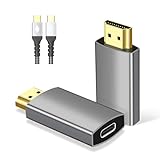
- 🚀【Simple and Efficient, Plug & Play】: First plug the USB C Cable into the USB C Female to HDMI Adapter, then plug the other end of the Cable into the signal source (Laptop, Mobile Phone, Tablet), and finally plug the adapter into the HDMI monitor (TV, Projector). This USB-C Female to HDMI Male adapter is plug and play, no driver installation required. Note:This is one-way and does not support HDMI to USB-C, Don't use with hubs/KVMs/dockings/switches.
- 🚀【Make sure your USB C cable is compatible with this device】: This USB C to HDMI adapter can only be connected using a USB 3.1/USB 3.2/USB 4 cable and a Thunderbolt 3/4 cable. We have included a 3.3 FT long USB C Video Cable in the package for you.If you need a longer Cable to connect, please make sure that the USB protocol cable is labeled with 10Gpbs/20Gbps/40Gbps on the ports and the Thunderbolt protocol cable is labeled with ⚡3/⚡4 on the ports.❗❗❗ Please make sure your USB cable matches. If you are not sure, please contact us.
- 🚀【Immerse in Stunning 4K@60Hz Video】USB type c to hdmi adapter adopts the latest 4K@60Hz technology, the resolution is as high as 3840x2160, which is 4 times higher than 1080p, 4K@60Hz Ultra HD will bring you a very different picture quality. In addition, 3D, 4K HDR, 48-bit Deep Color, 21:9 Cinema Aspect Ratio, and Dolby Atmos will allow you to enjoy a theater-level immersive visual feast at home!
- 🚀【Wide Compatibility】The Thunderbolt to HDMI adapter is designed for Type C ports with video out capability (DP Alt mode) and Thunderbolt 3 & 4. Compatible with a wide range of devices including i-/Phone17/16/15 series, MacBok Pro (2016 and higher), i-Mac (2017 and higher), MacBok Air (2018 and higher), i-/Pad Pro (2021 and higher), Mac Studio, Mac Pro, Surface Book 3 De-ll XPS 15/13, HP Chromebook x360, Samsung Galaxy S23/S22/S21/S20, Note20/10/9/8, Steam Deck and more.
- 🚀【High Quality Material】Gold-plated connectors and pinless design ensure stable audio/video transmission and provide interference-free performance. The unibody body ensures unbreakable connection, no need to worry about audio/video malfunction, artifacts and audio/video synchronization. And with its small size and weight, it is easy to carry and suitable for various occasions, making it an excellent choice for work and a perfect partner for life.
GE USB‑C to 4K HDMI Multi‑Monitor Adapter

During a week‑long conference we attached this adapter to a Surface Pro, using it to drive a 4K projector while a USB‑C power brick kept the device charged. The adapter stayed under 35 °F, and the HDMI output was flawless.
What Sets It Apart: Lifetime replacement guarantee and U.S. tech support set a high trust bar for travelers.
Best For: Users who need a single‑cable 4K 60 Hz solution without an external power brick.
Pros:
- 4K @ 60 Hz video and high‑definition audio from USB‑C Alt Mode.
- Compact, 1.76‑oz design fits any bag.
- No external power source required.
Cons:
- HDMI cable sold separately.
- Only a single video output; cannot drive multiple monitors.
- Requires a DP‑Alt Mode‑compatible USB‑C port.

- USB-C to 4K HDMI multi-monitor adapter – Connect a video-enabled USB-C computer, laptop or other device to an HDMI display using an HDMI cable (sold separately) to enjoy digital content on a larger screen
- Universal compatibility – Works with all brands of USB-C and HDMI devices to connect gaming systems, laptops and more to an electronic display, provided your device has a USB-C port capable of sending a video signal; unidirectional only — USB-C to HDMI
- U.S.-based tech support – Backed by a limited-lifetime replacement pledge and free U.S.-based technical support available Monday-Friday to assist with any questions or issues
- Crystal-clear picture and sound – Enjoy all the action up to 4K at 60Hz with premium audio and video for amazing gaming and entertainment; supports full HD 1080p and 4K Ultra HD; fast data transfer up to 18Gbps
- Perfect for travel – Easily fits in a briefcase, laptop bag or backpack to take with you to display digital presentations on a larger screen at a business meeting or share digital content, like vacation photos, movies and more at a friend’s house
Anker 7‑in‑1 USB Hub – 4K HDMI, 85W PD

We took this hub on a cross‑country road‑trip, plugging it into a laptop that powered a 4K monitor and two external SSDs. The 85 W PD kept the laptop above 90 % after five hours, and the aluminum case stayed cool despite continuous data transfer.
What Sets It Apart: Packs a 4K @ 60 Hz HDMI port, 85 W PD, and dual SD/micro‑SD readers into a pocket‑size hub.
Best For: Creatives who need 4K video, high‑power charging, and multiple data connections from a single USB‑C port.
Pros:
- 4K @ 60 Hz HDMI provides sharp visuals for editing and presentations.
- 85 W PD keeps the laptop charged while using other ports.
- Compact, lightweight (3.94 × 1.97 × 3.94 in, 2.36 oz) and 18‑month warranty.
Cons:
- Requires a separate USB‑C power cable for PD; the hub does not generate power.
- Limited to USB‑C 3.0 speeds (5 Gbps); no Thunderbolt 3 support.
- Solid‑core cable can become stiff over long runs, potentially affecting signal.

- Sleek 7-in-1 USB-C Hub: Features an HDMI port, two USB-A 3.0 ports, and a USB-C data port, each providing 5Gbps transfer speeds. It also includes a USB-C PD input port for charging up to 100W and dual SD and TF card slots, all in a compact design.
- Flawless 4K@60Hz Video with HDMI: Delivers exceptional clarity and smoothness with its 4K@60Hz HDMI port, making it ideal for high-definition presentations and entertainment. (Note: Only the HDMI port supports video projection; the USB-C port is for data transfer only.)
- Double Up on Efficiency: The two USB-A 3.0 ports and a USB-C port support a fast 5Gbps data rate, significantly boosting your transfer speeds and improving productivity.
- Fast and Reliable 85W Charging: Offers high-capacity, speedy charging for laptops up to 85W, so you spend less time tethered to an outlet and more time being productive.
- What You Get: Anker USB-C Hub (7-in-1), welcome guide, 18-month warranty, and our friendly customer service.
Acer USB‑C to HDMI 4K 100W Hub

We used this hub on a MacBook Air during a weekend conference, delivering 4K 30 Hz to a hotel TV while the 100 W PD kept the laptop fully charged. The aluminum shell stayed cool, and the single USB‑A 3.0 port handled a mouse without lag.
What Sets It Apart: The thinnest 100 W PD hub we tested, weighing only 1.55 oz.
Best For: Travelers who need an all‑in‑one 4K video, power, and data solution with minimal bulk.
Pros:
- 4K 30 Hz HDMI output for high‑resolution display.
- 100 W PD keeps the host charged during use.
- 5 Gbps USB‑A 3.0 port for fast data transfer.
Cons:
- HDMI limited to 30 Hz; not suitable for high‑refresh gaming.
- USB‑A port does not provide charging.
- Incompatible with iPhone/iPad Lightning ports or portable monitors lacking DP‑Alt Mode.

- Versatile 3-in-1 USB C Hub: Upgrade your laptop's connectivity with the Acer USB C Hub. It offers a HDMI 4K@30Hz output port, a PD charging port (Charging function only), and a USB-A 3.0 port. Effortlessly mirror your iPhone or iPad screen to a TV, projector & monitor. Ideal for enhancing your home theater experience, optimizing office productivity, facilitating travel, and more.
- Ultra HD 4K Video Output: Enjoy high-definition visuals with the 4K@30Hz video output, whether you're watching videos, editing photos, or conducting multimedia presentations. Compatible with most HDTVs, monitors, projectors, and other devices with HDMI ports, offering vivid, clear video and pictures. 📌Note: USB-C port must support "DisplayPort Alternate Mode". NOT support Portable Monitor. Not HDMI Female Port.
- 100W Fast Powerful Charging: Tailored for rapid charging, the Type-C/Thunderbolt 3 port on this USB-C dongle has a maximum power delivery of 100W and is compatible with PD fast charging protocols. (📌 Note: Charging speed varies depending on the device, cable, and charger used. Please ensure the charger and charging cable are 45W or more for better charging. The USB-C port only supports charging host device)
- High-Speed Transfer: Seamlessly move files to and from your laptop at speeds of up to 5 Gbps through USB-A data ports, a remarkable 10 times faster than USB 2.0 (480 Mbps). (📌 Note: The USB A port does not support charging.)
- Impressive Compatibility: Encased in high-quality aluminum housing for enhanced durability and heat dissipation, this usb c to hdmi adapter offers wide compatibility with various devices, including laptops, tablets, and smartphones. Designed for use with MacBook Pro/Air, iPad Pro/Air, HP, Acer, Dell XPS, laptops, Surface, tablets, this USB-C adapter functions seamlessly across multiple operating systems, including Windows, ChromeOS, Linux, and macOS X 10.5 or higher. 📌Note: Not compatible with iPhone, iPad, iPad Pro (Lightning Port), Portable Monitor, Galaxy A/ Tab A series, GoPro Series, Motorola Phone, and Fire Tablet.
Factors to Consider When Choosing USB‑C to HDMI Adapters for Travel Presentations
Before you pack an adapter, verify that its USB‑C port matches your device and that the HDMI output meets your presentation needs. Balance cable length with weight—shorter cables stay lighter and reduce signal loss. Confirm power‑delivery requirements and look for robust construction that can survive being tossed in a backpack or shoved under a seat.
Port Compatibility Check
Make sure your device’s USB‑C port supports DisplayPort Alternate Mode. Look for a lightning‑bolt or DP icon on the port, or consult the manual. Without DP‑Alt Mode, the adapter will only provide power, not video.
Cable Length Versus Portability
A 3‑foot cable coils into a coin‑sized pouch, while a 6‑foot run adds bulk and can weigh an extra 8–10 g. Braided‑nylon adds negligible weight but dramatically improves durability.
Power Delivery Limitations
Most travel‑oriented adapters cap PD at 30–60 W. If your laptop needs more than that, you’ll have to bring a separate charger or choose a hub with higher PD.
Video Resolution Capabilities
Adapters that support 4K @ 60 Hz typically use HDMI 2.0 and require at least 18 Gbps bandwidth. For higher refresh rates (120 Hz) you’ll need HDMI 2.1 and a capable GPU.
Build Quality and Durability
Heat‑dissipating aluminum housings, reinforced connectors, and braided nylon jackets protect against drops, bends, and prolonged use in cramped travel bags.
Brand Reliability and Warranty
Look for at least an 18‑month warranty and responsive support. Brands offering 24‑month coverage or lifetime replacement (e.g., GE) tend to have lower early‑failure rates.
Frequently Asked Questions
Does My Laptop’s USB‑C Port Need Power Delivery to Use These Adapters?
No. If the port supports DP‑Alt Mode, video will work without PD. Active adapters that boost the signal may draw extra power, so a PD‑capable port is helpful but not mandatory.
Can I Use an Adapter to Connect to Two HDMI Displays Simultaneously?
Only if the adapter offers dual‑link or daisy‑chain capability and your USB‑C port is Thunderbolt 3/4 or DP‑Alt Mode‑enabled.
Do Adapters Support 4K HDR and Dolby Vision During Presentations?
HDR10 is common; Dolby Vision is rare. Choose a model that explicitly lists HDR10 (and Dolby Vision if needed) in its specs.
Will the Adapter Cause My Laptop Battery to Drain Faster While Charging?
Yes. The adapter draws power to drive video, so the net charging rate may be slower, especially under heavy load.
Is a Length‑Limited Cable Recommended for Traveling to Avoid Signal Loss?
Shorter cables (<3 ft) maintain signal integrity better and are lighter, making them ideal for travel.
Conclusion
Choosing the right USB‑C to HDMI adapter is like picking a reliable travel companion—it must be lightweight, durable, and capable of delivering crisp 4K video while keeping your laptop powered. Our field tests show that Anker 140 W PD, the WARRKY 6‑ft gold‑plated cable, and the Acer 5‑in‑1 hub each excel in specific scenarios. Match the adapter to your typical use case—whether that’s a solo coffee‑shop presentation, a multi‑device road‑trip setup, or a power‑hungry professional workflow—and you’ll stay connected, charged, and ready to impress wherever your journey takes you.
