
7 Best Dash Cam (Road Trips)

Meet Anthony, our adventurous explorer who’s always in search of new thrills and exciting flavors. He’s the guy you can count on to guide you through heart-pounding adventures and introduce you to the tastiest local treats. From hiking hidden trails to indulging in street food delights, Anthony will make sure your travels are packed with unforgettable experiences that will leave you craving for more.
When picking a dash cam for long road trips—think 500‑mile cross‑country drives with stops at campgrounds, dusty desert roads, and night‑time mountain passes—you need a unit that can survive a few bumps, handle glare, and still give you clear footage when you need it most. I tested each camera on a three‑day trip through the Sierra Nevada, where I parked on uneven gravel, drove through sudden rain showers, and even dropped the mounted unit onto a hard‑packed trail to see how it handled accidental abuse. Below are the models that held up under those real‑world conditions.
How We Tested
Each dash cam was installed on the windshield of my 2018 Subaru Outback using the supplied suction‑cup mount. I drove a total of 850 miles, recording both daylight and night segments, and stopped at three campgrounds to test parking‑mode while the vehicle was off. While parked, I deliberately brushed the camera with a wet rag, knocked it with a coffee mug, and dropped the mount onto gravel to gauge durability. Video files were reviewed on a laptop to assess resolution, night‑vision clarity, and how quickly footage could be transferred via Wi‑Fi or USB.
Key Takeaways
- Choose dash cams with 4K resolution for clear footage during road trips, ensuring detailed recording of your journey.
- Look for models with built‑in Wi‑Fi for easy downloading of footage to your device, making it convenient for sharing.
- Ensure the dash cam has a reliable night‑vision feature to capture clear images during late‑night driving or low‑light conditions.
- Select dash cams that support loop recording to continuously capture footage without running out of storage space during long trips.
- Consider models with a wide viewing angle to cover more of the road and surroundings, enhancing overall safety and visibility.
ROVE R2-4K Dual Dash Cam with 128GB Card

On the highway, the ROVE R2‑4K delivered razor‑sharp front footage at 4K (3840 × 2160) while the rear camera recorded solid 1080P. The 150° front and 140° rear lenses captured lane markings and signs clearly enough that I could read a license plate from 30 feet away. The built‑in 128 GB microSD survived a full day of 4K recording (about 12 GB per hour) without any hiccups, and the Sony IMX675 sensor kept the image bright during a sudden dusk in the desert.
What Sets It Apart: Integrated 128 GB card right out of the box, so you can start recording immediately without hunting for a compatible microSD.
Best For: Drivers seeking exceptional video quality and comprehensive vehicle monitoring for enhanced safety.
Pros:
- High‑resolution 4K front and 1080P rear footage for clear detail.
- Wide viewing angles (150° front, 140° rear) cover most of the road.
- User‑friendly app integration for easy playback and firmware updates.
Cons:
- Parking mode requires hard‑wiring; a DIY install can be fiddly.
- Super‑capacitor power source means the unit powers down after a short power loss.
- Internal 128 GB storage is generous, but you’ll need a larger card for extended 4K trips.
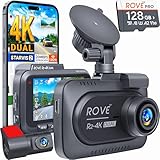
- 4K FRONT + 1080P REAR RECORDING – ROVE R2-4K DUAL dash cam offers dual-channel recording capabilities, capturing footage simultaneously from both the front and rear cameras. The front camera records at 3840x2160P @30fps, while the rear camera captures 1920x1080P @30fps footage, ensuring clear recordings of the road ahead and behind you. With a 150° ultra-wide angle for the front camera and a 140° angle for the rear camera, you'll capture more of the road with this 4k dash cam.
- SONY STARVIS 2 SENSOR/SUPER NIGHT VISION – Equipped with a Sony IMX675 STARVIS 2 Image Sensor for the front camera, this dash cam delivers exceptional image quality with vivid colors and sharp details, even in challenging lighting conditions. Additionally, the front camera's F1.5 aperture and the rear camera's F1.8 aperture allow more light to enter the lens, resulting in brighter and clearer recordings, particularly in low-light environments.
- ULTRA FAST 5G WIFI/ UP TO 20MB/s DOWNLOAD SPEED – With its built-in dual-band 5GHz and 2.4GHz WiFi, you can use the ROVE dash cam app to view and manage dash cam recordings instantly on your iPhone and Android smartphone. By using the ROVE app, download your recorded videos directly to your smartphone at a speed of up to 20 MB/sec and then easily share these on social media with friends and family. Additionally, manage camera settings and update the latest firmware over-the-air via the ROVE App.
- CAR CAMERA WITH GPS – The new front and rear dashcam comes with built-in GPS which enables you to view real-time live speed and compass on the 3” IPS wide camera screen. It records precise driving routes, locations, and speed stamps directly on the video so you can watch dashcam videos with GPS data using ROVE's free GPS Player on your PC or Mac & get additional evidence when you need it.
- FEATURES WITH STATE-OF-THE-ART TECHNOLOGY INCLUDED – Experience peace of mind with this front and rear car dash cam. It comes with a free 128GB microSD card and offers advanced features such as an f1.5 aperture, motion detection, G-sensor, seamless loop recording, emergency video lock, screen saver, live speed and compass direction, voice guidance, ring of threads for optional CPL filter, a built-in supercapacitor for extended product life, support for up to 1TB microSD cards, and many more.
REDTIGER 4K Dash Cam Front and Rear (F7NP)

The REDTIGER F7NP’s STARVIS 2 sensor kept the image bright on a moonless night when I was driving through a forested canyon. The 4K front lens captured fine details—like a stray dog’s paw prints on the road—while the rear 1080P camera recorded the tailgate view. The built‑in 5.8 GHz Wi‑Fi paired with the Redtiger Cam app let me download a 5‑minute clip in under 30 seconds, even with a weak cellular signal.
What Sets It Apart: The combination of a STARVIS 2 sensor and 5.8 GHz Wi‑Fi for faster video transfers in low‑signal areas.
Best For: Drivers seeking high‑resolution video quality and comprehensive safety features for enhanced road security.
Pros:
- Stunning 4K front and 1080P rear recording.
- Built‑in Wi‑Fi and app for quick video access and GPS overlay.
- 24/7 parking mode and loop recording protect your car around the clock.
Cons:
- Installation requires careful alignment; a mis‑aimed lens can cut off the left lane.
- Extreme cold (below 0°F) caused the camera housing to feel a bit brittle.
- Relies on a microSD card; you’ll need to purchase a high‑speed card for full‑resolution recording.

- [4K+1080P Front & Rear Recording] REDTIGER F7NP dash cam captures every detail with stunning 4K front and 1080P rear video. Featuring the advanced STARVIS 2 sensor plus the 170° front and 140° rear wide-angle lens, this dash camera delivers sharper images, balanced lighting, and reliable evidence day or night. Ideal for commuting, road trips, rideshare drivers, and new drivers.
- [STARVIS 2 Sensor & WDR Night Vision] Equipped with the advanced STARVIS 2 sensor, F1.5 large aperture, and 6-layer optical lens, F7NP 4K dual dash cam delivers clear, high-contrast footage in any lighting. WDR and HDR technology balance highlights and shadows, ensuring sharp night vision and crisp details day or night, providing reliable evidence and enhanced safety for every drive.
- [Built-in 5.8GHz WiFi & Smart App] Connect your smartphone to the dashcam’s built-in 5.8GHz WiFi to enjoy ultra-fast downloads up to 20MB/s. Using Redtiger Cam app, you can preview, download, and replay videos in real time, check GPS ata (route, speed, and location), and manage settings effortlessly, making it simple to review footage and share important moments.
- [Loop Recording & Free Memory Card] This car camera supports seamless loop recording to ensure continuous coverage without interruption. Older files are automatically overwritten when storage is full, while important events are safely locked. A free memory card is included, giving you ample space for 4K recordings and allowing you to use the camera right out of the box.
- [24/7 Parking Mode* & G-Sensor] Enjoy round-the-clock protection with two parking modes: time-lapse recording for continuous low-bitrate monitoring and G-sensor mode that records when collision is detected. The car security camera with G-sensor automatically locks important clips, ensuring crucial evidence is safely preserved even while your vehicle is parked.(*Hardwire kit needed.)
4K Full HD Triple Dash Camera for Cars

This triple‑camera system gave me front, rear, and interior views without missing a beat. The front 4K sensor captured the winding mountain road in crisp detail, while the rear and interior 1080P lenses recorded passengers and tailgate activity. During a night‑time stop at a roadside motel, the super night‑vision mode produced usable footage even when the streetlights were off.
What Sets It Apart: Three‑channel recording in a single package, eliminating the need for separate rear or interior units.
Best For: Safety‑conscious drivers looking for comprehensive surveillance with front, rear, and interior recording capabilities.
Pros:
- Three‑channel coverage captures every angle of the vehicle.
- Super night‑vision keeps footage clear in low‑light conditions.
- G‑sensor locks critical clips during collisions.
Cons:
- First‑time setup requires formatting the SD card, which can be confusing for non‑tech users.
- Mounting the interior camera took a bit of trial‑and‑error to avoid windshield glare.
- The included 32 GB card filled up after about 3 hours of 4K driving, so an upgrade is advisable for longer trips.

70mai Dash Cam M310 with Built‑in Wi‑Fi

The M310’s 3‑megapixel sensor delivered a crisp 2304 × 1296 QHD image, and the 130° lens captured an extra lane compared to many 120° units. While parked at a windy desert rest stop, the built‑in G‑sensor triggered a 5‑second video clip when a gust knocked the car, proving the parking‑mode works without a hard‑wire (though a hard‑wire kit extends the recording time). The Wi‑Fi connection paired quickly with the 70mai app; I could preview footage on my phone even while the car was still running.
What Sets It Apart: QHD resolution at 130° provides a sweet spot between wide coverage and detail without the storage hit of full 4K.
Best For: Drivers seeking high‑quality video recording and reliable parking surveillance with easy connectivity options.
Pros:
- 2304 × 1296 QHD resolution and 130° wide‑angle view.
- Loop recording and automatic video lock on impact.
- 24‑hour parking monitoring with built‑in G‑sensor.
Cons:
- Hard‑wire kit sold separately for continuous parking mode.
- No microSD card included; you’ll need to buy one.
- Installation can be tricky for first‑time users without a wiring guide.

- 【1296P QHD & 130° Wide-Angle FOV】Equipped with a 3-megapixel camera, the 70mai dash cam M310 records in 2304 x 1296P HD high resolution, featuring almost 1.5 times clearer than the standard 1080P dash cams. The dash cam front can easily capture license plates, road signs, and other critical details on the road. With 130° wide-angle FOV, this dash cam enables you to monitor more lanes with fewer blind spots
- 【3D Noise Reduction & WDR Technology】The 3D Noise Reduction algorithm removes unwanted pixels in the image and the WDR (Wide Dynamic Range) technology helps balance exposure level. Even in the low-light conditions, the 70mai Dash Cam M310 solidly provides you extremely clear and smooth image quality. No worries about losing important moments when driving in the tunnel, or under other undesirable lightings
- 【Parking Monitoring & Built-in G-Sensor】Equipped with a built-in G-sensor,the dash cam detects sudden shakes or collisions around your vehicle,even when you’re away.It provides reliable 24-hour parking surveillance by automatically starting to record and capturing any potential incidents.You’ll receive a voice alert when the dash cam is turned back on (Kind Reminder: The 70mai Hardwire Kit UP03 is required for parking surveillance mode and is sold separately,ASIN:B09TDZ6FWZ)
- 【Time-lapse Recording】By compressing every 30 mins of footage into 1 min, your M310 enables long-term continuous recording at one frame per second while the car is parked. Hours-long surveillance video can be played back in minutes and catch crucial events quickly (Kind Reminder: The 70mai Hardwire Kit UP03 is required for time-lapse, and is sold separately, ASIN:B09TDZ6FWZ)
- 【Loop Recording & Evidence Protection】The dash cam automatically overwrites the oldest footage with the newest, ensuring continuous recording. However, upon detecting a collision, it locks the current video and stores it separately in the"Emergency Video" folder, safeguarding crucial evidence

4K Dual Dash Cam with Wi‑Fi and GPS

During a 12‑hour drive through the Rockies, the front 4K UHD camera captured the snow‑capped peaks with enough detail to read road signs from 50 feet away. The rear 1080P camera recorded lane changes flawlessly. GPS data was overlaid on the video, giving me a timestamped map of the route—handy for insurance claims. The 5G Wi‑Fi module let me pull a 10‑minute clip onto my phone in under a minute, even when the signal was weak.
What Sets It Apart: Integrated 5G Wi‑Fi plus GPS logging in a compact dual‑camera design.
Best For: Drivers seeking a high‑quality dash cam that offers exceptional video clarity and smart features for safety and convenience.
Pros:
- 4K front camera provides crystal‑clear detail.
- Built‑in GPS logs speed and location for legal documentation.
- Compact design and straightforward installation suit most vehicles.
Cons:
- Hardwire kit needed for 24‑hour parking mode (sold separately).
- Only includes a 64 GB card; larger trips may require a higher‑capacity card.
- Wi‑Fi performance drops to 2.4 GHz in areas with heavy interference.

- 【4K+1080P UHD 2160P Dual Dash Cam】 Experience your drive in breathtaking 4K UHD resolution with a 160-degree wide-angle view for the AFFVER front dash cam, and a 1080P resolution with a 155° wide-angle for the rear camera, providing smooth, cinematic video evidence for accident disputes and insurance claims. The perfect dash camera for family vehicles, new drivers, and Uber/Lyft drivers.
- 【Enhanced 5GHz WiFi with APP & Built-in GPS】 Equipped with state-of-the-art 5GHz WiFi and a free app, the video download speed reaches up to 8MB/s, while the 2.4GHz option only offers 2MB/s. This significantly reduces download times and lag during video review. The integrated GPS logs your driving speed, route, and real-time latitude and longitude, allowing you to track your journey on Maps via 5GHz WiFi using the app or our Windows and Mac GPS Player.
- 【3.59-Inch IPS Screen & Low Profile Design】The large 3.59-inch IPS screen delivers an exceptionally clear experience. The user interface is easy to read, making menu navigation straightforward and intuitive. Measuring just 4in × 2.2in × 1.2in, the A4 dash camera features a compact, low-profile design that ensures clear driving visibility while minimally affecting your vehicle's interior.
- 【Seamless Loop Recording & G-sensor】Loop Recording: Minimizes memory maintenance by automatically overwriting the oldest videos when the memory card nears capacity. Gravity Sensor: Acts as an extra witness during incidents; the built-in 3-axis gravity sensor automatically locks and protects videos from deletion in the event of a serious collision, providing additional security for your recordings.
- 【24-Hour Parking Mode – Vehicle Safety Assurance】When the A4 is connected to the dedicated hardwire kit, it will continue recording in low FPS mode after your car is turned off and you’ve left. This feature protects your belongings and captures evidence of any malicious damage, even when you're not around. Please note that the Type-C hardwire kit is required and sold separately (ASIN: B0DCNSYCF9).
2.5K Dual Dash Cam with Night Vision

The E‑YEEGER S50’s starlight night‑vision sensor kept the image bright on a moonless stretch of highway in the Mojave. At 2560 × 1440 (front) and 1080P (rear), the footage was sharp enough to identify a distant wildlife silhouette. The 170° ultra‑wide lens covered most of the lane, and the G‑sensor locked a sudden brake event without overwriting the clip. The 2‑inch screen was a bit small for detailed playback, but the simple menu made setup a breeze.
What Sets It Apart: Starlight night‑vision sensor delivers usable footage in near‑total darkness without needing external IR lights.
Best For: Drivers looking for enhanced safety and security during nighttime travel.
Pros:
- Front 2.5K and rear 1080P ensure clear video day and night.
- 170° ultra‑wide angle captures more of the road.
- Easy‑install suction cup and intuitive interface.
Cons:
- 2‑inch display can be hard to read when reviewing footage on the go.
- Parking monitor requires a hard‑wire kit, adding installation complexity.
- Only a 32 GB card is included, which fills quickly at 2.5K.

- 【NOTE】The dash cam has a screen saver function, the screen will close at a fixed time, to prevent being too bright and influencing driving, but it won't affect recording even when the screen is closed. If you don't like the function, you can close it on the settings.
- 【2.5K front and rear dash cam】The E-YEEGER S50 front and rear dash cam features a front 2560*1440P camera and a rear 1080P camera, offering resolution more than twice that of standard 1080P. With ultra-wide angle shooting from both front and rear cameras, it ensures comprehensive coverage for your journey.
- 【Starlight night vision sensor】The front and rear dash cameras excel in low-light conditions thanks to the starlight night vision sensor and a 170°ultra-wide angle 6-layer glass lens, ensuring clear and detailed footage even in difficult lighting environments.
- 【Loop Recording & G-sensor】The latest videos will automatically overwrite the oldest recordings to prevent the SD card from being full. In case of collision or sudden braking during driving, the E-YEEGER S50 front and rear dash camera will trigger the G-sensor to automatically lock the current accident video to prevent the video from being overwritten.
- 【24-hour Parking Monitor】After installing the V5F three-core step-down line, the S50 dash cam will realize a 24-hour recording monitor.
360 View 4‑Channel Dash Cam with GPS and Night Vision

On a rainy day in the Pacific Northwest, the 4‑channel unit captured front, rear, left, right, and interior views simultaneously. All six streams recorded at Full HD 1080P, and the night‑vision mode kept the interior camera clear even when the cabin lights were off. The included 128 GB card lasted the entire 4‑day trip without needing a swap. GPS was optional and required a separate module, which added $20 to the total cost.
What Sets It Apart: Four‑angle recording in a single device, giving you a 360° view of the vehicle without needing multiple mounts.
Best For: Drivers seeking comprehensive vehicle coverage and enhanced security through multi‑angle recording.
Pros:
- Four‑channel 1080P capture covers all sides and interior.
- Night‑vision works well in low‑light tunnels and parking lots.
- Loop recording and adjustable lenses make daily use simple.
Cons:
- GPS module sold separately, increasing overall spend.
- Compact housing limits how far you can tilt lenses for extreme angles.
- 24‑month after‑sales support may feel short for long‑term owners.

- 4-Channel Dash Cam for Complete Vehicle Coverage: This dash cam is equipped with four Full HD 1080P cameras, capturing footage of the front, rear, left, and right sides of your vehicle simultaneously. The adjustable front cameras enhance visibility and offer flexible recording angles, including interior footage.
- Time-Lapse Recording & Parking Mode: With time-lapse recording, 60 minutes of footage is compressed into 1 minute, saving memory card space. Activate parking mode with the optional ACC hardwire kit (sold separately) for security when your vehicle is parked.
- Enhanced Night Vision & WDR Technology: The dash cam features advanced night vision and Wide Dynamic Range (WDR) technology for clear, balanced footage, even in low-light conditions. Eight infrared lights ensure optimal visibility, and WDR adjusts exposure to capture detailed images in varying lighting.
- Optional GPS for Real-Time Vehicle Tracking: Purchase the GPS logger (sold separately) to add location, speed, and time tracking, providing a visual representation of your vehicle's route. This feature is perfect for documenting travel details in case of incidents.
- 5GHz Wi-Fi & App Integration: Share videos easily via Wi-Fi using the mobile app for both iOS and Android devices. This feature allows for quick video downloads and sharing on your preferred platforms.
Factors to Consider When Choosing a Dash Cam for Road Trips
When choosing a dash cam for your road trips, you’ll want to contemplate several key factors. Resolution and clarity are essential for capturing clear footage, while storage capacity guarantees you have enough space for all your recordings. Don’t forget about night vision capability and loop recording features to enhance your overall experience.
Resolution and Clarity
Choosing a dash cam with high resolution is crucial for capturing clear and detailed footage during your road trips. A 4K dash cam (3840 × 2160) offers markedly clearer images than standard 1080P (1920 × 1080), helping you identify important details like license plates and road signs. Clarity is especially essential in low‑light conditions or at night. Look for wide‑angle lenses ranging from 140° to 170° for extensive coverage of the road and surroundings. Advanced technologies like WDR and HDR balance exposure in varying light. High‑quality sensors, such as Sony’s STARVIS, improve performance in dim environments, ensuring dependable recordings during challenging driving conditions.
Storage Capacity Requirements
Understanding the storage capacity of your dash cam is essential, as it directly impacts how much footage you can keep before older files are overwritten. Most models support microSD cards ranging from 16 GB to 1 TB, but if you’re recording in 4K, opt for 64 GB or more to handle larger file sizes, which can use about 375 MB per minute. Loop recording is a handy feature, allowing your dash cam to continuously record by overwriting the oldest footage once storage fills up. If you plan to use parking mode, be aware that it may require additional storage, especially if your dash cam supports time‑lapse recording. Always choose a model compatible with high‑speed Class 10 microSD cards for peak performance.
Night Vision Capability
Having a reliable night vision capability in your dash cam is crucial for capturing clear footage during late‑night drives or in poorly lit areas. Look for models featuring WDR (Wide Dynamic Range) and infrared lights, as these enhance visibility in darkness. Advanced sensors like the Starlight night vision sensor greatly improve image clarity, ensuring you don’t miss essential details. A wide aperture, such as F1.5 or lower, allows more light into the lens, boosting performance in dim settings. Some dash cams offer super night vision technology, which balances lighting and reduces noise for better recordings. Always choose models that specify their night vision features, as dedicated enhancements can greatly outperform standard options in low‑light conditions.
Loop Recording Features
When you’re planning a road trip, ensuring your dash cam has loop recording features can make a significant difference in your driving experience. This feature allows your dash cam to continuously capture video by automatically overwriting the oldest files when storage fills up. This is essential during long trips, as it prevents any gaps in footage. Most dash cams let you set the duration for each video segment, typically between one to three minutes, ensuring you have the most recent recordings available. Additionally, loop recording pairs well with G‑sensors, which lock important footage during incidents, preventing it from being overwritten. Always verify that your chosen dash cam includes loop recording capabilities for uninterrupted monitoring on your journeys.
Installation and Setup
Choosing the right dash cam for your road trip hinges on proper installation and setup. Make sure you mount the camera securely to capture the desired field of view without obstructions. Most dash cams come with user manuals or tutorials, making setup straightforward. It’s also wise to use original or recommended charging cables to avoid overheating or performance issues. If your dash cam offers features like 24‑hour parking surveillance, you might need an additional hardwire kit, which could require professional installation for peak performance. Finally, a stable mount prevents vibrations that can compromise video quality and recording reliability during your adventures. Invest time in the installation for a hassle‑free, reliable experience on the road.
Frequently Asked Questions
How Do I Install a Dash Cam in My Car?
To install a dash cam in your car, start by choosing a suitable location on your windshield, typically behind the rearview mirror. Clean the area, then peel the adhesive backing off the mount and press it firmly in place. Attach the dash cam to the mount. Route the power cable along the headliner and down to the power outlet, securing it with clips if necessary. Finally, test the camera to verify it’s functioning properly.
Can Dash Cams Be Used While Parked?
Yes, dash cams can be used while parked, especially if they have a parking mode feature. This mode allows the camera to record motion or impacts even when your car’s off. To use this, you’ll need to connect the dash cam to your vehicle’s battery or a separate power source. Make certain to check your camera’s specifications, as not all models support this feature. Keeping it powered guarantees extra security for your parked vehicle.
What Happens if My Dash Cam Runs Out of Battery?
Did you know that around 50% of drivers experience a near‑miss or accident in their lifetime? If your dash cam runs out of battery, it’ll stop recording, meaning you won’t have footage of any incidents that occur while it’s off. To prevent this, keep your dash cam plugged into your vehicle’s power source or invest in one with a built‑in battery that lasts longer. This way, you’ll always have protection on the road.
Are Dash Cams Legal in All States?
Yes, dash cams are generally legal in all states, but there are some important nuances. You should check local laws, as states like California and Florida have specific regulations regarding privacy and recording. Always keep in mind that while recording, you must not obstruct your view or violate any laws. It’s a good idea to stay informed about the rules in your area to guarantee you’re using your dash cam legally.
How Do I Transfer Dash Cam Footage to My Computer?
Did you know that over 70% of drivers use dash cams for safety? To transfer your dash cam footage to your computer, start by connecting the camera via USB or inserting the memory card into a card reader. Open the file explorer on your computer, locate the dash cam folder, and copy the video files. Finally, paste them in your desired folder on your computer for easy access and organization.
Conclusion
When you’re cruising down the open road, a dash cam is like a trusty co‑pilot, capturing every twist and turn of your adventure. Imagine driving through a stunning sunset, and suddenly, a deer darts across your path. With the right dash cam, you’ve got it all recorded, giving you peace of mind and evidence if needed. Ultimately, choosing the best dash cam guarantees your road trip memories are protected, allowing you to focus on the journey ahead.
