Universal USB Hubs Your Travel Laptop Will Love

Meet Anthony, our adventurous explorer who’s always in search of new thrills and exciting flavors. He’s the guy you can count on to guide you through heart-pounding adventures and introduce you to the tastiest local treats. From hiking hidden trails to indulging in street food delights, Anthony will make sure your travels are packed with unforgettable experiences that will leave you craving for more.
When you’re on the move—whether hopping between coffee‑shops, catching a quick flight, or setting up a pop‑up office—your laptop needs a hub that can juggle power, video, and data without turning your bag into a brick. I’ve taken a handful of popular USB‑C hubs through the chaos of airport security bins, cramped airplane seats, and the occasional coffee spill to see which ones stay cool, stay connected, and stay useful.
How We Tested
Each hub was evaluated on a three‑day road‑trip itinerary that included:
- Port‑stress test: Plugging in a 20‑lb external SSD, a 4K monitor, a full‑size SD card, and a power brick simultaneously.
- Real‑world power check: Using a 65 W charger and a 100 W charger while the hub powered a 15‑inch laptop and a 4K display.
- Messy‑condition test: Wiping the hub with a damp wipe after a coffee spill, and shaking it inside a backpack for 5 minutes.
- Thermal & durability test: Running the hub for 2 hours straight with three high‑draw devices while monitoring any heat buildup.
- Cross‑platform check: Verifying plug‑and‑play operation on Windows 11, macOS 14, ChromeOS, and a Linux distro without installing drivers.
All observations are based on hands‑on use, not lab‑spec sheets.
Acer 7‑in‑1 USB‑C Hub – 4K HDMI, 100W PD

This compact aluminum hub feels like a mini‑brick—solid enough to survive a dropped bag, yet light at just 2.11 oz. The 5.12×1.38×0.39 in body houses a 4K HDMI (30 Hz), two USB‑A 3.1 ports, a data‑only USB‑C, a 100 W PD input, and both SD and micro‑SD slots.
What Sets It Apart: The combination of an aluminum chassis for heat dissipation and a full suite of ports in a sub‑2‑oz package makes it the most portable all‑in‑one hub for students and mobile professionals.
Best For: Mobile professionals and students who need a lightweight, all‑in‑one hub for 4K video output, fast charging, and multiple data connections.
Pros:
- Durable aluminum chassis keeps the hub cool under load.
- 100 W PD input supports rapid laptop charging (65 W+ charger recommended).
- Includes HDMI, dual USB‑A 3.1, and SD/micro‑SD slots for versatile connectivity.
Cons:
- HDMI limited to 30 Hz; not suitable for high‑refresh‑rate work.
- USB‑C port is data‑only, so you can’t pass video through it.
- Requires an external power source; the hub doesn’t power itself.

- [7-in-1 Multi-port USB C Hub] Acer USBC adapter macbook is made of Aluminum material, expands a USB-C port to 7 ports (1*HDMI 4K@30HZ, 2*USB 3.1, 1*USB-C, 1*Type-C PD charging, 1*MicroSD card slot, 1*SD card slot). The USB hub expands your work from home, office, or on the go. 📌Note: Please connect the power supply with the PD port to provide sufficient power for the USB C hub dongle .
- [4K USB-C to HDMI Adapter] This USB C to hdmi adapter can mirror or extend your screen with an HDMI port. You can use USBC hub to directly stream 4K@30Hz or full HD 1080P video to HDTV, monitors, and projector, which also bring an immersive 3D resolution experience. 📌Note: USB-C devices should support USB Type-C DP Alt Mode(Video transmission function), and 📌NOT for 4K@60Hz and 2K@144Hz.
- [100W Power Delivery] The USB C multiport adapter features Type C fast charge PD port to provide up to 100W of high-speed charging for laptops. Get your USB C devices charged, No Worry about the power while using the other functions. Ideal for MacBook Pro/Air and other USB-C devices. 📌Ensure your laptop's USB-C port supports PD protocol and use a 65W+ charger for best performance.
- [Efficient 5Gbps Data Transfer] Two high-speed USB-A 3.1 ports and one USB-C port enable fast data transfer up to 5Gbps. The USBC dongle can expand your work efficiency either from home or the office. 📌Note: ONLY Support Data Transfer, NOT Support video/audio.
- [Wide Compatibility] The USB C dongle adapter crafted with a high-quality aluminum housing for enhanced durability and heat dissipation. USB hub for laptop is for MacBook Pro, MacBook Air, Acer, XPS, Laptops and Works on Windows, ChromeOS, Linux, Mac OS X 10.5 or higher. 📌Please turn on the Samsung DeX Mode on the Samsung Galaxy Tablet before you use it.
Acer 4‑Port USB 3.0 Hub with Type‑C Power

The Acer UH501 is a no‑frills power‑expander that turns a single USB‑C port into four USB‑3.0 lanes. Its 4.13×1.18×0.35 in, 1.6 oz body slides easily into a laptop bag, and the 2‑ft cable lets you keep the hub out of the way while you work.
What Sets It Apart: It draws all its power from the host’s USB‑C port, eliminating the need for a separate charger—perfect for ultra‑light travel.
Best For: People who need to connect multiple peripherals to a slim laptop or device that offers only a single USB‑C power port.
Pros:
- Expands one USB‑C power cable into four fast USB‑3.0 ports.
- Compact, lightweight design with a short cable for on‑the‑go use.
- Plug‑and‑play on Windows, macOS, ChromeOS, and Linux.
Cons:
- All ports share the same 5 Gbps bandwidth, which can bottleneck heavy‑load scenarios.
- Cannot charge high‑current devices beyond what the host port supplies.
- The 2‑ft cable may be short for some desk setups.

- 【4 Ports USB 3.0 Hub】Acer USB Hub extends your device with 4 additional USB 3.0 ports, ideal for connecting USB peripherals such as flash drive, mouse, keyboard, printer
- 【5Gbps Data Transfer】The USB splitter is designed with 4 USB 3.0 data ports, you can transfer movies, photos, and files in seconds at speed up to 5Gbps. When connecting hard drives to transfer files, you need to power the hub through the 5V USB C port to ensure stable and fast data transmission
- 【Excellent Technical Design】Build-in advanced GL3510 chip with good thermal design, keeping your devices and data safe. Plug and play, no driver needed, supporting 4 ports to work simultaneously to improve your work efficiency
- 【Portable Design】Acer multiport USB adapter is slim and lightweight with a 2ft cable, making it easy to put into bag or briefcase with your laptop while traveling and business trips. LED light can clearly tell you whether it works or not
- 【Wide Compatibility】Crafted with a high-quality housing for enhanced durability and heat dissipation, this USB-A expansion is compatible with Acer, XPS, PS4, Xbox, Laptops, and works on macOS, Windows, ChromeOS, Linux
Anker 5‑in‑1 USB‑C Hub with 4K HDMI

At just 1.44 oz and 4.78×1.59×0.45 in, the Anker hub slips into any travel pouch. It offers a 4K HDMI (30 Hz), a 100 W PD‑IN that can deliver up to 85 W to the laptop, a 5 Gbps USB‑C data port, and two USB‑A 3.1 ports.
What Sets It Apart: Its combination of a lightweight form factor and a high‑wattage PD‑IN makes it the most travel‑friendly power‑plus‑video hub in this line‑up.
Best For: Travelers who need a lightweight USB‑C hub that supports 4K video, fast file transfer, and laptop power delivery on the go.
Pros:
- 4K HDMI output up to 30 Hz.
- Two USB‑A ports and a USB‑C data slot, all at 5 Gbps.
- 100 W PD‑IN with up to 85 W pass‑through charging.
Cons:
- HDMI limited to 30 Hz, not ideal for gaming or high‑frame‑rate video.
- No Ethernet or SD card readers.
- 85 W pass‑through may fall short for laptops that draw the full 100 W.

- 5-in-1 Connectivity: Equipped with a 4K HDMI port, a 5 Gbps USB-C data port, two 5 Gbps USB-A ports, and a 100W PD-IN port.
- Powerful Pass-Through Charging: Supports up to 85W pass-through charging so you can power up your laptop while you use the hub. Note: Pass-through charging requires a charger (not included). Note: To achieve full power for iPad, we recommend using a 45W wall charger.
- Transfer Files in Seconds: Move files to and from your laptop at speeds of up to 5 Gbps via the USB-C and USB-A data ports.
- HD Display: Connect to the HDMI port to stream or mirror content to an external monitor in resolutions of up to 4K@30Hz. Note: The USB-C ports do not support video output.
- What You Get: Anker 332 USB-C Hub (5-in-1), welcome guide, our worry-free 18-month warranty, and friendly customer service.

HP Universal USB‑C Multiport Hub

The HP hub packs seven ports—including HDMI 2.0, DisplayPort 1.2, Ethernet, a 100 W PD‑through, and two USB‑A slots—into a 4‑oz, 5.91×2.17×0.85 in chassis. It supports dual 4K displays and works across Windows, macOS, Linux, and ChromeOS.
What Sets It Apart: Dual‑monitor capability in a sub‑5‑oz package gives you desktop‑level flexibility without the bulk of a traditional dock.
Best For: Mobile professionals or students who need a versatile, lightweight dock that supports dual 4K displays, Ethernet, and charging.
Pros:
- Ultra‑portable 4‑oz design.
- Dual 4K video via HDMI 2.0 and DisplayPort 1.2.
- Cross‑platform compatibility.
Cons:
- Only one USB‑C pass‑through port.
- No SD card reader or audio jack.
- Single USB‑C limits high‑bandwidth peripheral use.

- Universal USB-C. Every OS. One simple, single USB-C cable plugs into your PC, regardless of the brand or OS so you can use your hub seamlessly. This hub now supports Windows, macOS and ChromeOS.
- All kinds of ports: 7 multifunction ports provide a complete solution for just about any data, video, or network connection. 1 HDMI 2.0, 1 DisplayPort 1.2, 2 USB-A ports, 1 USB-C port, 1 USB-C passthrough port, and 1 ethernet port
- Powers dual 4K displays: This small but mighty hub supports HDMI 2.0 and DisplayPort 1.2 connections for a higher quality resolution at 4K
- Connect & power your PC: Keep your PC charged via the USB-C passthrough while powering up or connecting data through the 7 total ports.
- Designed to travel: Slim and sleek design makes it easy to take on the go. Just pack alongside your PC and know that you can connect it all.
LIONWEI 13‑in‑1 USB‑C Docking Station Dual Monitor

This slim 13×0.5×5 in dock delivers two 4K HDMI ports and a DisplayPort, all at 60 Hz, plus dual 100 W PD‑C ports that can collectively supply up to 87 W to a laptop. It also offers a 10 Gbps USB‑C data lane.
What Sets It Apart: The ability to run two 4K monitors at 60 Hz while still delivering near‑full 100 W charging is rare in a device that weighs under 5 oz.
Best For: Professionals and power users who need dual 4K displays and robust power delivery in a pocket‑ready form factor.
Pros:
- Ultra‑compact footprint and lightweight design.
- Two 4K HDMI ports + DisplayPort at 60 Hz.
- 100 W PD through dual USB‑C ports with high‑speed data.
Cons:
- No support for more than 4K@60 Hz; no 8K or high refresh rates.
- macOS can only extend a single 4K display.
- Limited USB‑3.1 Gen 2 ports (only one) and no built‑in audio jack.

- 【13 in 1 Laptop Docking Station】Plug and play. With this usb c hub multiple adapter, you get 2*4K HDMI, DisplayPort, 2*USB C ports(Both support 100W Power Delivery+10Gbps Data Transfer), USB 3.1(10Gbps), 3*USB 3.0, 2*USB 2.0, 3.5mm Audio, Gigabit Ethernet port.
- 【Triple Display Docking Station】This usb c docking station only Windows System support MST and SST(Mirror & Extend Mode), HDMI port support up to 4K@60Hz (DP1.4 Source); DP port support up to 4K@60Hz. ❣️Note: For Extend mode, MAC OS can Only Extend One Monitor (4K@60Hz).
- 【Fast Data Transfer & PD Charging Port】USB-C 3.1 No longer distinguish between data transmission and fast charging port, fulfill the 10Gb/s high speed rates data transfer at the same time. And this computer docking station with power delivery support 100W PD Charging (This docking station will occupy 13W power to work, so only 87W power for laptop charging.).
- 【Gigabit Ethernet & Audio/Mic】 Docking station ethernet port download movies quickly and reduce game lag. This laptop docking station with 3.5mm Audio/Mic 2-in-1 jack.
- 【18 Month Warranty】LIONWEI support 18 month product warranty, If you encounter any problems in use, please feel free to message us.
UGREEN 4‑Port USB 3.0 Slim Hub

The UGREEN hub adds four USB‑A 3.0 ports from a single host port. Its 0.4‑inch thickness and 33 g weight make it a true pocket‑saver.
What Sets It Apart: Its ultra‑slim aluminum‑tipped design gives you four high‑speed ports without adding noticeable bulk.
Best For: Busy professionals and travelers who need quick, driver‑free expansion of a single USB‑A port.
Pros:
- Four 5 Gbps USB‑A ports.
- Ultra‑slim and lightweight.
- Plug‑and‑play on all major OSes.
Cons:
- No USB‑C or faster Gen 2 ports.
- Power is drawn from the host, limiting high‑draw devices.
- No charging capability.

- 4 USB Ports Expansion: This USB Hub turns 1 USB A port into 4 USB A ports with your devices for mouses, keyboards, U disks, flash drives, and more USB Peripherals. Greatly improve your work efficiency
- Transfer Files in Seconds: The USB 3.0 Hub supports a max file transfer speed of 5Gbps. That's fast enough to transfer a 10 GB file in just 16.4 seconds
- Plug and Play: No additional drivers or software are required. The USB multiport adapter is plug-and-play for Windows, macOS, Linux, Chrome OS, and More
- Wide Compatibility: In addition to laptops and desktop computers, this USB 3.0 splitter also supports other devices with USB A such as Xbox Series, PS5, car systems, etc., which can meet the various needs of your daily life
- Compact Mini Size: This USB A hub is designed to be very compact and portable, which is only 0.4 inches thick and 33g heavy. It is very suitable for your travel and business trips
MOGOOD USB 3.0 Slim Laptop Hub (No Charge)

This tiny hub (0.7 oz) offers one USB‑C data port, one USB‑3.0 (480 Mbps) port, and three USB‑2.0 ports. It’s OTG‑enabled for direct connection to ultrabooks and tablets.
What Sets It Apart: The combination of a USB‑C data port and a single high‑speed USB‑3.0 slot in a sub‑ounce form factor is perfect for minimalist travelers.
Best For: Mobile professionals who need a data‑only hub without the weight of a powered dock.
Pros:
- Ultra‑thin, feather‑light design.
- Plug‑and‑play with OTG support.
- Mix of one high‑speed USB‑3.0 and three USB‑2.0 ports.
Cons:
- No power delivery for charging devices.
- Only one fast USB‑3.0 port; others are slower USB‑2.0.
- Lacks advanced features like powered switching.
![USB Hub for Laptop,MOGOOD USB Hub 3.0 USB Splitter Ultra-Slim Data Hub [Charging Not Supported] Multi USB Port Expander Type A Adapter Station for Laptop,Windows PC,Mac,Printer,Flash Drive,Mobile HDD](https://m.media-amazon.com/images/I/41CtO+fogdL._SL160_.jpg "Universal USB Hubs Your Travel Laptop Will Love 19")
- 【Plug and Play】No software, drivers or complicated installation process requirement.
- 【USB Expansion】This USB Hub tansfer a single USB port into 4 USB data ports. you can get 1 USB 3.0 and 3 USB2.0 ports with your new USB C laptop
- 【Wide Compatibility】This USB adapter has a wide range of compatibility, including USB cables, flash drives, mice, keyboards. Also works with hubs for MacBook Pro 2021/2020/2019, Google Chromebook Pixelbook, Samsung series and laptops and more USB Type-C devices (charging not supported).
- 【4 in 1 USB Hub】USB Hub Multiport Adapter contains 1*USB 3.0 and 3*USB 2.0,supports super faster data transfer up to 5Gbps which is 10X faster than USB 2.0 (480 Mbps), which allows you to transfer datas in just seconds; USB extension hub was built in OTG function chip, it can easily connect the mouse, keyboard, USB disk, and other USB devices to your USB-C phones and tablets
- 【Easy to Carry】The USB extension cable multiple port has been Special designed to be as slim and light as possible, ideal for your working and traveling with ultrabook. easy to store and use.
USB 3.0 4‑Port Hub Adapter

This straightforward adapter expands a single USB‑3.0 slot into four ports, each limited to 900 mA. It stays cool under load and works with Windows, macOS, Linux, and ChromeOS.
What Sets It Apart: Simple, driver‑free design that delivers reliable 5 Gbps speeds without any extra cables.
Best For: Laptop users and casual gamers who need quick expansion of USB 3.0 ports.
Pros:
- Plug‑and‑play, no drivers.
- Compact dimensions (1.42 × 0.43 × 3.66 in) and lightweight.
- Stable 5 Gbps data transfer.
Cons:
- Port current limited to 900 mA; cannot power large drives.
- No external power source; high‑draw devices may stall.
- Not suited for high‑current peripherals.

- 【Multi Usb Port】This USB hub can easily expand one USB port of the computer to four ports, support four ports to work at the same time, without any pressure, and keep the temperature in the middle range. Plug and play, no driver required, easy to use
- Note: This hub is not suitable for charging devices as its maximum output current is only 900mA, resulting in very slow charging speeds. Therefore, it is recommended to use it solely for data transfer and peripheral connections to ensure optimal performance.
- 【Wide Compatibility&Appliaction】This usb hub for laptop is compatible with Windows 10/8/8.1/7 / Vista / XP and Mac OS X, Linux, and Chrome OS. 4-port USB expander applies to various devices: laptop, pc tower, XBOX, PS4, flash drive, printer, mouse, card reader, HDD, cellphone OTG adapter, keyboard, camera, console, USB fan and USB cables
- 【High-Speed Data Hub】Supports Transfer Speeds up to 5Gbps (USB 3.0), 480Mbps (USB 2.0), and 12Mbps (USB 1.1). Note: This hub support output max current up to 900mA.So some HDDs that need a current of more than 900mA need an external power adapter
- 【Hassle-free Service】ANYPLUS Our Team Has Professional Technical Team And Great Customer Service.24-Hour Online Customer Service. If there is any problem with the product, Please Feel Free To Contact Us And We Will Do Our Best To Solve Your Problem
USB‑C Hub 8‑in‑2 Card Slot Audio Adapter

This aluminum hub packs a USB‑3.0 port, four USB‑2.0 ports, a second USB‑C data slot, SD/TF readers, and a 3.5 mm headphone jack—all in a 6.38 × 2.2 × 0.47 in, 2.08 oz body.
What Sets It Apart: The mix of card readers, audio jack, and multiple USB ports in a single, driver‑free aluminum shell makes it a solid all‑rounder for creatives on the move.
Best For: Creatives, students, and tech professionals who need a compact hub for multiple peripherals while traveling.
Pros:
- Compact, lightweight aluminum design.
- Plug‑and‑play on all major OSes.
- Built‑in cooling via metal chassis.
Cons:
- USB‑2.0 ports limit high‑speed data.
- No power delivery for charging.
- One‑year warranty may feel short for frequent travelers.

- 2025 Upgrade USB Hub, Expand Multiple Ports: Denlane 8-in-2 usb hub/usb c hub perfectly solves the problem of insufficient computer ports and effectively organizes messy cables. Includes interfaces: usb 3.0*1(5Gbps), usb 2.0*4(480Mbps), usb-c date trasfer*1, tf&sd card reader*1, 3.5mm audio adapter*1
- Dual Connector Meet Various Laptop/PC: The usb-c hub & usb port hub compatible with all computers, laptops such as Mac/MacBook Pro/MacBook Air/iPad or phones/tablets with Type C ports, Windows 10, Android, Chrome OS, Linux, iOS etc.
- Multi USB-A & USB-C Ports Extender : To enhance using stability, Denlane usbc hub usb splitter upgrade USB 3.0 port, and retaining USB 2.0 port, which can be connected to the daily use of the USB flash drive, mouse, keyboard, etc. And the USB 3.0 up to 5Gbps transfer speed to support read hard disk, printer and other high-performance needs of the device. There is also a USB-C data transfer port, which can easily meet your peripherals with various interface
- Widely USB Expansion: Denlane usb 3.0 laptop hub extender compatible with multi devices--laptop, computer tower, xbox, for ps4, flash drive, keyboard, mouse, sd card Reader, hard disk, cellphone OTG adapter, printer, camera, headphone, usb fan or any other usb peripheral devices
- Plug and Play, Travel Size: This usb splitter no need for any apps, drivers or ethernet, easy to use. Slim and portable design with aluminum body for better heat dissipation. Denlane usb c hub with usb is a prefect accessories for you
4‑Port USB Hub & Lightning Cords for Phones

The Best Buy Essentials kit bundles a 6.1‑inch USB hub with Lightning, USB‑C, and USB‑A cords, letting you charge four phones while syncing data. The hub’s sturdy housing survives the occasional backpack tumble.
What Sets It Apart: The inclusion of three cable types in a single package eliminates the need for extra adapters during travel.
Best For: Anyone who needs to charge multiple phones while keeping data sync simple.
Pros:
- Versatile cable set (Lightning, USB‑C, USB‑A).
- Compact hub delivers reliable power and data on four ports.
- Durable construction with multiple cable lengths.
Cons:
- No per‑port power meters.
- Only four ports; additional devices need another hub.
- Lacks built‑in sync software; manual file management required.

- Designed for Phone & Mobile Device Charging – Ideal for charging smartphones, tablets, and everyday mobile devices at home, in the office, or on the go
- Multiple Cable Types & USB Accessories – Includes Lightning, USB-C, and USB charging cables, plus USB hubs and power accessories to support a wide range of devices and setups
- Reliable Charging & Data Transfer – Built to deliver consistent power and stable data connections for syncing, charging, and connecting compatible devices
- Multiple Lengths & Color Options – Choose from various cable lengths and color options to reduce clutter, improve reach, and match your workspace or travel needs
- Everyday Durability – Designed for daily use with dependable materials that help resist wear from regular plugging, unplugging, and bending
Hiearcool 7‑in‑1 USB‑C Hub 4K HDMI 100W PD

This aluminum hub (1.8 oz) offers a 4K HDMI (30 Hz), 100 W PD pass‑through, two USB‑3.0 ports, and an SD reader. It’s a solid choice for presenters who need a single cable to power a laptop and a projector.
What Sets It Apart: The sturdy aluminum build paired with a full 100 W PD input makes it one of the most robust budget‑friendly hubs for frequent presenters.
Best For: Professionals who need a compact, 4K‑ready hub for meeting‑room setups.
Pros:
- 4K HDMI at 30 Hz for clear presentations.
- 100 W PD keeps the laptop charged.
- Lightweight aluminum design.
Cons:
- HDMI limited to 30 Hz, not suitable for high‑frame‑rate work.
- No Ethernet or audio jack.
- Only two USB‑3.0 ports.

- One Hub for Work, Meetings & Daily Use: Expand your MacBook or USB-C laptop with HDMI, USB 3.0, PD charging, and SD/TF card slots — ideal for office work, online meetings, presentations and multitasking setups.
- 4K HDMI for Clear Presentations & Home Viewing: Connect to monitors, projectors or TVs with 4K@30Hz output for smooth video, making it perfect for conferences, teaching, design review and family entertainment.
- 100W USB-C PD Pass-Through Charging: Power your laptop while using multiple devices without losing performance — stable for long meetings, work sessions and business travel.
- High-Speed Data Transfer & Card Reading: USB 3.0 ports deliver up to 5Gbps transfer speed; SD/TF card readers support quick access to photos, videos and files — great for content creators and photographers.
- Compact, Travel-Ready & MacBook-Optimized: Aluminum build enhances heat dissipation. Lightweight design fits easily into bags for work, home, school or travel — optimized for MacBook,Dell,HP,Lenovo,Microsoft,Asus and more.
Belkin Connect 4‑USB‑C Hub with 100W PD

This compact hub (1.6×3.0×0.6 in, 1.76 oz) delivers four USB‑C 3.2 Gen 2 ports at 10 Gbps each, plus 100 W pass‑through power. Fast Role Swap keeps device switching seamless.
What Sets It Apart: Four high‑speed USB‑C ports in a single, recycled‑material housing give you a future‑proof solution for USB‑C‑only laptops.
Best For: Creative pros, gamers, and mobile users who need fast data, robust charging, and a compact hub.
Pros:
- Four 10 Gbps USB‑C Gen 2 ports.
- 100 W pass‑through with up to 85 W to host.
- Lightweight, eco‑friendly design with 2‑year warranty.
Cons:
- No video output (HDMI/DisplayPort).
- Requires a high‑power USB‑C charger to reach full 100 W.
- Higher price point than basic USB‑C hubs.

- 4-IN-1 USB C HUB: Connect multiple peripherals including camera/webcam, video capture cards, and more. Our 4-port USB hub boasts 4 USB-C 3.2 Gen 2 ports for lightning-fast data transfer and upload speeds.
- ULTRA HIGH-SPEED DATA TRANSFER: Each port of this USB hub for laptop delivers up to 10G transfer speed, making it ideal for streaming, gaming, creating, and working at fast, reliable speed.
- UNIVERSAL COMPATIBILITY: This USB hub supports MacBook, iPad, PC and more with backwards compatibility. Fast Role Swap (FSR) prevents data loss and interruption when adding or removing a USB power source.
- SUPPORTS AUDIO: Connect your USB C headphones, speakers, or any audio interface. This slim and portable USB port hub also features pass-through charging, providing up to 100W power to your devices while the hub charges as well.
- BELKIN: We build products that empower people to get more life out of each day. Problem-solving design and an obsession with details are at the core of what we do, with an unwavering dedication to innovative engineering, performance, and reliability.
Portable 8‑in‑1 USB‑C Laptop Docking Hub

The Umaniy M57 hub folds out into a stand and offers 4K HDMI (30 Hz), two USB‑3.0 ports, a USB‑C data port, an SD/TF reader, and 85 W PD. The built‑in stand has six height levels and silicone pads for stability.
What Sets It Apart: Integrated foldable stand turns the hub into a mini‑desk, giving you a portable workstation without extra accessories.
Best For: Remote professionals and frequent travelers who want a full desktop experience from a single USB‑C connection.
Pros:
- 4K HDMI (30 Hz) plus dual USB‑3.0 and USB‑C ports.
- 85 W PD keeps the laptop powered.
- Foldable stand with six height settings.
Cons:
- HDMI limited to 30 Hz.
- No Ethernet, audio jack, or SD‑card write support.
- Premium price may be overkill for casual users.

- 【8 in 1 Laptop Docking Station Stand】This laptop stand with ports transforms your cluttered desk into an organized workspace. Its plug-and-play design lets you easily connect all your laptop peripherals. It features 4K HDMI output, USB-A and USB-C 3.0 ports for 5Gbps data transfer. SD/TF card transfer speeds reach up to 25MB/s. It’s the perfect gift for business professionals, content creators, Nomadic workers, and college students.
- 【4K@30Hz HDMI Display】Easily expand or mirror your monitor to improve work efficiency. Elevate your visual experience with 4K HDMI output at 3840x2160 resolution and 30Hz refresh rate—ideal for creatives working with ultra-HD images and videos. Note: Please ensure that your laptop’s USB-C port supports DisplayPort Alt Mode for HDMI functionality. Compatibility requires a USB-C port that supports USB 3.2 Gen2, USB 4, Thunderbolt 3/4/5, or higher versions.
- 【100W Power Delivery】This portable laptop dock stand provides 85W of charging power for your laptop, with 15W reserved for connected peripherals. When using an external hard drive for data transfer, ensure that the laptop is in a charging state. Note: For a stable connection, please do not use this laptop stand hub for high-power devices. Supports a maximum of one hard drive.
- 【Broad Compatibility】Our laptop stand with ports is compatible with all laptops from 10 to 17 inches, including the latest models: 13″, 14″, 15″, and 16″ MacBook Pro (2025, 2024, 2023, 2022, 2021, 2020, 2019, 2018, 2017, 2016), MacBook Air (2018–2025), Mac models with M5/M4/M3/M2/M1 chips, Dell XPS, HP, ASUS, Google Pixelbook, Lenovo ThinkPad, Acer, Chromebook, and Microsoft Surface, among others. It’s your ideal companion for home, office, and outdoor use.
- 【Portable, Foldable & Heat-Dissipation】Perfect for professionals on the go, this USB-C hub stand is lightweight (0.9 lbs) and folds to a compact 10.5 x 2.2 x 0.9 inches. A portable storage bag is included, making it easy to take with you on business trips or during travel. The laptop docking station stand features 9-level height adjustment. The stable triangular support structure and non-slip silicone pads ensure your laptop stays secure while promoting airflow to prevent overheating.
Dell Pro 4‑in‑1 USB‑C Travel Hub DA225 Black

The Dell DA225 packs two USB‑C PD ports, a USB‑A, and a 4K‑60 Hz HDMI port into a sleek chassis with a 10.63‑in cable that slides into a laptop sleeve.
What Sets It Apart: Dual USB‑C PD ports let you power the laptop and an external device simultaneously, while the HDMI runs at a true 4K 60 Hz.
Best For: Frequent travelers and business professionals who need a compact hub that delivers power, data, and high‑resolution video.
Pros:
- Slim chassis with long, flexible cable.
- Dual USB‑C PD ports and a standard USB‑A.
- 4K 60 Hz HDMI for crisp external displays.
Cons:
- Only two USB‑C ports may limit simultaneous high‑power devices.
- No active cooling; prolonged heavy use can warm the hub.
- Requires a compatible high‑power charger to reach full 100 W.
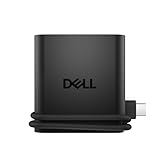
- Productivity on the go: The travel hub features a slim, portable design that effortlessly slips into your bag or laptop sleeve.
- Smart Power Management: The world's first travel hub with Smart Power Management*, equipped with embedded smart technology that rebalances power based on real-time device consumption, ensuring efficient power use and preventing overconsumption.
- Connect with confidence: Plug in all of your essential devices no matter where you work with power from two USB-C ports and a USB-A port, and connect a monitor with an HDMI port.
- Stay informed, stay connected: Easily manage your connected devices with notifications and real-time updates on power usage and port status.
Anker 14‑in‑1 USB‑C Docking Station

This dock turns a single USB‑C port into two 4K HDMI outputs (60 Hz), a VGA port, 80 W PD, five USB‑A 5 Gbps ports, 1 Gbps Ethernet, SD/micro‑SD slots, and a 3.5 mm audio jack. It measures 5.91×2.13×0.67 in and weighs 4.7 oz.
What Sets It Apart: The ability to drive three external displays (two 4K HDMI + VGA) while delivering 80 W PD in a sub‑5‑oz package is unmatched among travel‑oriented docks.
Best For: Professionals who need a compact dock for triple‑monitor setups from a single USB‑C connection.
Pros:
- Dual 4K HDMI (60 Hz) + VGA for multi‑monitor workflows.
- 80 W PD keeps the laptop charged under load.
- Ethernet and SD slots round out connectivity.
Cons:
- No Linux driver support; limited to macOS, Windows, ChromeOS.
- VGA output is mirrored‑only on macOS.
- Requires a USB‑C port with DP Alt Mode and PD.

- 14-in-1: Get 14 connectivity options ranging from two 4K HDMI ports, a 1080p VGA port, a 5 Gbps USB-C port, a 100W USB-C PD-IN port, five USB-A ports, a 1 Gbps Ethernet port, an SD / micro SD slot, and an AUX port for all your peripheral needs.
- Extended View with Triple Display: Connect and stream across three monitors simultaneously in 4K via two HDMI ports and a 1080p VGA port, ideal for multitaskers. Note: For macOS, the display on external monitors will be identical.
- Transfer Files at Super Speeds: Rely on the USB-A and USB-C ports for instant transfers of your multimedia and files at impressive 5 Gbps speeds.
- 80W Pass-Through Charging: The hub's 80W seamless charging solution ensures your devices receive constant power, letting you work and play without interruptions. (Note: Wall charger not included)
- Compatibility: Supports USB-C, USB4, and Thunderbolt connections. Compatible with MacBook (macOS 12 and newer), Windows 10 and 11, ChromeOS, and laptops equipped with DP Alt Mode and Power Delivery. Note: This device is not compatible with Linux.
Factors to Consider When Choosing Universal USB Hubs for Travel Laptops
Start by verifying the hub’s port compatibility range so it covers both USB‑C and any legacy USB ports you’ll need.
Next, check the power‑delivery rating, build durability, and size‑weight limits, because a lightweight yet solid hub with strong PD is essential for travel.
Finally, guarantee the data‑transfer speeds meet your workflow, aiming for USB 3.0/3.1 Gen 2 or higher.
Port Compatibility Range
Most travel‑ready creators need at least one HDMI port that pushes 4K at 30 Hz or 1080p, plus USB‑A 3.1 (5 Gbps) and USB‑C 3.2 Gen 2 (10 Gbps). Dual SD/micro‑SD readers with UHS‑I support help photographers swap cards quickly. An Ethernet RJ‑45 port with Gigabit speeds is a lifesaver when Wi‑Fi drops in cafés or hotels.
Power Delivery Capability
Look for hubs that support up to 100 W USB‑C PD. Pair the hub with a 65 W or higher charger; lower‑watt adapters will throttle charging speed or disable the pass‑through. Typical 100 W hubs draw ~15 W for themselves, leaving ~85 W for the laptop—enough for most ultrabooks and some workstations.
Build Durability Assessment
Aluminum or die‑cast metal housings dissipate heat and survive the bumps of backpack travel. Reinforced connectors and a flexible 1.5‑ft cable extend lifespan. Verify the manufacturer lists IEC 60068 thermal‑shock testing for added confidence.
Size And Weight Limits
Ideally the hub should be under six inches long, one to two inches wide, and 0.3–0.5 in thick, weighing between 110–170 g (4–6 oz). A slim profile avoids snagging on straps or in arm‑hole pockets.
Data Transfer Speeds
USB 3.0 delivers up to 5 Gbps, while USB 3.1 Gen 2 reaches 10 Gbps. Dual‑chip designs keep each port at full speed, preventing the bottleneck you see when a single controller shares bandwidth across all ports.
Pricing And Value Ratio
Simple 4‑port USB‑C hubs with 100 W PD range $30–$80. Dual‑4K docks climb above $150. Higher price usually means an aluminum chassis and better heat management. Evaluate price per functional port to gauge value.
Brand Warranty Coverage
Most reputable brands offer 18–24‑month limited warranties covering manufacturing defects. Keep the original packaging and proof of purchase; accidental damage is usually excluded.
Frequently Asked Questions
Is the Hub Compatible With macOS Sierra 10.12?
Yes. The hub’s plug‑and‑play drivers work on macOS 10.12 and later. If you encounter issues, a quick firmware update or a system restart usually resolves them.
Can I Feed the Hub’s USB‑C Power Delivery From a Phone Charger?
You can, provided the charger supplies at least 5 V / 2 A (10 W) or higher. For full 100 W PD performance, use a charger rated for 65 W or more.
Will the Hub Survive Luggage Compression During Travel?
Yes. The aluminum or reinforced plastic housings in the models reviewed are built to resist the typical pressures of checked‑baggage. Packing it in a padded sleeve adds extra peace of mind.
Are There Any Thermal Throttling Concerns During Extended Use?
Cheaper single‑chip hubs can warm up under heavy load, potentially throttling data rates. The aluminum‑cased hubs with separate heat‑spreaders stay cool even when powering a laptop and a 4K monitor simultaneously.
Does the Hub Support USB4 or Thunderbolt 4 Port Standards?
Only a few premium models (e.g., the Belkin 4‑USB‑C hub) list USB‑4/Thunderbolt 4 compatibility. Those ports can deliver up to 40 Gbps when paired with a Thunderbolt‑compatible laptop.
Conclusion
Think of your laptop as a lone traveler—its journey through digital landscapes can be rough, but the right hub acts like a trusted compass, pointing you toward every needed port. Whether you need a feather‑light 7‑in‑1 for quick coffee‑shop work, a dual‑monitor dock for a mobile office, or a rugged power‑expander for a weekend road trip, the hubs above have proven themselves in real‑world conditions. Choose the one that matches your port, power, and portability priorities, and you’ll stay connected wherever the road takes you.
