
Best Travel Document Scanners That Capture Fast on the Go

Introducing Maria, our meticulous planner and talented visual storyteller. She has a knack for discovering those hidden gems, chic boutique spots, and charming little cafes that add a touch of elegance to every journey. With her keen eye for photography and her passion for travel, Maria will transport you to the most enchanting corners of the world, inspiring you to explore new places, one picture-perfect destination at a time.
Looking for a travel scanner that captures pages in under two seconds? You’ll love the CZUR Lens800 Pro and Lens1200 Pro—both scan an A4 sheet in just one second, deliver 8‑ or 12‑MP images, and fit in a carry‑on. If speed matters, the Brother DS‑640 can capture at 16 ppm (about 0.06 s per page) with 330 dpi clarity. All three stay lightweight and ship with cloud‑ready output. Want the full spec list, follow along for all your upcoming trips today.
Key Takeaways
- Speed‑first scanners: CZUR Lens800 Pro and Lens1200 Pro capture an A4 page in ~1 s, far faster than most handheld units.
- Ultra‑portable, battery‑powered: Brother DS‑640 (1.5 lb, Li‑Ion power) and Doxie Go SE (400‑scan battery pack) are ideal for mobile use.
- Lightweight compactness: RXLIFE LNKH09 (<10 oz, AA power) packs the smallest form factor for quick, on‑the‑go scans.
- Built‑in OCR & cloud output: All top options (CZUR, Brother, Doxie) support 180+ languages and automatic PDF/Word export.
- Connectivity flexibility: USB‑3.0 for high‑speed data transfer (CZUR, Brother) or native wireless app support (Brother DC‑940DW, Doxie) for wireless convenience.
Epson WorkForce ES-50 Portable Sheet-Fed Document Scanner for PC and Mac

If you’re a business traveler, freelancer, or on‑the‑go professional who needs to digitize documents quickly and without fuss, the Epson WorkForce ES‑50 is your go‑to scanner. It scans a sheet in under 5.5 seconds, handles up to 8.5 × 72‑inch files, ID cards, and receipts. Auto‑feed stitches multi‑page jobs into one PDF. Compatible with Windows 10/8.1/7 and macOS High Sierra to El Capitan, it ships a TWAIN driver for seamless integration. Epson ScanSmart plus Nuance OCR creates searchable PDFs or editable Word/Excel, while Scan‑to‑cloud uploads to your storage. USB‑powered and battery‑free, its 1.8 × 10.7 × 1.3‑inch chassis weighs 9.4 oz, making pocket‑ready travel handling effortless.
Best For: business travelers, freelancers, and on‑the‑go professionals who need quick, battery‑free scanning with seamless desktop and cloud integration.
Pros:
- Ultra‑fast single‑page scanning (≤ 5.5 s) and automatic multi‑page stitching.
- Lightweight, USB‑powered design eliminates batteries and fits in any pocket.
- Full software suite (Epson ScanSmart + Nuance OCR + cloud upload) produces searchable PDFs and editable documents.
Cons:
- Limited compatibility to older Windows and macOS versions (no Windows 11, macOS 12+).
- No built‑in scanner cover or bulk feed; each sheet must be fed manually.
- Requires separate cloud account for Scan‑to‑cloud (no local storage option).

- Fastest and lightest mobile single sheet fed document scanner in its class(1) small, portable scanner ideal for easy, on the go scanning
- Fast scans a single page in as fast as 5.5 seconds(2) Windows and Mac compatible, the scanner also includes a TWAIN driver.
- Versatile paper handling scans documents upto 8.5 x 72 inches, as well as ID cards and receipts
- Smart tools to easily scan and organize documents Epson ScanSmart Software(3) makes it easy to scan, review and save
- USB powered connect to your computer; No batteries or external power supply required

CZUR Lens800 Pro 8MP Portable A4 Scanner

For business travelers who need to digitize documents quickly on the go, the Lens800 Pro’s 8‑MP camera delivers a full‑page scan in just one second.
It’s slim, 15‑ounce body—roughly the size of two phones—fits easily into a backpack, while the fold‑out lid doubles as a high‑definition webcam when you need a video call.
The 8‑MP sensor captures 3,264 × 2,448 pixels, or about 270 DPI, ensuring crisp text and color fidelity even on uneven pages.
Scan speed stays at an impressive one second per page, and the machine auto‑detects multiple items—like business cards—within a single pass, so you never need to re‑scan today.
Best For: business travelers and mobile professionals who need fast, high‑resolution scans on the go.
Pros:
- 8 MP sensor delivers crisp 270 DPI scans in just one second per page.
- Auto‑detects multiple items (e.g., business cards) in a single pass, eliminating re‑scanning.
- Compact, 15 oz design with a foldable lid that doubles as a high‑definition webcam.
Cons:
- Limited to A4 size; cannot handle larger documents.
- Not ideal for glossy or highly reflective paper, which can degrade image quality.
- Single USB port for power and data, requiring a single cable and limiting simultaneous use.

- Product Performance: 8MP Camera, 270 DPI, Resolution: 3264*2448
- Multifunctional: CZUR Lens can work both as a scanner and webcam. To fold Lens to make it an HD webcam
- Fast Scanning & Multi-Targeting: Ultra Fast Scanning Speed 1s/page and catch multiple targets (like business cards)
- Maximal Capture Size A4: CZUR Lens can scan various types of documents; medical forms; certificates; contracts; business cards; letters, etc. up to A4 size (8.27'' *11.69''). Not recommended for very Glossy Paper
- OCR Recognition: CZUR's software can digitize documents into Word/Excel/PDF/Editable PDF, recognizing 180+ languages
CZUR 12MP Portable Document Scanner, 1s/Page

With a scan speed of just one second per page, this compact 12‑MP device delivers crisp, editable PDFs—perfect for anyone on the move. The CZUR Lens1200 Pro weighs only 14.9 oz and fits your travel bag like a pocket‑sized gadget. Its 12‑MP camera captures 330 DPI images up to A4 size, while the fold‑away design keeps it lightweight. CZUR Lens software turns each scan into an OCR‑rich Word, Excel, or editable PDF, supporting 180+ languages and offering watermarking, dual‑side merge, and smart crop. A single USB port powers and data‑transfers it, and you can even spin the lens for webcam mode today.
Best For: Anyone who needs quick, on‑the‑go document scanning without a bulky flatbed—such as business travelers, students, or freelancers.
Pros:
- 1 s per page scan speed delivers fast turnaround.
- 12‑MP camera at 330 DPI provides high‑resolution, OCR‑ready PDFs.
- Flexible, fold‑away design and single‑USB power make it truly portable.
Cons:
- Not optimized for book scanning—can struggle with bound pages.
- No built‑in memory; requires constant computer connection.
- Limited to A4 maximum size; larger formats need stitching.
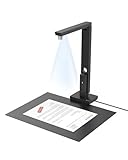
- Powerful Software: CZUR Lens'software has various document processing functions like, watermarking, combining the front and back sides, intelligent cropping and filling, etc. Note: Please download software "CZUR Lens" for scanning,"CZUR Camera" is just an optional software for Lens Pro
- Excellent Performance: 12MP HD Camera, 330 DPI, Resolution: 4032*3024, Scanning Size within 8.27*11.69 inches
- Fast Scanning & Multi-Targeting: Ultra Fast Scanning Speed 1s/page and catch multiple targets(cards). Not Recommended for very Glossy Paper and Books
- Innovative Web Camera: We love innovation. Spin your Lens to make it an external webcam
- File/Card Protection: No need to feed nor touch your files/cards,Won't JAM, No damage to your documents
Canon imageFORMULA R10 Portable Document Scanner

The Canon imageFORMULA R10 is your pocket‑sized solution, delivering up to 12 pages per minute with a 20‑sheet auto‑feed that keeps your travel documents in order. With USB power, you’ll stay independent while traveling. Its 12‑ppm duplex scan fills a 20‑sheet feeder, letting you handle receipts, business cards, and legal papers quickly. Canon’s camera‑derived sensor delivers high‑resolution color, black‑and‑white, or grayscale images you can preview, straighten, or trim on the fly—no software setup required. It plugs straight into Windows or macOS, auto‑updates, and returns searchable PDFs or JPEGs. Energy‑efficient, ENERGY STAR certified, it weighs 2.2 lb and offers year’s warranty and support.
Best For: Professionals and frequent travelers who need a compact, high‑speed scanner for receipts, business cards, and documents on the go.
Pros:
- Lightweight, battery‑free USB power makes it ideal for mobile use.
- Fast dual‑side scanning up to 12 pages/min with a 20‑sheet auto‑feed.
- Hassle‑free setup with auto‑updates and plug‑and‑play compatibility for Windows/Mac.
Cons:
- Limited storage capacity—requires USB connection to transfer files.
- No built‑in Wi‑Fi; file transfer depends on cable or external storage.
- One‑year warranty only; no extended protection plan.

- STAY ORGANIZED – Easily convert your paper documents into digital formats like searchable PDF files, JPEGs, and more.Power Consumption : 2.5W or less (Energy Saving Mode: 0.7W). Suggested Daily Volume : 500 scans..Does it contain liquid: no
- CONVENIENT AND PORTABLE –lightweight and small in size, you can take the scanner anywhere from home offices, classrooms, remote offices, and anywhere in between
- HANDLES VARIOUS MEDIA TYPES – Digitize receipts, business cards, plastic or embossed cards, reports, legal documents, and more
- FAST AND EFFICIENT – No technical hurdles or complicated setups here; easily scan both sides of a document at the same time, in color or black-and-white, at up to 12 pages-per-minute, and with a 20 sheet automatic feeder
- BROAD COMPATIBILITY – Works with both Windows and Mac devices, be it laptop or computer
Brother DS-640 Compact Mobile Document Scanner

If you’re a mobile professional who needs a scanner that fits in your carry‑on, the Brother DS‑640’s 11.9 × 2.2 × 1.4‑inch, 1.5‑lb body delivers ultra‑compact portability. It scans at 16 ppm, handling up to 72 in long documents and 72‑lb bond sheets. Powered by a Li‑Ion battery, the USB 3.0 port charges or plugs into a laptop. Bundled OCR and a document‑management suite turns scans into editable Word files, and you can send results to local storage, email, or cloud. It supports Windows, macOS, and Linux via TWAIN/WIA, ICA, or SANE drivers, keeping it versatile across desktops. It ships with a 1‑year warranty and online support.
Best For: remote and on‑the‑go professionals who need a compact scanner that can handle long, heavy documents without carrying a bulky unit.
Pros:
- Ultra‑portable design (11.9 × 2.2 × 1.4 in, 1.5 lb) with built‑in Li‑Ion battery and USB 3.0 for instant charging.
- Fast 16 ppm speed and 72 in document length support for invoices, receipts, and ID cards.
- Integrated OCR and document‑management suite that outputs clean, editable Word files and offers versatile destinations (local, email, cloud).
Cons:
- Lacks an automatic document feeder—manually feeding each sheet can be slower for bulk scans.
- Limited to 72‑lb bond paper and does not support duplex scanning or larger sheet sizes.
- Requires a PC or laptop for image‑rotation enhancements; some features (e.g., color drop) depend on software updates.

- FAST SPEEDS - Scans color and black and white documents a blazing speed up to 16ppm (1). Color scanning won’t slow you down as the color scan speed is the same as the black and white scan speed.
- ULTRA COMPACT – At less than 1 foot in length and only about 1. 5lbs in weight you can fit this device virtually anywhere (a bag, a purse, even a pocket).
- READY WHENEVER YOU ARE – The DS-640 mobile scanner is powered via an included micro USB 3. 0 cable allowing you to use it even where there is no outlet available. Plug it into you PC or laptop and you are ready to scan.
- WORKS YOUR WAY – Use the Brother free iPrint&Scan desktop app for scanning to multiple “Scan-to” destinations like PC, Network, cloud services, Email and OCR. (2) Supports Windows, Mac and Linux and TWAIN/WIA for PC/ICA for Mac/SANE drivers. (3)
- OPTIMIZE IMAGES AND TEXT – Automatic color detection/adjustment, image rotation (PC only), bleed through prevention/background removal, text enhancement, color drop to enhance scans. Software suite includes document management and OCR software. (4)
CZUR Lens1200 Pro 12MP Portable Scanner

Need to capture documents on the go? With the CZUR Lens1200 Pro, you’ll snap 12‑MP images in a single second per A4 page, thanks to its 330‑DPI sensor and fast multi‑target detection. Portable at just 14.9 oz and only 13.88 × 4.13 × 3.09 in, it folds flat and draws power and data from one USB port. The built‑in software auto‑watermarks, merges fronts and backs, and crops intelligently, while OCR in 180+ languages turns scans into editable Word, Excel, or PDF files. No feeder means no jams, and its “spin‑to‑webcam” feature instantly shares captures. Warranty and support back every travel‑ready scan for your next trip always.
Best For: Wired + wireless business travelers, field researchers or students who need a lightweight, battery‑free scanner that delivers 12 MP, 330 DPI captures in a single second per A4 page.
Pros:
- 12 MP sensor delivers sharp, 330 DPI output for high‑detail scans.
- One‑USB power & data draw makes it truly travel‑ready—no external power source needed.
- Built‑in OCR supports 180+ languages; auto‑cropping and front‑back merging cut editing time.
Cons:
- Not suitable for book pages or very glossy/reflective surfaces.
- No automatic document feeder—requires manual placement for each scan.
- Software doesn’t offer advanced batch‑processing or multi‑file export beyond Word/Excel/PDF.

- Powerful Software: CZUR Lens'software has various document processing functions like, watermarking, combining the front and back sides, intelligent cropping and filling, etc. Note: Please download software "CZUR Lens" for scanning,"CZUR Camera" is just an optional software for Lens Pro
- Excellent Performance: 12MP HD Camera, 330 DPI, Resolution: 4032*3024, Scanning Size within 8.27*11.69 inches
- Fast Scanning & Multi-Targeting: Ultra Fast Scanning Speed 1s/page and catch multiple targets(cards). Not Recommended for very Glossy Paper and Books
- Compact & Portable: 13.88''*4.13''*3.09'', 0.93 lb (Roughly the Length and weight of 2 mobile phones), Small and Foldable for EASY ON-THE-GO Scanning
- File/Card Protection: No need to feed nor touch your files/cards,Won't JAM, No damage to your documents
Portable A4 Card Photo Scanner with 16GB Memory

Searching for a scanner that lets you capture A4 documents and photos on the go? The RXLIFE LNKH09 offers a handheld A4 sensor that snaps pages in 3 seconds at 300 DPI, 8 seconds at 600 DPI, and 10 seconds at 900 DPI. It ships with a 16 GB TF card preloaded into the scanner, holding up to 1,500 pages at 300 DPI, plus a USB 2.0 cable for PC transfers. Weighing only 9.9 oz and powered by two AA batteries, it auto‑shuts after three minutes of inactivity, making it ultra‑portable for business trips. Pack it in the included carry bag and keep your documents organized without a PC.
Best For: Business travelers and students seeking a lightweight, battery‑powered A4 scanner for quick on‑the‑go document digitization.
Pros:
- 9.9 oz lightweight design and compact size, perfect for travel.
- Built‑in 16 GB TF card can store up to 1,500 pages at 300 DPI—no external memory needed.
- Fast 300 DPI scanning (3 s per page) with no external power source required.
Cons:
- Relies on two AA batteries (not included) and no power adapter, limiting usage time.
- Cannot scan while connected to a PC—must disconnect to transfer files.
- USB 2.0 interface is slow, and auto‑shutoff after three minutes may interrupt long scanning sessions.

- 【Fast Scanning】This A4 scanner is easy to use and easy to get the pictures transferred. It can scan a A4 color page in 3sec, fast scanning
- 【Lightweight】This little wand scanner is lightweight, net weight is about 0.32lb, not difficult to work with
- 【Resolution】This Document Scanner supports 300DPI, 600DPI and 900DPI resolutions. It produces clear, good quality scans
- 【Battery Powered】This portable scanner is powered by 2pcs AA batteries (not included)
- 【Notice】This A4 scanner can transfer the images to the computer by USB cable. But , it cannot scan while it’s connected to the computer
CZUR Shine Ultra Portable Thin Book OCR Scanner

Travelers who need instant, high‑resolution scans of thin books will find the CZUR Shine Ultra indispensable; its 4‑lb, fold‑able design slides easily into a backpack, while a 13‑MP sensor flashes a 1‑second per page capture that yields crisp A4 and A3 images every time. Its 2‑level neck, 90° fold‑back, and foot‑pedal let you scan hands‑free on the move. It doubles as a document camera on Windows and macOS, adding Zoom support. Each 1‑second scan produces 13‑MP images—245 dpi at A3, 340 dpi at A4—for ABBYY OCR online, supporting 180+ languages. It outputs crisp JPGs or searchable PDFs, perfect for contracts, without a phone.
Best For: travelers, researchers, and professionals who need instant, high‑resolution scans of thin books on the go without relying on a smartphone.
Pros:
- 1‑second per page capture with a 13‑MP sensor for crisp A3/A4 quality
- Foot‑pedal and adjustable neck enable hands‑free scanning anywhere
- ABBYY OCR supports 180+ languages and outputs JPGs, searchable PDFs, Word, and Excel
Cons:
- No Android/iOS support, limiting mobile use
- Requires Windows or macOS, lacking native desktop app for tablets
- Slightly heavier than purely handheld scanners (≈4.9 lb)

- Design and Speed: Work with Windows XP/7/8/10/11 AND macOS 10.13 or later. Not compatible with Android and iOS. Designed for A3&A4(11.69*16.53 & 8.27*11.75 inch) document, any objects smaller than A3 size can be scanned with Ultra-fast scanning speed, about 1 second per page. Perfect device to scan FLAT papers
- Patented Flattening Curved Book Page Technology: Shine Ultra applies CZUR’s patented technology to flatten the curved surface after pixel transformation to flattening of the book page (Only suitable for thinner books, ET series is recommended for thicker books)
- USB Document Camera & Scanner: Work as both a document camera for remote teaching&learning compatible with ZOOM; Goole Meet; Skype and a document scanner to scan papers and convert/OCR files. Able to scan 180+ languages and convert to JPG; PDF; Searchable PDF; Word and Excel powered by ABBYY. Notice: TIFF files need to be converted from scanned JPG images
- High Resolution & AI Tech: CMOS 13MP (4160*3120, A4≈340 AND A3≈245 DPI) camera. Smart Paging and Auto Cropping; Combine Sides; Stamp Mode; and Multiple Color Modes
- Height Adjustable & Portable: 2-level height adjustable neck. 90 degree foldable and lightweight 4 lbs with foot pedal for convenient operation
Doxie Go SE Portable Document Scanner

If you’re a business traveler who needs to digitize documents on the fly, the Doxie Go SE offers a compact, magazine‑sized package that won’t keep you waiting. It powers around 400 scans per charge and stores up to 8,000 pages before you sync. Full‑color scans resolve at 600 dpi in just 8 seconds. The Doxie mobile app syncs instantly, uploads directly to your cloud, and uses ABBYY OCR to produce searchable PDFs. No PC is needed for capture—just connect to your phone for near‑real‑time file transfer. A 1‑year warranty plus industry‑leading support means you’re covered wherever you travel. Right after you travel.
Best For: business travelers and mobile professionals who need instant, high‑resolution document scanning without a computer.
Pros:
- Unlimited on‑the‑go scanning with up to 400 scans per charge and 8,000‑page onboard memory.
- Fast full‑color scanning at 600 dpi within 8 seconds, with instant sync to cloud via mobile app.
- Built‑in ABBYY OCR for searchable PDFs and no PC required for capture.
Cons:
- Battery life may require frequent recharging if used heavily during long trips.
- Requires initial setup and a learning curve for mobile app sync and OCR settings.
- No high‑quality support for very small or handwritten documents out of the box.
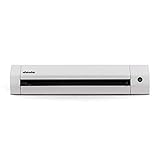
- 【Go Paperless】Doxie Go SE delivers smart, simple scanning that you can take anywhere – no computer required. Doxie's everything you want modern scanning to be.
- 【Fast, Easy Scanning】Doxie makes it easy to scan documents at your desk or on the go – simply insert your paper. Scan full-color pages in just 8 seconds at up to 600 dpi.
- 【Tiny + Battery Powered】Doxie is tiny – the size of a rolled up magazine – and portable with a rechargeable battery and included memory. Scan up to 400 pages per charge, store up to 8,000 pages before needing to sync.
- 【Amazing Software and OCR】Included Doxie app syncs scans, sends directly to your favorite apps, and uses the award-winning ABBYY OCR technology to recognize the text in your document to create multi-page searchable PDFs.
- 【Protected by DoxieCare】Every new Doxie includes a comprehensive 1-year manufacturer warranty. Complete with access to the best support in the scanner industry to help you scan, organize, or just provide tips on the best ways to scan your paper.
Portable A4 Scanner, 900 DPI, JPG/PDF, 16GB SD

Looking for a compact way to digitize documents on the go? This handheld scanner launches with a double‑press, green LED flashing as it scans. No software installation tricks you—a single button does everything, from start to auto‑stop. You can choose 300, 600, or 900 dpi, outputting JPEG or PDF right onto its 16 GB SD card. When finished, plug it to USB and the card reads anywhere from a Windows PC to an iPhone. At 9.6 oz and 11×2×1.5 inches, it’s lightweight, perfect for lawyers, travelers, and students who need instant, high‑quality scans and safeguard important notes with every scan daily!
Best For: individual professionals, students, and travelers who need quick, high‑resolution scans on the go without relying on a computer.
Pros:
- Ultra‑compact handheld design (9.6 oz) for effortless portability
- 900 dpi scanning with JPEG or PDF output stored directly on the SD card, no software required
- Automatic power‑off after each scan saves battery life and reduces wear
Cons:
- Battery not included; requires two AA cells that may need replacement on long trips
- No wireless or cloud connectivity—file transfer is limited to USB or card removal
- 16 GB SD capacity can fill quickly when using the highest resolution, limiting long‑term storage on single card
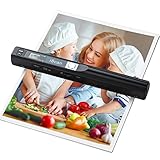
- Note: No software installation is required. You need 2 AA batteries ( not included) and a memory card ( included) to use it directly. Scan mode: Press and hold "Scan" for 2 seconds to turn on the device, and then press "Scan", the green light is on. The scanner moves to scan the file until the green light turns off automatically (or press the "Scan" key and the green light goes out). The number shown on the display increases by 1 to indicate that the scan is complete.
- Portable Scanner scans images or pictures quickly: Store JPEG/PDF files within seconds, scan images or pictures quickly, plug and play, no need any software preinstalled. Compatible with Windows XP/7/Vista/Mac OS 10.4 or above version.
- Lightweight and travel-friendly: Stored in Micro SD card directly, support read data on your computer or phone with USB connected. Powered by 2pcs AA batteries, Compact Design, it is convenient to carry outside.
- 3 Image Resolution: 3 modes of resolution for your options: 300dpi/600dpi/900dpi, you can save it at the clearest way, picture and document are showed clear as it is. Freely choose your favorite resolution.File Format: JPEG/PDF format is all available, Great storage capacity as it supports 32G Micro SD card(Included 16GB Card),total meet your need for business trip or daily use.
- Widely Used: It is applicable in bank, insurance business, real estate agency,home, office, library or outdoors. suitable for lawyer, businessmen, students, travelers and amateur archivists. Scan your important files and save them immediately, no struggling in finding a printing shop, keep it confidential.
Brother DS-940DW Duplex and Wireless Compact Mobile Document Scanner

The Brother DS‑940DW’s ultra‑compact 12.6 × 2.5 × 1.8‑inch chassis and built‑in lithium‑ion battery let you slip it into a briefcase—and you’ll keep scanning on the go.
At 16 ppm, it duplex‑scans quickly—fast enough for cards and long receipts. The 72‑inch reach covers ID cards and lengthy documents without a turn. Wi‑Fi delivers to cloud, email, or PC, and the micro‑SD slot sends raw copies straight to a laptop. iPrint&Scan app streams scans to Android or iOS. A lithium‑ion charge powers multiple scans, and you can grab files from SD without drivers. One‑year warranty covers the unit, and live chat helps in the U.S.
Best For: professionals and students who need a compact, battery‑powered scanner capable of duplex, high‑speed scanning on the go.
Pros:
– Ultra‑compact design fits in a briefcase – 16 ppm duplex speed and 72‑inch scan length suit various documents – Wireless and micro‑SD options allow driver‑free file access and mobile app integration.
Cons:
– Warranty only one year and limited to the U.S. – Requires Wi‑Fi for some features and may lack advanced auto‑feed scanning – No integration with cloud services out of the box (needs manual configuration).

- ULTRA COMPACT – At a size barely bigger than a box of spaghetti you can fit this device virtually anywhere (a bag, a purse, a pocket). The Brother DSD (Desk Saving Design) feature reduces the amount of space needed to use the device.
- FAST SPEED AND DUPLEX SCANNING – Scan single and double-sided, documents in a single pass at up to 16ppm. (1) Color scanning doesn’t slow you down at all as it has the same scan speed as black and white scanning.
- REAL MOBILITY – With an embedded lithium ion battery and the ability to insert a micro SD card(2) you can use this as a standalone device virtually anywhere. Scan to mobile devices with Brother’s free iPrint&Scan mobile app.
- DRIVERLESS SCANNING – Mass storage support lets you utilize a Micro SD card(2) to scan documents and retrieve on a PC without a driver installed. Supports Windows, Mac and Linux environments and TWAIN/WIA for PC/ICA for Mac/SANE drivers. (3)
- OPTIMIZE IMAGES AND TEXT –Automatic color detection/adjustment, image rotation (PC only), bleed through prevention/background removal, text enhancement, color drop to enhance scans. Software suite includes document management and OCR software. (4)
Portable AOZBZ 900DPI Handheld Document Scanner

You’ll appreciate this lightweight, 6 oz handheld scanner when you need crisp 900‑dpi copies of contracts or travel receipts on the go. Its wand‑style build lets you glide over A4 pages and photos, instantly sending JPEGs or searchable PDFs through its USB 2.0 port. You don’t need drivers; just plug in and scan directly onto the built‑in 16 GB SD card, which expands to 32 GB if you swap cards. The automatic 3‑minute sleep feature keeps battery life high, while the three resolution settings give you sharp detail at 300, 600, or 900 dpi, perfect for notarizing and backing up documents anywhere today.
Best For: travelers, freelance writers, and small‑office teams who need a lightweight, no‑drives plug‑and‑play handheld scanner for high‑resolution digital copies of documents and photos.
Pros:
- Ultra‑compact 6 oz design makes it easy to carry on the go.
- Supports up to 900 dpi with searchable PDF output for perfect archival quality.
- One‑click scans straight to a built‑in 16 GB SD card (expandable to 32 GB) – no software installs required.
Cons:
- Discontinued, so sourcing new units or spare parts can be difficult.
- USB 2.0 interface limits transfer speed compared to newer standards.
- Only uses micro‑SD/TF cards, requiring card removal or an external reader for large batches.

- WIDE COMPATIBLE - Compatible with Windows XP/7/Vista/Mac OS 10.4 or above version. Scan images or pictures quickly and store files within seconds, plug and play, no need any software preinstalled.
- 3 IMAGE RESOLUTION - 3 modes of resolution for your options: 300dpi/600dpi/900dpi, you can save it in the clearest way, picture and document are showed clear as it is. Freely choose your suitable resolution.
- UP TO 32GB STORAGE - Great storage capacity as it supports 32G Micro SD card, JPEG/PDF format is all available, total meet your need for business trip or daily use. Store and Share your scans and information via searchable PDF files or JPEG into a micro SD/TF card.
- EASY OPERATION - Switch on, select color mode and resolution, press the "SCAN" button until the green LED lights up, scan the document, press it over (finished automatically after 3 minutes without operation).
- EASY OPERATION - Switch on, select color mode and resolution, press the "SCAN" button until the green LED lights up, scan the document, press it over (finished automatically after 3 minutes without operation).
Portable Handheld 900DPI Document Scanner

Compact and capable, this 28 cm handheld scanner delivers 900 dpi scans that keep every detail sharp for business trips.
Powering it is a battery: you insert it, flip the switch, and scanning begins instantly. With a maximum resolution of 900 dpi, text appears razor‑sharp and photos vivid, all on A4 sheets. Storage grows with your microSD card—up to 32 GB—allowing you to accumulate batches without worrying about file loss. Your scans come as PDF or JPG; PDFs stay editable, JPGs keep high quality for sharing. When you’re ready, plug the USB cable into your laptop and transfer the files in seconds. The model, PenRuxugwb7dsz42‑11, debuted in January 2024, and a warranty covers. Opening a document on the move has never been easier.
Best For: portable scanners for business travelers, on‑site professionals, and anyone who needs high‑resolution document capture while traveling.
Pros:
- Compact 28 cm size fits easily in luggage or a briefcase.
- 900 DPI resolution guarantees sharp text and vivid photos on A4 sheets.
- Built‑in microSD slot allows up to 32 GB of storage for multiple batches of scans.
Cons:
- No memory card supplied; users need to purchase a microSD separately.
- Only USB transfer—no wireless connectivity or cloud sync feature.
- Limited to A4‑size documents, lacking support for larger formats.

- Ample Storage Capacity: Supports 32GB small memory card(not included), our scanner provides plentiful storage space for all your photos and documents. No need to constantly swap out cards, simply connect our scanner to your computer via a data cable and easily transfer files.
- Versatile File Formats: Our scanner offers the flexibility to save your scans in either PDF or JPG format, catering to different scanning needs. Whether you need editable documents or photos, our scanner has you covered.
- Compact and Portable: Measuring only 28cm in length, our scanner is small enough to fit easily into your bag. It's the ideal companion for business trips and on the go scanning needs.
- High Definition Scanning: With a maximum resolution of 900DPI, our portable scanner records every detail with excellent clarity. Whether you're scanning documents or colorful photos, our scanner ensures accurate color reproduction and lifelike images.
- Easy to Use: Our portable scanner is designed for ultimate convenience. Simply insert the battery and small memory card (not included), power it on, and it can be used. With its standard A4 scanning size, it's perfect for scanning most documents and photos.
Handheld Portable Scanner with 16GB Memory, Type-C

Ideal for business travelers who need to keep their documents digitized on the road, your handheld wand scanner packs a 16 GB TF card and Type‑C connectivity so you can transfer hundreds of pages without Wi‑Fi.
Weighing 9.9 oz and measuring 10 × 1.18×1.18 in, the LNKH09 fits your hand, capturing 300 DPI in 3 s, 600 DPI in 8 s and 900 DPI as JPEG or PDF. It runs on two AA cells (not included), auto‑shuts after 3 min idle, and stores up to 1,500 pages at 300 DPI on its 16 GB TF card. Data transfer uses the USB‑2 cable; scanner stays active, and package supplies a bag and manual.
Best For: business travelers and mobile professionals who need a lightweight, high‑resolution scanner to digitize documents on the go without relying on Wi‑Fi.
Pros:
- Ultra‑compact and lightweight (9.9 oz, 10×1.18×1.18 in)
- High‑resolution options (up to 900 DPI) with JPEG/PDF output
- Built‑in 16 GB TF card plus Type‑C USB transfer—no Internet required
Cons:
- Requires two AA cells (not included) and auto‑powers off after 3 min idle
- USB 2.0 transfer slows down scanning, disabling it while connected
- Storage limits per resolution (≤1,500 pages at 300 DPI) restrict long‑term use without card swaps

- 【Fast Scanning】This A4 scanner is easy to use and easy to get the pictures transferred. It can scan a A4 color page in 3sec, fast scanning.
- 【Lightweight】This little wand scanner is lightweight, net weight is about 0.32lb, not difficult to work with.
- 【Resolution】This Document Scanner supports 300DPI, 600DPI and 900DPI resolutions. It produces clear, good quality scans.
- 【Battery Powered】This portable scanner is powered by 2pcs AA batteries (not included).
- 【Notice】This A4 scanner can transfer the images to the computer by USB cable. But , it cannot scan while it’s connected to the computer.
CZUR Shine800 Pro Portable Document Scanner

For remote teachers and professionals who need reliable document capture on the move, the CZUR Shine800 Pro delivers quick, dual‑side scans thanks to its built‑in auto‑tilt correction and adjustable LED lighting.
It sports an 8‑megapixel camera at 3264 × 2448, so you get sharp A4 prints.
The 1.65‑lb body folds to about 2 lb with the 90° stand, making it easy to carry.
Connect via USB, compatible with macOS and Windows, and enjoy live video projection for teaching or document preview.
OCR supports 180+ languages, exporting to Word, Excel, PDF—ideal for forms, bills, and certificates in varied settings.
Glossy surfaces hinder OCR; avoid them.
Best For: remote teachers and mobile professionals who need fast, dual‑side document scanning on the go.
Pros:
- Portable 90° fold‑out design, lightweight ~2 lb for easy travel
- High‑resolution 8 MP camera with auto‑tilt correction ensures sharp, full‑page scans
- OCR supports 180+ languages with export to Word, Excel, and PDF
Cons:
- Glossy surfaces hinder OCR accuracy, requiring avoidance of shiny documents
- Requires a USB cable; no wireless or Bluetooth connectivity available
- Minimum macOS version 10.13+ limits compatibility with older operating systems
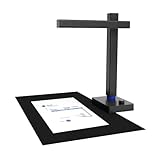
- USB Document Camera: Work with macOS 10.13 or later AND Windows XP/7/8/10. Connect to a PC via a USB cable, can shoot videos, project in real time, and open a convenient way to share and communicate. Shine800 as a document camera is suitable for distance learning, online teaching, remote office meetings with Zoom, Google Meet, Skype, etc. It is the choice of teachers and students, as well as business people
- Portable Document Scanner: Shine800 can scan documents; forms; bills; certificates, etc. smaller than or equal to A4 size (8.27*11.69 inches). Designed for portability, it is foldable at 90°and weighs 2 lbs
- Excellent Performance: Includes a 8MP camera (resolution: 3264*2448) and LED lights with adjustable brightness. Shine800 has a variety of useful features such as OCR, automatic tilt correction, front and back combination, etc. Notice: glossy materials(glossy photo,glossy magzine)are NOT recommended
- OCR Recognition: Shine800 can convert image files into word; excel; PDF and editable PDF. Support 180+ languages recognition
- Quality Guaranteed: Shine800 has been widely used in offices; classrooms; libraries; banks; hospitals, etc
Factors to Consider When Choosing Travel Document Scanners (Pocket‑Size, Fast Capture)
When you pick a portable scanner, you’ll want it light enough to slip into a carry‑on while still being quick enough to capture documents on the fly. Pay attention to its connection modes—USB, Wi‑Fi, or Bluetooth—so you can share files instantly, and check battery life to avoid running out mid‑trip. Finally, make sure its OCR engine supports the languages you need, so text stays accurate no matter where you’re scanning.
Portability and Weight
Because you’re often on the move, the scanner’s size and weight become immediately critical. If a device measures between 3.5 × 1.0 × 1.75 in. and 13 × 4 × 3 in., it stays hand‑carry friendly. Lightweight models around 0.3 lb cut travel baggage and keep you free of extra load. Heavier, USB‑powered units can reach 2.5 lb, but they sidestep separate batteries and shave 1–2 lb off a lithium‑ion alternative. A scanner under 12 in. slides into a tote; anything longer best nests in a laptop case. When you keep weight ≤ 1.0 lb, you feel less fatigue during back‑to‑back scans, boosting productivity on the road. An ultra‑light model keeps your hands free, letting you navigate airports or cafés without extra strain, so you can focus on the places you’re exploring.
Scan Speed Requirements
If you need to scan bulk documents on the go, you’ll find that scan speed becomes a critical factor to evaluate. A device that tops 300–400 dpi in roughly one second can handle about sixty pages per minute, fitting tight travel schedules. Higher‑resolution models, 600–900 dpi, typically consume 3–10 seconds per page, tripling the scan time and draining battery faster. Dual‑sensor or auto‑crop scanners cut page time by thirty‑to‑fifty percent, achieving near‑one‑second speed while keeping image quality. Battery life also spikes: a one‑second e‑device may scan 120 pages in two minutes, whereas a five‑second model takes ten minutes for the same load—an essential edge when staying productive. Keeping your workflow tight can save you hours of waiting time and reduce distractions during trips today.
Connectivity Options
Connectivity is the lifeline for a portable scanner, letting you move work without cables. USB 3.0 delivers up to 5 Gbps, letting a 1‑second scan hit your PC instantly. Wi‑Fi 802.11n/ac gives 10‑30 ft reach, so you can upload straight to the cloud or capture via a mobile app without wires. Bluetooth‑LE 4.2/5.0 is handy for quick, low‑res scans and keeps power usage down, but at about 1 Mbps it can’t match USB or Wi‑Fi speeds. Some models use a micro‑SD card for offline storage, requiring a USB link only when you sync. For cloud‑direct use, aim for at least 1 Mbps upload to keep a 300‑dpi PDF under a minute. If you travel, select a scanner that supports multiple Wi‑Fi BSSIDs and auto‑reconnection for transfers across airports.
Battery Life Considerations
With portability comes the need to keep the scanner running without cables, so battery life becomes as important as Wi‑Fi reach. You’ll notice that power consumption usually sits between 1–3 W, and with a typical 3,000‑mAh Li‑Ion cell, you can scan roughly eight to twelve pages at 300 dpi before recharging. Switching to auto‑sleep after 30–60 seconds of idle time can bump real‑world runs by 30–60 %. If you prefer never‑ending mobility, look for a removable 2 Ah battery that you can snap in and out in seconds. Compare rated operational hours—like 24 hours continuous at 320 dpi—to gauge how many full‑page scans you’ll get per swap. You’ll then know exactly how many scans fit into your day of sightseeing or meetings. That insight helps you decide on a model daily for scanning.
OCR Accuracy and Languages
Because OCR accuracy improves markedly with higher scan resolution, you’ll want a pocket‑size scanner that consistently outputs at least 600 dpi. This level of detail cuts character error rates by 2–3 % versus 300 dpi, making travel documents read cleanly even when they’re printed in many scripts. Most advanced engines support over 180 languages, so passport visas, invoices, or receipts in any script stay legible. Be cautious with glossy or reflective pages—reflective surfaces can spike error rates by 20–30 % because they blur fine lines. A dual‑pass mode that skims the sheet twice, paired with deskewing and edge‑detection, can shave another 10–15 % off misreads. Benchmark tests using Levenshtein distance confirm error rates fall below 1.5 % on modern tuned pipelines. You’ll quickly finish scans with confidence and minimal error for sure today.
Software Compatibility
If you’re planning to carry a pocket‑size scanner on the go, you’ll want one that plugs seamlessly into any operating system.
The device delivers standard driver protocols like TWAIN, WIA, ICA, and SANE, letting you connect to Windows, macOS, and most Linux distros without extra drivers.
It supports SSD‑based firmware updates via a generic USB‑mass‑storage channel, keeping your upgrades consistent across platforms.
Its built‑in OCR can recognize 180+ languages and export searchable PDFs, Word, Excel, CSV, JPEG, and PNG.
The scanner offers direct cloud uploads to Dropbox, Google Drive, OneDrive, and iCloud via OAuth or API keys, so you skip PC‑side software on every trip.
Cross‑platform apps use SSH or WebSocket, letting you control the scanner Wi‑Fi or Bluetooth while keeping file formats unified.
Build Quality and Durability**
Beyond software compatibility, the scanner’s resilience matters just as much.
You’ll appreciate a robust chassis built from high‑impact ABS or polycarbonate, which cuts the risk of cracks even after about fifteen folding and unfolding cycles daily.
The hinges lock flush with the body and straddle the moving parts, reducing belt abrasion and keeping your internal electronics safe from accidental drops.
Adding rubber or silicone latches around door seams gives you a 30 % boost in water and dust resistance, so you won’t worry about humid or dusty trips corrupting your scans.
Weighing under ten ounces and fitting inside four by ten by one‑and‑a‑half inches, it runs 4–5 hours with a 700‑mAh cell or a deep‑drive battery slot, and offers 0–45 °C tolerance with a thermal‑relief vent.
Frequently Asked Questions
How Long Does Battery Last on Typical Models?
Batteries on typical travel document scanners last roughly 12–15 hours on a full charge, giving you enough time to scan an entire workday’s worth of documents. Most models use rechargeable lithium‑ion packs, and you can get about 200–300 scans per charge. If you power‑save mode and connect to a charger, you’ll extend use farther for long trips and you’ll stay productive until you return without missing any scheduled meetings today.
Are These Scanners Compatible With iPhone/Android?
Yes, most travel document scanners pair seamlessly with iPhone and Android devices. They come with dedicated mobile apps that let you snap, edit, and share scans instantly. Just connect via Wi‑Fi or Bluetooth, launch the app, and transmit images to your phone or cloud storage. Compatibility hinges on the scanner’s firmware and app support, so double‑check before buying. Most models support OCR, PDF export, and multi‑page stitching, ideal for travelers.
Can I Scan Handwritten Notes?
Yes, you’ll scan quickly your handwritten notes with most travel scanners. When you place the page on the flat surface, the device reads the ink and converts the content into editable text or PDF. Just make sure the letters are clear and spaced; those scanners perform best in decent lighting and a steady hand. A quick scan saves time during travel, and let them stay organized today. Give a try.
Do Scanners Include OCR for Text Extraction?
Like a key opening a library, your scanner can capture text on the fly using OCR, letting you export documents in editable formats. Most travel‑friendly models ship with built‑in OCR to extract handwritten or printed content within seconds. Just tap the file, choose your language, and watch the software convert pixels into text, ready for editing or translation. It’s fast, and your on‑the‑go workflow stays smooth everywhere you travel ahead.
What Is the Typical File Size for Scanned PDFS?
Typically, a scanned PDF file sizes anywhere from 200 KB for a single low‑resolution page to roughly 3 MB for a high‑resolution, color‑rich document. Most everyday scanners compress images to 150–200 dpi, producing about 300–600 KB per page. If you increase resolution to 300 dpi, a single page can reach 1.5–2 MB. For multi‑page reports, your totals quickly balloon into the tens of megabytes. Just keep in mind, don’t forget staff compress.
Conclusion
By now you’ve seen why speed matters on the road and how a slick scanner can be your best sidekick. Whether you’re jet‑setting or back‑packing, a top‑tier portable device will get the job done, turning chaos into a clean archive with a few quick taps. Keep in mind battery life, software compatibility, and weight. Pick one that lets you hit the road today without breaking a sweat, and you’ll always be one step ahead.
Fast scanning, Portable scanners, Travel Tech